Freedom251 › GIF Maker Software
Gickr
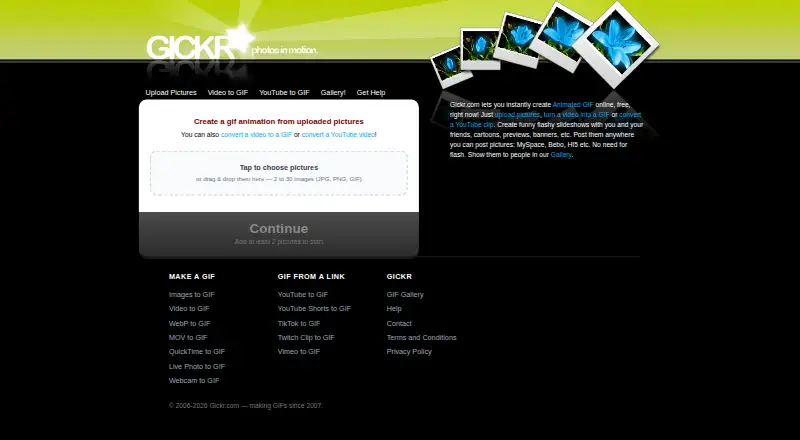
What Gickr is
Gickr is a web tool for creating animated GIFs from pictures, video files, or YouTube clips. Its image maker accepts 2 to 30 JPG, PNG, or GIF images, with a live preview and controls for order, speed, and size. The video converter accepts files up to 95 MB, supports formats including MP4, MOV, WebM, AVI, MKV, WMV, FLV, MPEG, and 3GP, and allows trimming clips to 10 seconds. Video output sizes range from 240 px to 640 px. The YouTube converter accepts YouTube, youtu.be, and Shorts links, but clips are limited to 5 seconds and 480 px wide; private, age-restricted, and region-locked videos cannot be fetched. Video and YouTube conversion require no sign-up, and normal video-converter use has no daily limit. Those GIFs include a small Gickr badge. Uploaded files are used to build animations, and finished GIFs remain available at links that are not indexed but are not secret. Source files and animations may be removed as server space is reclaimed; uploaded videos are deleted within a couple of hours.
Who it suits
Gickr suits people who want to make GIFs from image sets, video clips, or supported YouTube links in a browser. Its limits and output badge are worth considering for video and YouTube conversions.
What it does well
- Image maker accepts 2 to 30 JPG, PNG, or GIF files.
- Video converter supports files up to 95 MB.
- Video clips can be trimmed to 10 seconds.
- Video and YouTube converters require no sign-up.
- Free online GIF creation.
What to know first
- Video and YouTube GIFs carry a Gickr badge.
- YouTube clips are capped at 5 seconds and 480 px wide.
- Private, age-restricted, and region-locked videos cannot be fetched.
- Generated GIF links are not secret.
Limits
Video files can be up to 95 MB and trimmed to 10 seconds, with output sizes from 240 px to 640 px. YouTube GIF clips are capped at 5 seconds and 480 px wide; private, age-restricted, and region-locked videos cannot be fetched. Video and YouTube conversions add a small Gickr badge.
Plans
| Plan | Billed and limits | Price |
|---|---|---|
| Free | Online GIF creation; image, video, and YouTube conversion | Free |
As gickr.com lists them, read 11 Oct 2026. The maker's own page has the final word.
Getting started
- Visit https://gickr.com/
- Choose image, video, or YouTube conversion
- For images, upload 2 to 30 JPG, PNG, or GIF files
- For video or YouTube conversion, use the converter without signing up
Verdict
Gickr offers image, video, and YouTube-to-GIF conversion with controls for previews, timing, and size. Review the clip limits, badge, and link privacy before using it for sensitive material.
Questions
How much does Gickr cost?
Gickr is free. Its listed Free plan costs nothing.
Does Gickr require an account?
The video and YouTube converters are described as requiring no sign-up.
What can I use to create a GIF?
Gickr can make GIFs from uploaded pictures, video files, or YouTube clips. The image maker accepts 2 to 30 JPG, PNG, or GIF images.
Which video formats does Gickr accept?
The video converter lists MP4, MOV, WebM, AVI, MKV, WMV, FLV, MPEG, and 3GP among its supported formats.
Can Gickr convert any YouTube video?
No. Private, age-restricted, and region-locked YouTube videos cannot be fetched for conversion.
Which platform is Gickr available on?
Gickr is available on the web.
Facts from Gickr's own pages
- Data handling
- Gickr says uploaded pictures and videos are stored to build animations, and resulting GIFs remain available at links that are not indexed but are not secret. · gickr.com, 11 Oct 2026
- Founded
- 2007 · gickr.com, 28 Sept 2026
- History and gallery
- Gickr says it has been making GIFs since 2007, and its gallery describes 258,295 animations dating back to that year. · gickr.com, 11 Oct 2026
- Image input
- The image maker accepts 2 to 30 JPG, PNG, or GIF images and provides a live preview, reverse order, speed, and size controls. · gickr.com, 11 Oct 2026
- No account
- The video and YouTube converters are described as free and requiring no sign-up; the video converter says there is no daily limit for normal use. · gickr.com, 11 Oct 2026
- Output badge
- GIFs made with the video and YouTube converters carry a small Gickr badge in the corner. · gickr.com, 11 Oct 2026
- Privacy practices
- The privacy policy says Gickr does not sell data or use pictures to train anything, and shares data only with its hosting provider or when legally required. · gickr.com, 11 Oct 2026
- Retention
- The privacy policy says source files and generated animations may be removed at any time as server space is reclaimed. · gickr.com, 11 Oct 2026
- Support
- The help page directs users to email [email protected] if the site is broken or a feature does not work. · gickr.com, 11 Oct 2026
- Video conversion
- The video converter accepts files up to 95 MB, lets users trim clips up to 10 seconds, and offers output sizes from 240 px to 640 px. · gickr.com, 11 Oct 2026
- Video formats
- The video converter lists MP4, MOV, WebM, AVI, MKV, WMV, FLV, MPEG, and 3GP among supported formats. · gickr.com, 11 Oct 2026
- Video retention
- The video converter says uploaded videos are automatically deleted from the server within a couple of hours, while the finished GIF remains available at its link. · gickr.com, 11 Oct 2026
- What it does
- Gickr creates animated GIFs online from uploaded pictures, videos, or YouTube clips. · gickr.com, 11 Oct 2026
- YouTube conversion
- The YouTube converter accepts YouTube, youtu.be, and Shorts links and limits GIF clips to 5 seconds and 480 px wide. · gickr.com, 11 Oct 2026
- YouTube restrictions
- Private, age-restricted, and region-locked YouTube videos cannot be fetched for conversion. · gickr.com, 11 Oct 2026
Where Gickr stands on Freedom251
- GIF Maker Software#10 of 33
- GIF makers#34 of 54