Freedom251 › Family Locator Apps
GeoFamily
What GeoFamily is
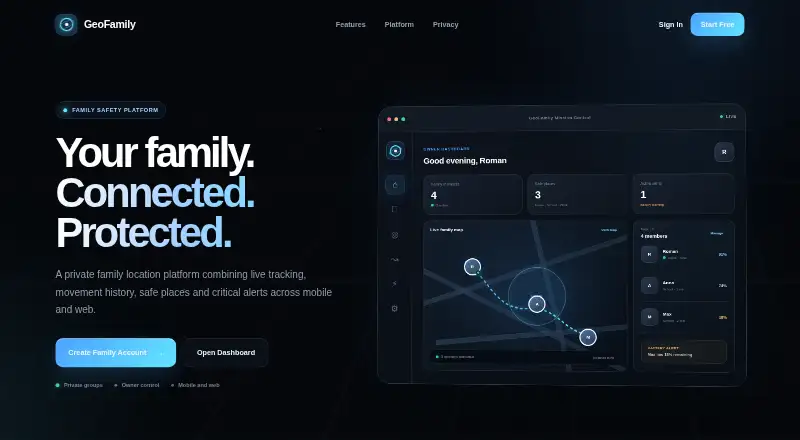
GeoFamily is a private family location platform for sharing live location, reviewing movement history and receiving alerts. Members can view one another and recent activity on a private map. For a selected day, users can look back at routes, stops and important locations. Owners can set Home, School and Work zones for arrival and departure alerts, and receive notifications for SOS events, offline status, low battery and geofence activity. The mobile app shares location and device status; owners manage the family space through a web dashboard. They can monitor battery level, connection state and location sharing, and manage invitations, roles, permissions and connected devices. Only invited members can join, and owners control visibility and access. An owner can create a private group and invite relatives with a code. GeoFamily is listed for Android, iOS and web, with a free plan.
Who it suits
GeoFamily suits families who want to share location and device status, with owners managing access from a web dashboard. Its route history, safe-place alerts and SOS notifications may be useful to members who need those features.
What it does well
- Shows family members on a private map.
- Reviews routes, stops and locations by day.
- Home, School and Work zones trigger alerts.
- Owners control membership, roles and permissions.
- Available on Android, iOS and web.
What to know first
- The official page does not state plan prices.
- The official page does not give support contact details.
Getting started
- Open the GeoFamily website.
- Choose “Start Free” or “Create Family Account.”
- Create a private family group as its owner.
- Generate an invitation code and invite relatives to connect.
- Family members use the mobile app to share location and device status.
Verdict
GeoFamily brings family location sharing, history and alerts together with owner-managed permissions. A free plan is listed, though the official page does not provide plan details or prices.
Questions
Does GeoFamily have a free plan?
Yes. GeoFamily is listed as freemium and offers a free plan.
Which platforms does GeoFamily support?
GeoFamily is available on Android, iOS and web. Family members share location and device status through the mobile app, while owners manage the family space from a web dashboard.
How does a family join a GeoFamily space?
An owner creates a private family group, generates an invitation code and invites relatives to connect. Only invited members can join.
What can owners manage?
Owners can manage invitations, member roles, permissions and connected devices. They can also control visibility and monitor battery level, connection state and location sharing.
What alerts does GeoFamily provide?
Alerts include SOS, offline, low-battery and geofence notifications. Owners can also set arrival and departure alerts for Home, School and Work zones.
Facts from GeoFamily's own pages
- Access control
- Only invited members can join a family, and owners control roles, visibility, permissions, and connected devices. · geofamily.space, 3 Oct 2026
- Account setup
- The registration page says an owner can create a private family group, generate an invitation code, and invite relatives to connect. · geofamily.space, 3 Oct 2026
- Alerts
- Smart alerts include SOS, offline, low-battery, and geofence notifications. · geofamily.space, 3 Oct 2026
- Android listing
- Google Play describes an Android GeoFamily app with real-time location sharing, route history, safe places, SOS, battery and location absence alerts, and user-controlled sharing. · play.google.com, 3 Oct 2026
- Device monitoring
- GeoFamily monitors battery level, connection state, and location sharing. · geofamily.space, 3 Oct 2026
- Device status
- The site says owners can monitor battery level, connection state and location sharing. · geofamily.space, 2 Oct 2026
- Family management
- Owners can manage invitations, member roles, permissions, and connected devices. · geofamily.space, 3 Oct 2026
- Free access
- The homepage links to “Start Free” and “Create Family Account.” · geofamily.space, 3 Oct 2026
- Headquarters
- Valladolid, Spain · geofamily.space, 28 Sept 2026
- Integrations
- The landing page describes a GeoFamily Cloud connecting mobile location and device status with web maps, history and management; it names no third-party integrations. · geofamily.space, 2 Oct 2026
- Live location
- The platform shows family members, their latest activity, and device status on a private map. · geofamily.space, 3 Oct 2026
- Mobile and web
- Family members share location and device status through the mobile app, while owners manage the family space from a web dashboard. · geofamily.space, 3 Oct 2026
- Movement history
- Users can review routes, stops, and important locations for a selected day. · geofamily.space, 3 Oct 2026
- Plans and prices
- The opened official page shows “Start Free” and “Create Family Account” but does not state plan details or prices. · geofamily.space, 2 Oct 2026
- Privacy controls
- The site says only invited members can join a family and owners control roles, visibility, permissions and connected devices. · geofamily.space, 2 Oct 2026
- Purpose
- GeoFamily is a private family location platform for live tracking, movement history, safe places, and critical alerts across mobile and web. · geofamily.space, 3 Oct 2026
- Safe places
- Users can create Home, School, and Work zones with arrival and departure alerts. · geofamily.space, 3 Oct 2026
- Support
- The Google Play listing provides the support email [email protected] and phone number +55 19 98981-3776. · play.google.com, 3 Oct 2026
- Support and company details
- The opened official page does not state support contact details, headquarters or founding date. · geofamily.space, 2 Oct 2026
- Web dashboard
- The site says owners manage the family space from a web dashboard while family members share location and device status through a mobile application. · geofamily.space, 2 Oct 2026
Where GeoFamily stands on Freedom251
- Family Locator Apps#21 of 29