Freedom251 › Family Locator Apps

Family Locate
What Family Locate is
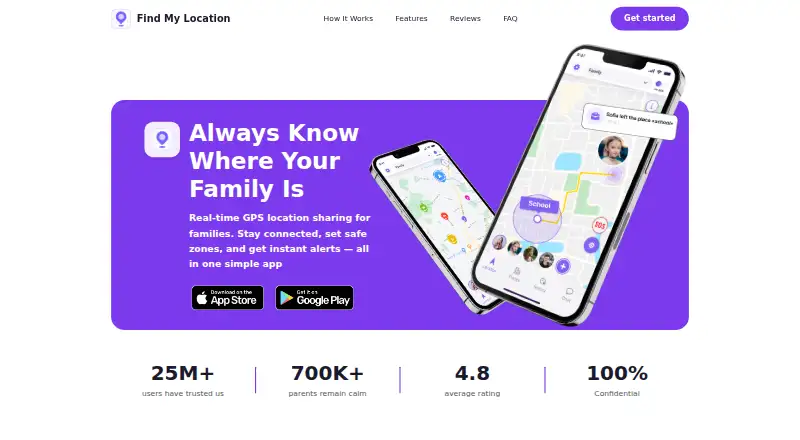
Family Locate shares family members’ real-time GPS locations on a private map. Available for Android and iOS, it uses device GPS to show invite-only circle members and records where they have been during the day. Users can set safe zones for home, school, work, or other places and receive arrival or departure alerts. The app describes driving-speed tracking and identification of risky driving patterns, plus private family chat and location-sharing controls. An SOS button sends circle members a one-tap alert with the sender’s live location. Invitations can be sent by phone number or email through a joining link. Location sharing can be paused in settings. The site says location data is end-to-end encrypted, visible only to circle members, and not sold to third parties. Users can start with a free account; the freemium service includes a seven-day trial. Subscriptions can be canceled through App Store or Google Play settings, with access continuing through the current billing period.
Who it suits
Family Locate suits families, couples, friends, and people checking on children or parents. It is designed for private circles needing location sharing, alerts, chat, and emergency contact.
What it does well
- Real-time location sharing on a private map
- Safe-zone arrival and departure alerts
- One-tap SOS with live location
- End-to-end encrypted location data
- Available on Android and iOS
What to know first
- Driving insights may require location tracking
- Subscription access continues through the billing period after cancellation
- Most users report under 5% extra daily battery drain
Limits
The free access model includes a 7-day trial. Subscriptions continue through the current billing period after cancellation.
Getting started
- Open the Family Locate website
- Create a free account
- Install the Android or iOS app
- Create an invite-only family circle
- Invite members by phone number or email
- Set safe zones and sharing preferences
Verdict
Family Locate combines live location, history, safe zones, driving insights, chat, and SOS tools for private circles. Its free starting access and privacy controls make it suitable for families, couples, and friends who agree to share locations.
Questions
Is Family Locate free?
Users can create a free account and get started for free. The pricing model is freemium and includes a 7-day trial.
Which platforms support Family Locate?
Family Locate is available on Android and iOS.
Can location sharing be paused?
Yes. Users can pause location sharing in the app settings.
How is location data handled?
The site says location data is end-to-end encrypted, shared only with family-circle members, and not sold to third parties.
How can a subscription be canceled?
Subscriptions can be canceled through App Store or Google Play settings, with access continuing through the current billing period.
Does it include emergency alerts?
Yes. An SOS feature sends family members a one-tap alert with the sender’s live location.
Facts from Family Locate's own pages
- Battery
- The site says most users report less than 5% additional battery drain per day. · familylocate.app, 10 Oct 2026
- Battery use
- The FAQ says most users report less than 5% additional battery drain per day. · familylocate.app, 9 Oct 2026
- Cancellation
- The FAQ says subscriptions can be canceled through App Store or Google Play account settings, with access continuing through the current billing period. · familylocate.app, 10 Oct 2026
- Consent controls
- Users can pause location sharing from the app settings. · familylocate.app, 10 Oct 2026
- Driving insights
- Driving Insights can track speed and identify risky driving patterns. · familylocate.app, 10 Oct 2026
- Emergency SOS
- The app can send family members an emergency alert with the sender’s live location. · familylocate.app, 10 Oct 2026
- Encryption and data use
- The site states that location data is end-to-end encrypted, shared only with family-circle members, and not sold to third parties. · familylocate.app, 9 Oct 2026
- Family chat
- Private, invite-only family circles include a family chat and location-sharing privacy controls. · familylocate.app, 10 Oct 2026
- Family chat and circles
- The site describes invite-only family circles with family chat and privacy controls for location sharing. · familylocate.app, 9 Oct 2026
- Free access
- The site says users can create a free account and that the app is free to get started. · familylocate.app, 9 Oct 2026
- Headquarters
- London, United Kingdom; Miami, United States · familylocate.app, 28 Sept 2026
- Intended users
- The site describes use by families, couples, friends, and people checking on parents or children. · familylocate.app, 9 Oct 2026
- Invitations
- Family members can be invited by phone number or email and receive a link to join a circle. · familylocate.app, 10 Oct 2026
- Live location
- The app uses a device’s GPS to show circle members’ real-time locations on a private map. · familylocate.app, 9 Oct 2026
- Location history
- The app lets users look back at where family members have been throughout the day. · familylocate.app, 10 Oct 2026
- Platforms
- The site directs users to download the app from the App Store or Google Play. · familylocate.app, 10 Oct 2026
- Privacy controls
- The site says users can pause location sharing in the app settings. · familylocate.app, 9 Oct 2026
- Product
- The site presents Find My Location as a family GPS tracking app that shares live location among members of a private family circle. · familylocate.app, 9 Oct 2026
- Purpose
- Family Locate shares family members’ real-time GPS locations on a private map. · familylocate.app, 10 Oct 2026
- Safe zones
- Users can set places such as home, school, or work and receive arrival and departure alerts. · familylocate.app, 10 Oct 2026
- Security and privacy
- The site says location data is end-to-end encrypted, visible only to family-circle members, and not sold to third parties. · familylocate.app, 10 Oct 2026
- Subscription cancellation
- The site says subscriptions can be canceled at any time through the App Store or Google Play settings, with access continuing through the current billing period. · familylocate.app, 9 Oct 2026
- Support
- The site lists [email protected] as its contact email. · familylocate.app, 10 Oct 2026
Where Family Locate stands on Freedom251
- Family Locator Apps#18 of 29