Freedom251 › Game Voice Chat Software
GameChat
What GameChat is
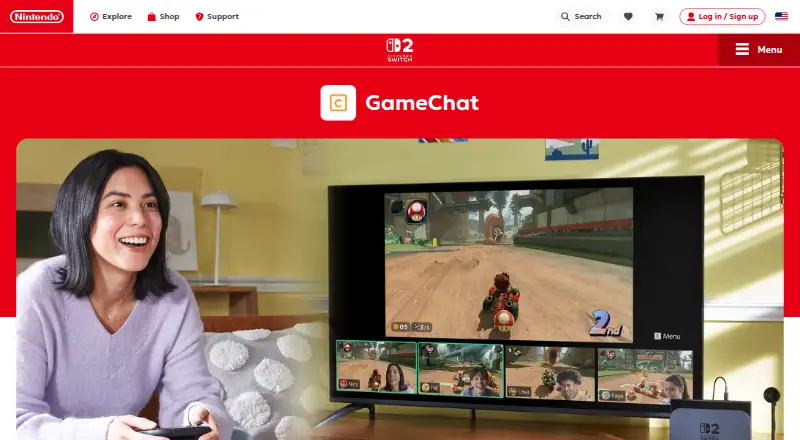
GameChat is a Nintendo Switch 2 feature for voice chats, game-screen sharing and video chats with friends during play. A voice chat can include up to 12 people. Up to four participants can share their screens at once, even when they are playing different games, and up to four can join video chat simultaneously. The console’s built-in microphone filters sounds such as game audio and adjusts its volume to the surroundings. Video chat requires a compatible USB-C camera, sold separately; players can change the background, including to the game they are playing. Players use the C Button on the right Joy-Con 2 controller to start a chat, respond to invitations or mute themselves. GameChat sessions are limited to people on the player’s friends list who have been approved for the feature. Setup requires text-message verification using the phone number registered to a Nintendo Account. Online use requires internet access, a Nintendo Account and a Nintendo Switch Online membership, and availability varies by country. For supported games, GameShare lets a player share a game with chat friends who do not own it, with select modes for up to four people. Players under 16 need adult approval through the Nintendo Switch Parental Controls app and can chat only with people that adult approves.
Who it suits
GameChat suits Nintendo Switch 2 players who want to talk with friends, show their games or join video chat while playing. It can also suit families using parental approval and the app’s controls for younger players.
What it does well
- Voice chat supports up to 12 participants.
- Up to four people can share screens simultaneously.
- The built-in microphone filters unwanted sounds.
- GameShare supports select modes for up to four people.
- Players can report uncomfortable or harassing behavior.
What to know first
- Available only on Nintendo Switch 2.
- Video chat requires a compatible camera sold separately.
- Online use requires Nintendo Switch Online membership.
- Availability varies by country.
Limits
GameChat is included with Nintendo Switch Online, but online use requires that membership. The Nintendo Switch Online membership has a 7-day free trial; this is a membership trial, not a GameChat-specific trial. Video chat requires a compatible USB-C camera sold separately, and availability varies by country.
Plans
| Plan | Billed and limits | Price |
|---|---|---|
| GameChat | Included with Nintendo Switch Online; Nintendo Switch 2 only; up to 12 voice-chat participants | Free |
| Nintendo Switch Online Individual | $19.99 USD/year · 1 Nintendo Account | $19.99 a year |
| Nintendo Switch Online Individual | $19.99 USD / year · 1 Nintendo Account; GameChat access on Nintendo Switch 2 | $19.99 a year |
| Nintendo Switch Online Family | $34.99 USD/year · Up to 8 Nintendo Accounts | $34.99 a year |
| Nintendo Switch Online + Expansion Pack Individual | $49.99 USD / year · 1 Nintendo Account; includes Nintendo Switch Online benefits and additional content | $49.99 a year |
| Nintendo Switch Online + Expansion Pack Individual | $49.99 USD/year · 1 Nintendo Account | $49.99 a year |
| Nintendo Switch Online + Expansion Pack Family | $79.99 USD/year · Up to 8 Nintendo Accounts | $79.99 a year |
As nintendo.com lists them, read 7 Oct 2026. The maker's own page has the final word.
Getting started
- Open the GameChat page on Nintendo’s website.
- Use a Nintendo Switch 2 and connect to the internet.
- Set up a Nintendo Account and verify its registered phone number by text message.
- Get a Nintendo Switch Online membership for online GameChat features.
- Add friends and ensure they are approved for GameChat.
- For players under 16, ask a parent or guardian to allow GameChat in the Nintendo Switch Parental Controls app.
- Connect a compatible USB-C camera separately if you want video chat.
Verdict
Choose GameChat if you play on Nintendo Switch 2 and want voice chat or screen sharing with approved friends. Look elsewhere if you need a chat feature for another platform; video chat also requires a separately sold compatible USB-C camera.
Questions
How much does GameChat cost?
GameChat is included with Nintendo Switch Online. The Individual plan is $19.99 a year for one Nintendo Account, and the Family plan is $34.99 a year for up to eight accounts.
Is there a free plan or trial?
There is no separate free plan or GameChat-specific trial. Nintendo Switch Online has a 7-day free trial for the membership.
What platforms support GameChat?
GameChat is available only on Nintendo Switch 2.
How many people can join?
Up to 12 people can join voice chat. Up to four can share screens or take part in video chat at the same time.
Do I need a camera?
A compatible USB-C camera, sold separately, is required for video chat. Voice chat uses the console’s built-in microphone.
What does Expansion Pack add?
Nintendo Switch Online + Expansion Pack includes Nintendo Switch Online benefits, additional game libraries and included downloadable content. Its Individual plan is $49.99 a year for one account; the Family plan is $79.99 a year for up to eight accounts.
Facts from GameChat's own pages
- Access requirements
- Online GameChat requires an internet connection, a Nintendo Account, and a Nintendo Switch Online membership; Nintendo says availability varies by country. · nintendo.com, 7 Oct 2026
- Account verification
- Setting up GameChat requires text message verification using the phone number registered to the Nintendo Account. · nintendo.com, 7 Oct 2026
- Camera
- Video chat requires a compatible USB-C camera, sold separately; players can change the background, including using the game they are playing. · nintendo.com, 7 Oct 2026
- Controls
- Players can start GameChat, respond to invitations, or mute themselves using the C Button on the right Joy-Con 2 controller. · nintendo.com, 7 Oct 2026
- Expansion Pack
- Nintendo Switch Online + Expansion Pack adds Nintendo Switch 2 features including GameChat along with additional game libraries and included downloadable content. · nintendo.com, 7 Oct 2026
- Founded
- 1889 · nintendo.com, 28 Sept 2026
- Friends and safety
- GameChat sessions can be started only with people on the user's friends list, and users can report offensive behavior to Nintendo. · nintendo.com, 7 Oct 2026
- Friends only
- GameChat sessions can be started only with people on the player's friends list who have been approved for GameChat. · nintendo.com, 7 Oct 2026
- GameChat controls
- Players can start GameChat, respond to invitations, or mute themselves using the C Button on the right Joy-Con 2 controller. · nintendo.com, 7 Oct 2026
- GameShare
- For games that support GameShare via GameChat, players can share a game with chat friends who do not own it and play select modes with up to four people. · nintendo.com, 7 Oct 2026
- Headquarters
- Kyoto, Japan · nintendo.com, 28 Sept 2026
- Identity verification
- Setting up GameChat requires text-message verification using the phone number registered to the Nintendo Account. · nintendo.com, 7 Oct 2026
- Membership and availability
- As of October 7, 2026, Nintendo says online features including GameChat require internet, a Nintendo Account, and a Nintendo Switch Online membership; availability varies by country. · nintendo.com, 7 Oct 2026
- Microphone
- Nintendo Switch 2 has a built-in microphone that filters unwanted sounds such as game audio and adjusts its volume to the surroundings. · nintendo.com, 7 Oct 2026
- Parental controls
- Players under 16 need parent or guardian approval through the Nintendo Switch Parental Controls app, and can chat only with people approved by the parent or guardian. · nintendo.com, 7 Oct 2026
- Platform limit
- GameChat is available only on Nintendo Switch 2. · nintendo.com, 7 Oct 2026
- Purpose
- GameChat is a Nintendo Switch 2 system feature for voice chatting with friends while playing games. · nintendo.com, 7 Oct 2026
- Reporting
- Players can report someone for uncomfortable or harassing behavior during a chat; confirmed behavior may result in actions such as account suspension. · nintendo.com, 7 Oct 2026
- Safety and parental controls
- Players under 16 need a parent or guardian to allow GameChat in the Nintendo Switch Parental Controls app, and younger players can chat only with people approved by that parent or guardian. · nintendo.com, 7 Oct 2026
- Screen and video sharing
- Up to four people can share their game screens or take part in video chat at the same time. · nintendo.com, 7 Oct 2026
- Screen sharing
- Participants can share their game screens in real time, including when they are playing different games, with up to four sharing simultaneously. · nintendo.com, 7 Oct 2026
- Trial distinction
- Nintendo Switch Online has a 7-day free trial, but the comparison page describes it as a membership trial rather than a GameChat-specific trial. · nintendo.com, 7 Oct 2026
- Video chat
- Video chat supports up to four people simultaneously and requires a compatible USB-C camera sold separately. · nintendo.com, 7 Oct 2026
- Voice chat
- A GameChat session supports up to 12 participants in voice chat. · nintendo.com, 7 Oct 2026
Where GameChat stands on Freedom251
- Game Voice Chat Software#22 of 22