FS-UAE
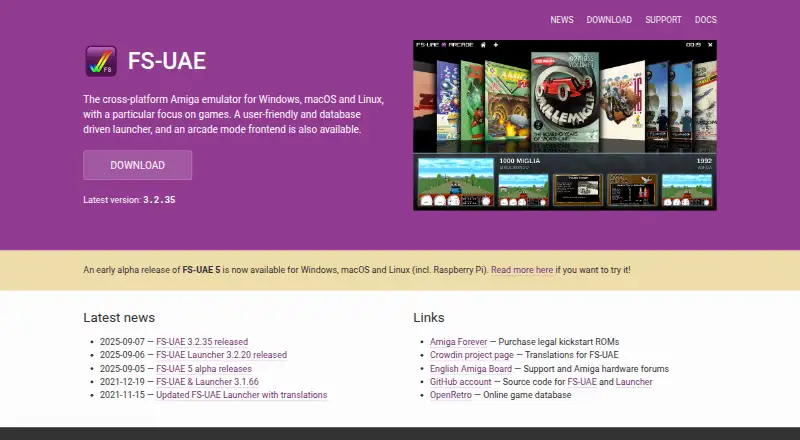
What FS-UAE is
FS-UAE is a free Amiga emulator for Linux, macOS, and Windows, focused on games while also supporting high-end Amiga systems. It emulates models including the Amiga 500, 600, 1200, 4000, CD32, and CDTV. You can load floppy and CD images, or mount computer folders as Amiga hard drives. The optional graphical FS-UAE Launcher helps configure the emulator without configuration files and can identify games, including many archived WHDLoad titles. Its connection to the Open Amiga Game Database can retrieve covers and screenshots. An on-screen menu supports gamepad control for tasks such as changing floppy disks and loading save states. FS-UAE also supports online play across platforms and offers graphics options such as aspect correction, zoom, shaders, and visual themes. It is free software under GPLv2, with some other project parts and dependencies using different open-source licenses. It requires a moderately fast computer with accelerated OpenGL graphics. Kickstart ROMs are not included, and users should ideally have them for the systems they want to emulate.
Who it suits
FS-UAE suits people looking to play Amiga games on Linux, macOS, or Windows, including games for higher-end Amiga systems. A gamepad or joystick is recommended, and users should ideally have the relevant Kickstart ROMs.
What it does well
- Free software with no paid plan listed.
- Emulates multiple Amiga models, including CD32 and CDTV.
- Supports floppy images, CD images, and mounted folders.
- Online play works across platforms.
- Optional Launcher configures without configuration files.
What to know first
- Requires a moderately fast computer with accelerated OpenGL graphics.
- Kickstart ROMs are not included.
- A gamepad or joystick is recommended, though not required.
Limits
FS-UAE is free, and the listed plan costs nothing. Kickstart ROMs are not included, and the emulator requires accelerated OpenGL graphics on a moderately fast computer.
Plans
| Plan | Billed and limits | Price |
|---|---|---|
| FS-UAE | Open-source Amiga emulator · donations optional | Free |
As fs-uae.net lists them, read 29 Sept 2026. The maker's own page has the final word.
Getting started
- Visit the FS-UAE website.
- Choose the version for Windows, macOS, or Linux.
- Use the optional FS-UAE Launcher to configure the emulator graphically.
- Provide Kickstart ROMs for the Amiga systems you want to emulate.
- Load supported disk images or mount a computer folder as an Amiga hard drive.
FS-UAE is a free Amiga emulator built chiefly for games, with profiles spanning classic home computers and CD-based systems. It suits players who want controller-friendly setup and online play across desktop platforms; its strongest practical drawbacks are the OpenGL requirement and separately sourced Kickstart ROMs.
Overview
FS-UAE covers Amiga models from the A500 through the A4000/040, alongside the CD32 and CDTV. That breadth makes it a sensible choice for a library that crosses generations, rather than an emulator aimed at one particular model. It can also mount computer folders as Amiga hard drives, useful for directory-based collections.
The optional FS-UAE Launcher is a substantial convenience: it configures the emulator through a graphical interface, avoiding hand-written configuration files. Its connection to the Open Amiga Game Database can identify ADF, IPF and WHDLoad games and fetch covers and screenshots. This makes it especially useful for players managing a collection, although users who prefer configuring without a launcher can do so.
Key features
Game media and controls
FS-UAE supports ADF and IPF floppy images, plus ISO and BIN/CUE CD-ROM images; its format support also includes DMS, ADZ and ZIP. The Launcher can recognise many archived WHDLoad titles in ZIP or LHA form and configure them to start. This combination gives game-focused users several ways to organise and launch software, while the Open Amiga Game Database integration helps identify supported items rather than leaving every file as an unknown entry.
The on-screen menu supports gamepad control for actions such as swapping disks and loading save states. A joystick or gamepad is recommended, not mandatory, so keyboard users are not excluded; controller owners gain a more natural way to handle common emulator tasks without leaving the game setup.
Graphics and online play
FS-UAE uses accelerated OpenGL and offers aspect correction, zoom, shaders and visual themes. Those options give users room to adjust presentation, but the graphics requirement is a real compatibility gate: a computer without moderately fast hardware and accelerated OpenGL is a poor fit.
Cross-platform online play is designed to avoid desynchronization. That is a useful distinction for people who want to play over the Internet with others, though it does not remove the need to have suitable game files and ROMs ready.
Pricing
FS-UAE costs free. The free plan includes the open-source Amiga emulator, hardware acceleration, save states, netplay and support for the listed Amiga models and disk formats. There is no paid tier or trial to weigh against it; donations are optional.
The GPLv2 license makes the core software free to use, with some other project parts and dependencies under LGPL or other open-source licenses. The free price does not include Kickstart ROMs: users should ideally have ROMs for the Amiga models they intend to emulate. That separate requirement is the main setup cost in effort, even though the emulator itself is free.
Platforms
FS-UAE runs on Windows, macOS and Linux. Its cross-platform availability applies to online play as well, making it a practical desktop option across those systems. It is not the right pick for someone seeking a mobile-first emulator.
Who it's for
Choose FS-UAE if you want a free, game-oriented Amiga emulator with broad model coverage, multiple disk formats, save states and a graphical library launcher. It is particularly well suited to players who want gamepad control or online play and are comfortable arranging their own Kickstart ROMs.
Look elsewhere if your computer lacks accelerated OpenGL, you need an emulator that includes Kickstart ROMs, or you want a native mobile option. The Launcher lowers the configuration burden, but FS-UAE still assumes access to the required machine ROMs and compatible hardware.
Pros and cons
- Pros: The optional graphical Launcher avoids manual configuration files and can identify games and display cover art and screenshots.
- Pros: Support for floppy and CD images, mounted folders and archived WHDLoad games accommodates varied game libraries.
- Pros: Gamepad-operated disk swapping and save-state loading, plus online play, make it well suited to playing rather than just configuring emulation.
- Cons: Accelerated OpenGL and a moderately fast computer are required, excluding some older or less capable machines.
- Cons: Kickstart ROMs are not included, so users must bring suitable ROMs for the systems they want to emulate.
Alternatives
Damisoft Amiga Emulator is another free option if starting in a browser matters more than using FS-UAE's desktop-focused setup; it also requires a Kickstart ROM and at least one game. For Android support, consider Amiberry, a free, open-source alternative available on Android as well as desktop platforms.
Meta Amiga Emulator is free and cross-platform, but its pre-alpha state and lack of an emulator to run yet make it a project to watch rather than a current substitute. E-UAE is a free, open-source option for readers who want to consider another GPL Amiga emulator.
For mobile-specific choices, UAE4ALL2 Mod targets Android and iOS. Amigo — Amiga Emulator is a free option for iOS and macOS, with no ads or accounts and a bring-your-own-ROM-and-disks approach.
For broader discovery, browse Amiga Emulators or the wider Emulator Software category. Buddi is budgeting software and Jammy is a free Linux/Windows option; neither is an Amiga emulation alternative.
Verdict
FS-UAE is a strong choice for desktop players who want broad Amiga game support, a graphical launcher and cross-platform online play without paying for the emulator. Choose it when you can supply Kickstart ROMs and have accelerated OpenGL; otherwise, its hardware requirement or ROM setup is a reason to look elsewhere.
Verdict
FS-UAE combines Amiga game emulation with support for multiple disk formats, save states, and cross-platform online play. Check the OpenGL requirement and Kickstart ROM availability before setting it up.
Questions
How much does FS-UAE cost?
The FS-UAE plan is free. Donations are optional.
Which computers can run FS-UAE?
It supports Windows, macOS, and Linux. It requires a moderately fast computer with accelerated OpenGL graphics.
Which Amiga systems does it emulate?
Listed systems include Amiga 500, 500+, 600, 1000, 1200, 4000, CD32, CDTV, A1200/020, A3000, and A4000/040.
Are Kickstart ROMs included?
No. Users should ideally have the Kickstart ROMs for the Amigas they want to emulate.
Is FS-UAE open source?
Yes. FS-UAE is free software licensed under GPLv2; some other project parts and dependencies use LGPL or other open-source licenses.
Who develops FS-UAE?
The site identifies Frode Solheim and contributors as the copyright holders and describes FS-UAE as a hobby project supported by donations.
Facts from FS-UAE's own pages
- Controls
- Its on-screen menu supports gamepad control for actions such as swapping floppy disks and loading save states. · fs-uae.net, 29 Sept 2026
- Developer
- The site identifies Frode Solheim and contributors as the copyright holders and says FS-UAE is a hobby project supported by donations. · fs-uae.net, 29 Sept 2026
- Disk images
- It supports ADF and IPF floppy images, ISO and BIN/CUE CD-ROM images, and computer folders mounted as Amiga hard drives. · fs-uae.net, 29 Sept 2026
- Emulated systems
- It emulates Amiga 500, 500+, 600, 1000, 1200, 4000, CD32 and CDTV. · fs-uae.net, 29 Sept 2026
- Game database
- The Launcher integrates with the Open Amiga Game Database to recognize ADF, IPF and WHDLoad games and retrieve covers and screenshots. · fs-uae.net, 29 Sept 2026
- Graphics
- FS-UAE uses OpenGL and offers aspect correction, zoom, shaders and visual themes. · fs-uae.net, 29 Sept 2026
- Kickstart ROMs
- The documentation says users should ideally have Kickstart ROMs for the Amigas they want to emulate. · fs-uae.net, 29 Sept 2026
- Launcher
- The optional graphical FS-UAE Launcher configures the emulator without requiring users to write configuration files. · fs-uae.net, 29 Sept 2026
- License
- FS-UAE is free software licensed under GPLv2, with some other project parts and dependencies under LGPL or other open-source licenses. · fs-uae.net, 29 Sept 2026
- Online play
- FS-UAE supports cross-platform online play over the Internet, designed to avoid desynchronization issues. · fs-uae.net, 29 Sept 2026
- Purpose
- FS-UAE is a cross-platform Amiga emulator with a focus on games, and it can also emulate high-end Amigas. · fs-uae.net, 29 Sept 2026
- Requirements
- The emulator requires a moderately fast computer with accelerated OpenGL graphics; a gamepad or joystick is recommended but not required. · fs-uae.net, 29 Sept 2026
- Support
- The project directs support questions to its English Amiga Board subforum and also provides a Discord community and email contact. · fs-uae.net, 29 Sept 2026
- Website privacy
- The website says it uses no tracking cookies, does not try to track visitors, and temporarily stores IP addresses in access logs when necessary. · fs-uae.net, 29 Sept 2026
- WHDLoad
- The Launcher can recognize many archived WHDLoad games in ZIP or LHA format and configure them to launch. · fs-uae.net, 29 Sept 2026
Where FS-UAE stands on Freedom251
- Amiga Emulators#7 of 22
- Emulator Software#15 of 39