Freedom251 › Network Monitoring
FreeMeter
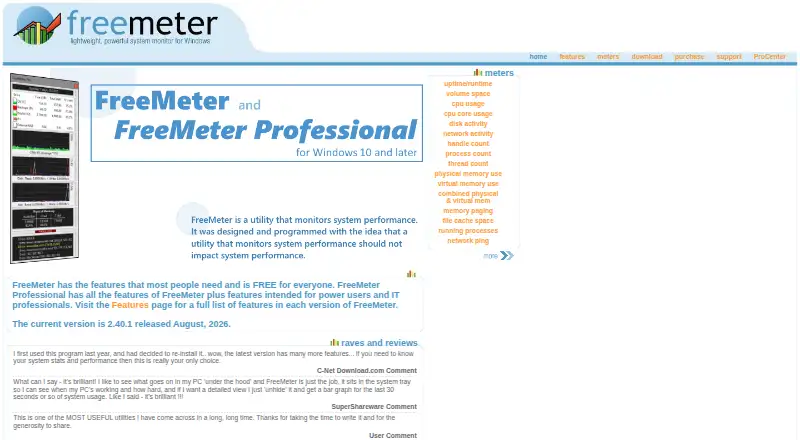
What FreeMeter is
FreeMeter is a Windows system resource meter for viewing activity and capacity on a computer. Its readings cover uptime, disk space and activity, CPU, network activity, handles, processes, threads, memory, file cache, and network ping. Meters can be arranged in one or two columns, shown as bar or line graphs, and selected readings can appear in system tray icons. The free plan is available for Windows 10 and 11 and Windows Server 2012 and later. FreeMeter Professional adds alert options for low disk space, low memory, high CPU use, and unresponsive ping hosts. Actions can be visual, sound, application, or email, though some are limited to Professional. Email alerts use an SMTP server; sending email using SSL/TLS is not supported. The Professional plan costs $9.99, paid once for a single-user license, with per-license prices varying by quantity. A license is required for each computer. The maker says bug fixes and some new features are free updates, while major upgrades may carry a fee.
Who it suits
FreeMeter suits Windows users who want to monitor system resources, with Professional adding alert options for power users and IT professionals.
What it does well
- Monitors CPU, memory, disk, network, and other readings.
- Meters support columns, bar graphs, and line graphs.
- Free plan supports Windows 10 and 11.
- Professional offers alerts for selected resource conditions.
What to know first
- Email alerts do not support SSL/TLS sending.
- Professional requires a license for each computer.
- Major upgrades may carry a fee.
Plans
| Plan | Billed and limits | Price |
|---|---|---|
| FreeMeter | Free for everyone · Windows 10 & 11 and Windows Server 2012 and later | Free |
| FreeMeter Professional | Single user license · 1–4 licenses: $9.99 each · 5–9: $8.99 each · 10–19: $8.49 each · 20–34: $7.99 each · 35–49: $6.99 each · 50 and up: contact | $9.99, paid once |
As freemeter.us lists them, read 11 Oct 2026. The maker's own page has the final word.
Getting started
- Open the FreeMeter website
- Choose the free edition or Professional
- Use a supported Windows 10, 11, or Server 2012-and-later system
- Install the software on each intended computer
- Purchase Professional through PayPal if needed
- Use the emailed registration information for Professional access
Verdict
FreeMeter covers a wide range of Windows system readings and offers flexible meter displays. Professional adds alerts, but email alerts have an SSL/TLS limitation and licenses are per computer.
Questions
Is FreeMeter free?
Yes. The FreeMeter plan costs nothing. FreeMeter Professional is a one-time purchase starting at $9.99 per license for one to four licenses.
Which operating systems are supported?
The site lists Windows 10 and 11 and Windows Server 2012 and later. Older versions may install but are untested.
What does Professional add?
Professional adds alerts for low disk space, low memory, high CPU use, and unresponsive ping hosts, with visual, sound, application, and email actions.
How are Professional orders handled?
Orders are processed by PayPal, and registration information is normally emailed within a few minutes after purchase.
Does FreeMeter contain advertising or spyware?
The features page states that FreeMeter has no ads or spyware.
Facts from FreeMeter's own pages
- Ads and spyware
- The features page states that FreeMeter has no ads or spyware. · freemeter.us, 11 Oct 2026
- Alerts
- Professional can alert on low disk space, low memory, high CPU use and unresponsive ping hosts through visual, sound, application or email actions, with some actions limited to Professional. · freemeter.us, 11 Oct 2026
- Current version
- The version history identifies version 2.40.1, released August 23, 2026, as the current release. · freemeter.us, 11 Oct 2026
- Display
- Meters can appear in one or two columns, use bar or line graphs, and show selected resource readings in system tray icons. · freemeter.us, 11 Oct 2026
- Email limitation
- Email alerts use an SMTP server, and the site says sending email using SSL/TLS is not supported. · freemeter.us, 11 Oct 2026
- License count
- A Professional license is required for each computer on which the software is installed. · freemeter.us, 11 Oct 2026
- Operating systems
- The site lists Windows 10 and 11 and Windows Server 2012 and later as supported; older versions may install but are untested. · freemeter.us, 11 Oct 2026
- Payment and delivery
- Orders are processed by PayPal, and registration information is normally emailed within a few minutes after purchase. · freemeter.us, 11 Oct 2026
- Professional access
- Registered Professional users can access their account, download the latest software and try betas through the ProCenter. · freemeter.us, 11 Oct 2026
- Purpose
- FreeMeter is a system resource meter, and its Professional edition adds features for power users and IT professionals. · freemeter.us, 11 Oct 2026
- Resource monitoring
- Its meters cover uptime, disk space and activity, CPU, network activity, handles, processes, threads, memory, file cache and network ping. · freemeter.us, 11 Oct 2026
- Support
- The site directs users to a support request form and provides a page for looking up lost registration information. · freemeter.us, 11 Oct 2026
- Updates
- The site says bug fixes and some new features are free updates, while major upgrades such as version 3.0 may have an upgrade fee. · freemeter.us, 11 Oct 2026
Where FreeMeter stands on Freedom251
- Network Monitoring#20 of 55