Freedom251 › Email Forwarding Services

Forward Email
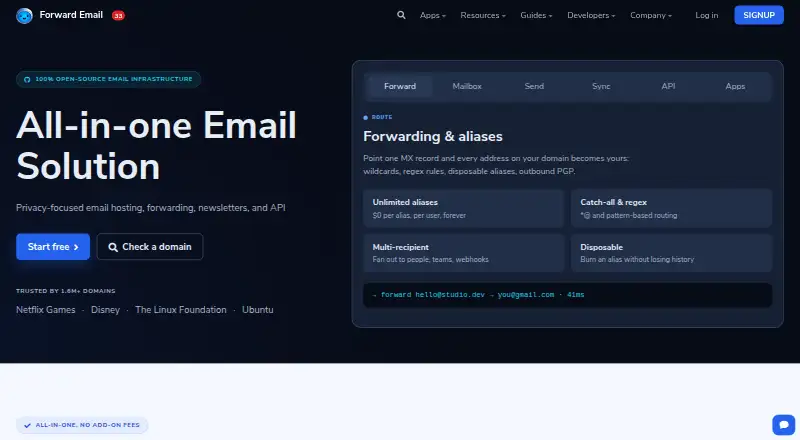
What Forward Email is
Forward Email provides custom-domain email forwarding, with paid plans adding email hosting and encrypted mailbox storage. The Free plan supports forwarding only: it does not allow sending mail or storing mail on Forward Email servers. Enhanced Protection costs $3 a month and includes unlimited aliases, 10 GB pooled storage, API access, and 9000+ outbound messages per month. Additional storage costs $3 per month per additional 10 GB. The service lists Gmail send-as, SMTP, email-to-webhook delivery, and developer API access. Native apps are available for macOS, Windows, Linux, Android, and iOS, alongside a web app. The apps page lists IMAP, POP3, CalDAV, and CardDAV support. Forward Email describes its service as built with open-source software. Its security information says email traffic uses TLS 1.2 or higher and stored email is encrypted at rest with ChaCha20-Poly1305. Listed protections include multi-factor authentication, DKIM, SPF, DMARC, spam filtering, attachment virus scanning, and phishing detection. Team costs $9 a month; Enterprise costs $250 a month.
Who it suits
Enhanced Protection is positioned for individuals, freelancers, and small businesses. Team is aimed at groups and organizations, while Enterprise is positioned for education, healthcare, government, and custom implementations.
What it does well
- Free plan supports unlimited inbound email forwarding.
- Native apps cover macOS, Windows, Linux, Android, and iOS.
- Enhanced Protection includes 10 GB pooled storage.
- Security details include multi-factor authentication and phishing detection.
What to know first
- Free plan cannot send mail.
- Free plan does not store mail on Forward Email servers.
- Additional 10 GB storage costs $3 per month.
Limits
The Free plan supports forwarding only, with unlimited inbound email and a 50 MB attachment limit; it does not allow sending mail or storing mail on Forward Email servers. Enhanced Protection includes 10 GB pooled storage, with each additional 10 GB costing $3 per month.
Plans
| Plan | Billed and limits | Price |
|---|---|---|
| Enterprise | $250/month for unlimited domains · Unlimited API requests · dedicated support chatroom · enterprise contract · onboarding and real-time engineering support | $250 a month |
| Enhanced Protection | $3/month for unlimited domains · Unlimited aliases · 10 GB pooled storage · 9000+ outbound / month · API access | $3 a month |
| Team | $9/month for unlimited domains · Unlimited team members · team permissions · shared organizational access · priority support | $9 a month |
| Free | $0/month for unlimited domains · Email forwarding only · unlimited inbound email · spam protection · 50 MB attachment limit · cannot send mail | On request |
As forwardemail.net lists them, read 29 Sept 2026. The maker's own page has the final word.
Getting started
- Open forwardemail.net.
- Choose the Free forwarding plan or a paid plan.
- Set up custom-domain forwarding; catch-all forwarding and multiple recipients are listed.
- Use the web app or a native app on macOS, Windows, Linux, Android, or iOS.
- For a paid plan, configure available options such as SMTP, Gmail send-as, or email-to-webhook delivery.
Overview
Forward Email combines custom-domain forwarding with paid email hosting and encrypted mailbox storage. It is best suited to people who want domain-based addresses and may need sending, storage, or team controls; the free plan is only for forwarding incoming mail.
That split is the key buying decision: free covers unlimited inbound forwarding, but not sending or server-side storage. Paid plans broaden the service into hosted email, while self-hosted Docker email is also an option for people who want to manage deployment themselves.
Key features
Forwarding, sending, and protocols
Custom domains, catch-all forwarding, multiple recipients, and delivery logs make Forward Email useful for routing domain mail to existing inboxes. Paid options include Gmail send-as, SMTP, email-to-webhook delivery, and developer API access. Those integrations suit users who need more than redirection, though the free plan cannot send mail.
IMAP and POP3 support standard email clients, while CalDAV and CardDAV cover calendar and contact protocols. Native apps are offered for macOS, Windows, Linux, Android, and iOS, alongside a web app. That range gives users several ways to access hosted mail rather than tying them to one platform.
Storage, security, and compliance
Enhanced Protection includes 10 GB of pooled storage; each extra 10 GB costs $3 per month. That is a useful starting allowance for a personal mailbox or small operation, but users with larger archives should factor in the recurring storage charge.
Email traffic uses TLS 1.2 or higher, and stored email is encrypted at rest with ChaCha20-Poly1305 in SQLite files. Security controls include multi-factor authentication, DKIM, SPF, DMARC, spam filtering, real-time attachment virus scanning, and phishing detection. The service also states GDPR-compliant data handling, CCPA privacy controls, SOC 2 Type II audited processes, and a DPA for business customers. These controls make it relevant to organizations with compliance needs, although the listed safeguards alone do not establish that a particular deployment meets every organization's obligations.
Forward Email describes its service as built with open-source software and lists self-hosted Docker email. That gives technically capable users a self-managed route, rather than limiting them to the hosted plans.
Pricing
The Free plan is billed $0/month for unlimited domains. It provides unlimited inbound email, spam protection, and a 50 MB attachment limit, but supports forwarding only: it cannot send mail or store mail on Forward Email servers. It works for domain aliases that redirect elsewhere, not for users who need a complete mailbox.
Enhanced Protection costs $3 a month, billed $3/month for unlimited domains. It includes unlimited aliases, 10 GB pooled storage, 9000+ outbound / month, and API access. This is the clearest fit for individuals, freelancers, and small businesses needing hosted mail and outbound capacity. Additional storage costs $3 per month per 10 GB.
Team costs $9 a month, billed $9/month for unlimited domains. It adds unlimited team members, team permissions, shared organizational access, and priority support. Groups that need shared administration and priority requests have a reason to move up from Enhanced Protection; the listed plan details do not include a storage allowance or outbound quota.
Enterprise costs $250 a month, billed $250/month for unlimited domains. It includes unlimited API requests, a dedicated support chatroom, an enterprise contract, onboarding, and real-time engineering support. Its positioning for education, healthcare, government, and custom implementations makes sense for organizations needing close support, but the price is a substantial step up from Team.
Platforms
Forward Email supports Android, iOS, Linux, macOS, Windows, web, API, and self-hosted use. The native apps and standard mail protocols broaden device choice, while API access and Docker self-hosting address automation and self-management needs.
Who it's for
Choose Forward Email if you want addresses on your own domain and value a path from simple inbound forwarding to encrypted hosted mail. Enhanced Protection targets individuals and small businesses; Team is aimed at groups needing shared access, and Enterprise at organizations requiring dedicated support or custom implementations. It is a poor fit if your only requirement is a free sending mailbox, since the free tier cannot send or retain mail on its servers.
Pros and cons
- Pro: Unlimited domains on every plan make it possible to use the service across multiple domains without changing tiers.
- Pro: The free tier allows unlimited inbound forwarding and includes spam protection, useful for routing domain mail without paying for hosted storage.
- Pro: Paid hosting combines 10 GB pooled storage with outbound mail, API access, and broad protocol support.
- Pro: Security controls include encrypted storage, multi-factor authentication, and attachment scanning, with compliance measures that address common organizational concerns.
- Con: Free users cannot send mail or store messages on Forward Email servers, so forwarding alone will not replace a mailbox.
- Con: Extra storage costs $3 per month per additional 10 GB, which can raise the bill for large archives.
- Con: Enterprise at $250 a month is a large jump from Team at $9 a month, making its support and contract features difficult to justify for smaller groups.
Alternatives
For a broader comparison of routing services, see Email Forwarding Services.
- EForw is worth considering if a web-only service with a free one-domain plan, unlimited catch-all aliases, and SPF, DKIM, and DMARC pass is enough; its Personal plan is $1.99 a month.
- Forward may suit someone who wants a free one-domain allowance of 25 aliases, 500 forwards per day, seven days of logs, and one team seat.
- ImprovMX is another web and API option, with a free plan covering one domain, 25 aliases, 500 forwarded emails per day, seven-day log retention, API access, and a 99% uptime guarantee.
- InboxMail may be a better match for readers seeking a free plan that combines one custom domain and unlimited aliases with agent inboxes and campaign capacity.
- Mailcast offers a free one-domain plan with up to 25 aliases and a 10Mb attachment limit, but no sending from the domain or webhook support.
- MailerZ has a free plan with one domain, three aliases, a 14-day message store, and one seat; send-as, SMTP, and API are disabled on that tier.
- Cloudflare Email Routing is a free alternative for unlimited inbound routing, with a paid Workers option that includes 3,000 outbound emails per month.
- DNSExit Email Forwarding is another web-based forwarding alternative.
Verdict
Forward Email is a strong choice for people who want custom-domain forwarding now and the option to add encrypted hosted mail, outbound sending, or team controls later. Its free tier is useful for forwarding, but anyone who needs a mailbox that sends or stores mail must choose a paid plan; look elsewhere if forwarding alone is all you need and another service better matches your domain or alias limits.
Verdict
Forward Email offers forwarding on its free tier and adds mailbox storage and outbound mail on paid plans. Check the free-tier limits if sending or server-side storage is necessary.
Questions
Is Forward Email free?
Yes. The Free plan provides forwarding for unlimited domains and unlimited inbound email.
What does the Free plan include?
It includes email forwarding, spam protection, and a 50 MB attachment limit. It cannot send mail or store mail on Forward Email servers.
How much do the paid plans cost?
Enhanced Protection is $3 a month, Team is $9 a month, and Enterprise is $250 a month.
Which platforms have native apps?
Native apps are listed for macOS, Windows, Linux, Android, and iOS, alongside a web app.
Is Forward Email open source?
The company describes its service as built with 100% open-source software.
What integrations or delivery options are listed?
The options include Gmail send-as, email-to-webhook delivery, SMTP, and developer API access.
Facts from Forward Email's own pages
- Authentication and abuse protection
- The security page lists multi-factor authentication, DKIM, SPF, DMARC, spam filtering, real-time attachment virus scanning, and phishing detection. · forwardemail.net, 29 Sept 2026
- Client platforms
- Native apps are offered for macOS, Windows, Linux, Android, and iOS, alongside a web app. · forwardemail.net, 29 Sept 2026
- Compliance
- The security page states GDPR-compliant data handling, CCPA privacy controls, SOC 2 Type II audited processes, and a DPA for business customers. · forwardemail.net, 29 Sept 2026
- Email protocols
- The native apps page lists IMAP, POP3, CalDAV, and CardDAV support. · forwardemail.net, 29 Sept 2026
- Encryption
- The security page states that email traffic uses TLS 1.2 or higher and stored email is encrypted at rest with ChaCha20-Poly1305 in SQLite files. · forwardemail.net, 29 Sept 2026
- Free tier limit
- The Free plan supports forwarding only and does not allow sending mail or storing mail on Forward Email servers. · forwardemail.net, 29 Sept 2026
- Integrations
- The pricing page lists Gmail send-as, email-to-webhook delivery, SMTP, and developer API access among its options. · forwardemail.net, 29 Sept 2026
- Open source
- The company describes its service as built with 100% open-source software. · forwardemail.net, 29 Sept 2026
- Self hosting
- The pricing page lists self-hosted Docker email as a feature. · forwardemail.net, 29 Sept 2026
- Storage
- Enhanced Protection includes 10 GB pooled storage, and the page says additional storage costs $3 per month per additional 10 GB. · forwardemail.net, 29 Sept 2026
- Support
- Team includes priority support requests, while Enterprise includes a dedicated support chatroom and real-time engineering support. · forwardemail.net, 29 Sept 2026
- What it does
- Forward Email provides custom-domain email forwarding and paid email hosting with encrypted mailbox storage. · forwardemail.net, 29 Sept 2026
- Who it serves
- The pricing page positions Enhanced Protection for individuals, freelancers, and small businesses, Team for groups and organizations, and Enterprise for education, healthcare, government, and custom implementations. · forwardemail.net, 29 Sept 2026
Where Forward Email stands on Freedom251
- Email Forwarding Services#1 of 25