Freedom251 › Email Forwarding Services
EForw
What EForw is
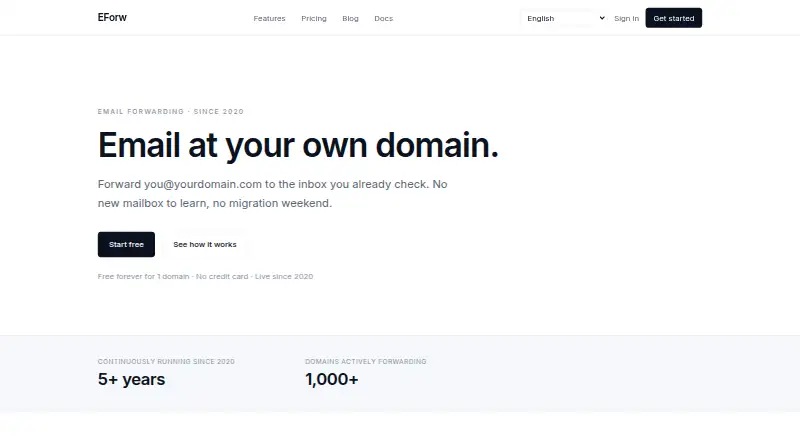
EForw forwards email sent to custom-domain addresses into an inbox a user already checks. Setup involves adding a domain and entering MX, SPF, and DKIM records in DNS. Catch-all forwarding routes mail for every address on a domain to one inbox, while unlimited aliases can be routed to different destinations. The Personal plan adds SMTP send-as, which EForw says works with Gmail, Outlook, or any email client. It says it preserves SPF, DKIM, and DMARC alignment for forwarded messages. EForw also says it does not scan message contents, use them for AI training, or keep message contents after delivery; mail is encrypted in transit with TLS to the inbox provider. Users can export or delete their data with one click. The Free plan includes one domain and unlimited catch-all aliases. Personal costs $1.99 a month, or $9.99/year, and includes up to 25 domains. Business pricing is by contact and includes custom domains, an audit log, and a dedicated support contact. EForw is operated by France-registered Apps34.
Who it suits
EForw suits people who want to route custom-domain mail to an existing inbox, including users who need catch-all forwarding or multiple aliases. The Personal plan may fit those who also want to send through SMTP from Gmail, Outlook, or another email client.
What it does well
- Free plan includes one domain and unlimited catch-all aliases.
- Unlimited aliases can route to different destinations.
- Personal plan includes SMTP send-as.
- One-click data export or deletion.
- TLS encryption in transit to the inbox provider.
What to know first
- Setup requires editing DNS records.
- Free plan covers one domain.
- Personal costs $1.99 a month.
- Business price is available by contacting the company.
Limits
Free includes one domain. Personal supports up to 25 domains and costs $1.99/month or $9.99/year; the Business price is available by contacting EForw.
Plans
| Plan | Billed and limits | Price |
|---|---|---|
| Free | forever · 1 domain · Unlimited catch-all aliases · SPF, DKIM, DMARC pass · Community support | Free |
| Personal | per month, or $9.99/year · Up to 25 domains · Send-as via SMTP · Per-alias routing rules · Priority email support | $1.99 a month |
| Business | Contact us · Custom domains · Audit log of forwards · Dedicated support contact · Invoiced billing | On request |
As eforw.com lists them, read 3 Oct 2026. The maker's own page has the final word.
Getting started
- Visit the EForw website.
- Choose Free or Personal, or contact EForw about the Business plan.
- Add your domain.
- Copy the MX, SPF, and DKIM records into the domain's DNS settings.
- Set catch-all forwarding or create aliases and route them to your inboxes.
Overview
EForw is a web-based service that routes messages sent to your custom-domain addresses into an inbox you already use. It is a good fit for individuals who want several addresses without taking on a separate mailbox, and for small teams that need custom routing. The trade-off is a DNS setup step, and sending replies as your domain is reserved for Personal.
Key features
To get started, add a domain and copy EForw’s MX, SPF, and DKIM records into its DNS settings. That gives the service the routing configuration it needs, but it also means you must be able to change DNS records. Catch-all forwarding sends mail for any address on a domain to one inbox; EForw also supports unlimited aliases that can be routed anywhere. On Personal, per-alias routing rules make it possible to send different addresses to different destinations.
Personal includes SMTP send-as for Gmail, Outlook, or any email client. That matters if you want to reply using your domain rather than only receive mail there. EForw says it preserves SPF, DKIM, and DMARC alignment for forwarded mail, a useful safeguard for mail authentication.
EForw says it does not scan message contents, use them for AI training, or keep them after delivery. It also says mail is encrypted in transit with TLS to the inbox provider, and offers one-click data export and deletion. These controls will appeal to users concerned about message handling; they do not remove the need to trust the inbox provider receiving forwarded mail. Migration guidance covers Cloudflare Email Routing, ImprovMX, and Forward Email. Delivery logs are available, without a stated retention period.
Pricing
EForw has a permanent free option and a paid plan starting at $1.99 a month. The choice turns less on alias count than on how many domains you need and whether you need sending, routing rules, or a higher support level.
| Plan | Price and terms | What it includes |
|---|---|---|
| Free | free, billed forever | 1 domain, unlimited catch-all aliases, SPF, DKIM, DMARC pass, and community support |
| Personal | $1.99 a month, billed per month, or $9.99/year | Up to 25 domains, SMTP send-as, per-alias routing rules, and priority email support |
| Business | Custom pricing; billed Contact us | Custom domains, an audit log of forwards, a dedicated support contact, and invoiced billing |
Free is a strong starting point if one domain and catch-all delivery are enough; despite the unlimited aliases, it does not include the Personal plan’s SMTP send-as or per-alias routing rules. Personal is the practical upgrade for sending through your domain, separating destinations by alias, or managing more than one domain, with a cap of 25. Business is aimed at organizations that need an audit log, dedicated support, or invoicing, but its price requires a direct quote.
Platforms
EForw is available on the web. SMTP send-as works with Gmail, Outlook, or any email client, but the forwarding service itself is presented as web-based.
Who it's for
Choose EForw if you want custom-domain forwarding into an inbox you already use, particularly if unlimited aliases and catch-all delivery cover your needs. Personal suits people who also want replies to use the domain or need different destinations for different addresses. It is a weaker fit if you cannot edit DNS, need more than 25 domains on a fixed-price plan, or want a standalone mailbox rather than forwarding.
Pros and cons
- Pro: Unlimited aliases and catch-all forwarding make it possible to use many domain addresses without adding separate mailboxes.
- Pro: Personal combines SMTP send-as and per-alias routing rules, covering both replies and differentiated delivery.
- Pro: The stated no-content-scanning and no-retention approach, TLS in transit, and one-click export or deletion provide relevant privacy controls.
- Con: Setup depends on adding MX, SPF, and DKIM records, so users need DNS access and must configure it correctly.
- Con: Free covers only one domain and lacks the paid plan’s send-as and per-alias routing rules.
- Con: Business pricing requires contacting EForw, making it harder to assess against a fixed budget.
Alternatives
Compare email forwarding services if you want to weigh more options. Forward Email is worth considering if you want a service the company describes as built with 100% open-source software, or need its broad range of platforms including self-hosted, mobile, desktop, and API access. Forward may suit a lighter setup: its free plan has one domain, 25 aliases, 500 forwards per day, seven days of logs, and one team seat.
ImprovMX is an option if a 25-alias free plan with a 500-forwarded-email daily cap, seven-day log retention, API access, and a 99% uptime guarantee fits your needs. InboxMail may be a better match if you also want campaign and AI-action allowances alongside forwarding, rather than forwarding alone. Mailcast is another free-plan option, though its free tier limits you to one domain and 25 aliases and excludes sending from your domain.
MailerZ may be worth comparing if you prefer a free tier with three aliases and a 14-day message store, but its free plan disables send-as and SMTP. Cloudflare Email Routing is a free alternative if unlimited inbound routing is the priority; its paid Workers plan also includes 3,000 outbound emails per month. polkit is another free option.
Verdict
EForw is a sensible choice for people who want to route custom-domain mail into an existing inbox, with unlimited aliases and a clear upgrade path to SMTP send-as. Choose Free for one-domain catch-all forwarding; choose Personal when domain-based replies or per-alias destinations matter. Look elsewhere if DNS configuration is a barrier, you need a standalone mailbox, or you want a Business price before contacting the provider.
Verdict
EForw focuses on forwarding custom-domain email, with aliases, catch-all routing, and SMTP send-as on Personal. Check that you can update DNS records and that the domain allowance and plan terms suit your setup.
Questions
Is EForw free?
Yes. The Free plan is billed forever and includes one domain and unlimited catch-all aliases.
How much does Personal cost?
Personal costs $1.99/month, or $9.99/year.
What does the Personal plan add?
It includes up to 25 domains, SMTP send-as, per-alias routing rules, and priority email support.
What does the Business plan cost?
Its price is available by contacting EForw.
Which platforms or email clients work with EForw?
EForw is a web service. Its SMTP send-as feature can be used with Gmail, Outlook, or any email client.
Who operates EForw?
EForw is operated by Apps34, a company registered in France.
Facts from EForw's own pages
- Aliases
- EForw says users can create unlimited aliases and route them anywhere. · eforw.com, 3 Oct 2026
- Authentication
- EForw says it preserves SPF, DKIM, and DMARC alignment for forwarded mail. · eforw.com, 3 Oct 2026
- Catch-all
- Catch-all forwarding sends mail for every address on a domain to one inbox. · eforw.com, 3 Oct 2026
- Data controls
- The site says users can export or delete their data with one click. · eforw.com, 3 Oct 2026
- Data rights
- The privacy policy lists GDPR rights including access, rectification, erasure, portability, and objection, and says it responds to requests within 30 days. · eforw.com, 3 Oct 2026
- Encryption
- The site says mail is encrypted in transit with TLS to the inbox provider. · eforw.com, 3 Oct 2026
- Founded
- 2020 · eforw.com, 28 Sept 2026
- Headquarters
- France · eforw.com, 28 Sept 2026
- Integrations
- SMTP send-as is described as compatible with Gmail, Outlook, or any email client. · eforw.com, 3 Oct 2026
- Migration
- The site provides migration guidance for Cloudflare Email Routing, ImprovMX, and Forward Email. · eforw.com, 3 Oct 2026
- Operator
- The privacy policy says EForw is operated by Apps34, a company registered in France. · eforw.com, 3 Oct 2026
- Privacy
- The site says EForw does not scan email contents, use them for AI training, or store message contents after delivery. · eforw.com, 3 Oct 2026
- Product
- EForw forwards email sent to a custom-domain address to an inbox the user already checks. · eforw.com, 3 Oct 2026
- Send-as
- The Personal plan includes SMTP send-as and can be used with Gmail, Outlook, or any email client. · eforw.com, 3 Oct 2026
- Setup
- Setup requires adding a domain and copying MX, SPF, and DKIM records into DNS. · eforw.com, 3 Oct 2026
- Support
- The Free plan includes community support, the Personal plan priority email support, and the Business plan a dedicated support contact. · eforw.com, 3 Oct 2026
Where EForw stands on Freedom251
- Email Forwarding Services#6 of 25