Freedom251 › Phone Transfer Software

FoneLab HyperTrans
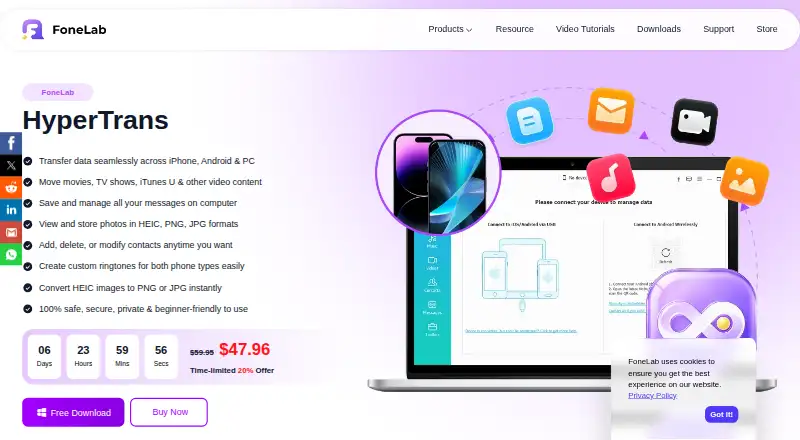
What FoneLab HyperTrans is
FoneLab HyperTrans transfers photos, messages, videos, music and contacts among iPhones, Android devices and Windows computers. It supports phone-to-phone transfers as well as transfers between a phone and a computer. The FAQ describes transfers as direct between devices, without cloud uploads or synchronization to iCloud or Google Drive. HyperTrans also helps organize phone files: users can rename, move, edit and delete them, create photo albums and playlists, and remove clutter. Included utilities back up and restore contacts, make ringtones, and convert HEIC images to JPG or PNG. Listed requirements include Windows XP SP2 or later, Android 4.0 or later, iOS 6.0 or later and iTunes 10.7 or later. A free trial is available before purchase, though the purchase page does not give its duration. The 1 Month License costs $20 a month with auto-renewal and cancellation at any time; lifetime options cost $47.96, paid once for one PC or $79.20, paid once for three PCs. The monthly license includes one month of updates and technical support, while lifetime licenses include both for life. FoneLab says HyperTrans does not collect data, store it in the cloud or provide third-party access.
Who it suits
HyperTrans suits people who need to move and manage files across iPhone, Android and Windows devices, or back up contacts and convert HEIC images. It is also a fit for buyers who prefer direct transfers instead of cloud uploads and need a licence for one or three PCs.
What it does well
- Transfers photos, messages, videos, music and contacts.
- Supports transfers between phones and between phones and computers.
- Includes contact backup and restore utilities.
- Converts HEIC images to JPG or PNG.
- Lifetime licences include lifetime updates and technical support.
What to know first
- The monthly licence covers one PC.
- The monthly licence auto-renews, though it can be cancelled at any time.
Limits
The monthly licence covers one PC and includes one month of free updates and technical support. Its price is $20 a month with auto-renewal. The trial duration is not given on the purchase page.
Plans
| Plan | Billed and limits | Price |
|---|---|---|
| 1 Month License | Auto-renewal; cancel at any time · 1 PC · 1-month free updates and tech support | $20 a month |
| 1 PC Lifetime License | One time purchase · 1 PC · Lifetime free updates and tech support | $47.96, paid once |
| 3 PCs Lifetime License | One time purchase · 3 PCs · Lifetime free updates and tech support | $79.20, paid once |
As fonelab.com lists them, read 11 Oct 2026. The maker's own page has the final word.
Getting started
- Visit the FoneLab HyperTrans website.
- Check that your devices meet the listed Windows, Android, iOS and iTunes requirements.
- Try the free trial before purchasing.
- Choose the monthly licence or a one-PC or three-PC lifetime licence.
- Install HyperTrans on the covered PC and connect the devices you want to transfer between.
Verdict
Choose HyperTrans if you need to transfer or organize phone data across iPhone, Android and Windows, with direct transfers and built-in contact utilities. Look elsewhere if your devices fall outside its listed system requirements or you need a trial with a stated duration before deciding.
Questions
How much does HyperTrans cost?
The 1 Month License costs $20 a month. The 1 PC Lifetime License costs $47.96, paid once, and the 3 PCs Lifetime License costs $79.20, paid once.
Is there a free plan or trial?
A free trial is available before purchase. FoneLab does not give its duration on the purchase page.
Which platforms does HyperTrans support?
It supports Android, iOS and Windows. Listed requirements include Windows XP SP2 or later, Android 4.0 or later, iOS 6.0 or later and iTunes 10.7 or later.
Can HyperTrans transfer data without cloud syncing?
The FAQ says transfers happen directly between devices without cloud uploads or syncing to iCloud or Google Drive.
How many PCs does a licence cover?
The monthly and one-PC lifetime licences cover one PC; the three-PC lifetime licence covers three PCs.
What support comes with each licence?
The monthly licence includes one month of free updates and technical support. Lifetime licences include lifetime free updates and technical support.
Facts from FoneLab HyperTrans's own pages
- Company background
- FoneLab says it was founded in 2012 to help people manage phone data. · fonelab.com, 11 Oct 2026
- Company privacy
- FoneLab's privacy policy says its website logs domain name, IP address, and browser type and describes its use of Google Analytics. · fonelab.com, 11 Oct 2026
- Compatibility
- The listed requirements include Windows XP SP2 or later, Android 4.0 or later, iOS 6.0 or later, and iTunes 10.7 or later. · fonelab.com, 11 Oct 2026
- Phone management
- It lets users organize, rename, move, edit, and delete phone files, create photo albums and playlists, and remove clutter. · fonelab.com, 11 Oct 2026
- Purpose
- HyperTrans transfers data among iPhone, Android devices, and Windows computers. · fonelab.com, 11 Oct 2026
- Security
- FoneLab says HyperTrans has no data collection, cloud storage, or third-party access; the FAQ describes transfers as direct between devices. · fonelab.com, 11 Oct 2026
- Support
- The purchase page includes technical support for one month with the monthly license and lifetime support with lifetime licenses. · fonelab.com, 11 Oct 2026
- Transfer method
- The FAQ says transfers happen directly between devices without cloud uploads or syncing to iCloud or Google Drive. · fonelab.com, 11 Oct 2026
- Transfer types
- It transfers photos, messages, videos, music, and contacts between supported devices. · fonelab.com, 11 Oct 2026
- Trial
- FoneLab says a free trial version is available before purchase, but the HyperTrans purchase page gives no trial length for HyperTrans. · fonelab.com, 11 Oct 2026
- Utilities
- Included utilities are contact backup and restore, ringtone making, and HEIC conversion to JPG or PNG. · fonelab.com, 11 Oct 2026
Where FoneLab HyperTrans stands on Freedom251
- Phone Transfer Software#23 of 44