Freedom251 › PDF Converter Software

Flyingbee PDF Converter Online
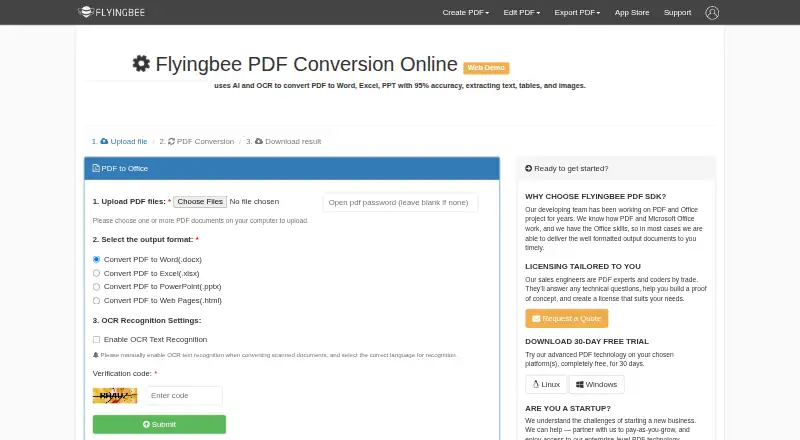
What Flyingbee PDF Converter Online is
Flyingbee PDF Converter Online is a free web demo for converting PDFs into Word, Excel, PowerPoint, or HTML files. It supports OCR conversion and batch conversion, and API access is available for connecting conversion to software or processes. Flyingbee says the converter uses AI and OCR and claims 95% accuracy when extracting text, tables, and images. Scanned documents require OCR to be enabled manually, with a recognition language selected. An optional upload field accepts an open password for protected PDFs. The page says successful uploads are deleted within 24 hours, so results should be downloaded promptly. Flyingbee describes a separate PDF Conversion SDK for Windows, Linux, and web, with a 30-day free trial. The SDK identifies DOCX, XLSX, and PPTX conversion formats, while the online demo also supports HTML.
Who it suits
It suits people or workflows needing browser-based PDF conversion to Office files or HTML. OCR, batch processing, and API access also support scanned documents and automated use.
What it does well
- Free web-based converter
- Word, Excel, PowerPoint, and HTML outputs
- OCR for scanned documents
- Batch conversion support
- API access available
What to know first
- Scanned files require manual OCR settings
- Uploads are deleted within 24 hours
- 95% extraction accuracy is a stated claim
Limits
The online converter is listed as free, with no quota stated in the facts. The separate PDF Conversion SDK has a 30-day free trial; its longer-term licensing is handled through Flyingbee sales engineers.
Getting started
- Open the Flyingbee PDF Converter website
- Upload a PDF file
- Enter the open password if the PDF is protected
- Enable OCR and choose a recognition language for scanned documents
- Select Word, Excel, PowerPoint, or HTML as the output
- Download the converted result promptly
Verdict
Flyingbee PDF Converter Online focuses on free browser conversion across four output formats, with OCR, batch handling, and API access. Its separate SDK and stated deletion window are relevant when evaluating developer use and file handling.
Questions
What formats can it create from a PDF?
The demo converts PDFs to Word (.docx), Excel (.xlsx), PowerPoint (.pptx), and HTML (.html).
Does it support OCR?
Yes. Flyingbee says it uses AI and OCR and claims 95% accuracy for extracting text, tables, and images. Scanned documents require OCR to be enabled manually with a recognition language selected.
Can it process multiple files?
Yes. Batch conversion is listed as a capability.
Is there an API?
Yes. API access is listed for the product.
Which platforms are supported?
The online demo supports the web. The separate PDF Conversion SDK is described for Windows, Linux, and the web.
What happens to uploaded files?
Flyingbee says uploads are deleted within 24 hours after conversion succeeds and asks users to download results as soon as possible.
Facts from Flyingbee PDF Converter Online's own pages
- AI and OCR
- The maker says the converter uses AI and OCR and claims 95% accuracy when extracting text, tables, and images. · flyingbee.com, 11 Oct 2026
- Business licensing
- The page says sales engineers can answer technical questions, help build a proof of concept, and create a tailored license; it also invites startups to pay as they grow. · flyingbee.com, 11 Oct 2026
- Conversion formats
- The demo offers PDF conversion to Word (.docx), Excel (.xlsx), PowerPoint (.pptx), and web pages (.html). · flyingbee.com, 11 Oct 2026
- Conversion technology
- The page says it uses AI and OCR and claims 95% accuracy when extracting text, tables, and images. · flyingbee.com, 11 Oct 2026
- Developer platforms
- The separate PDF Conversion SDK is described as a library for Windows, Linux, and Web, with a 30-day free trial offered on the converter page. · flyingbee.com, 11 Oct 2026
- File deletion
- The page says uploaded files are deleted within 24 hours after conversion succeeds. · flyingbee.com, 11 Oct 2026
- File formats
- The SDK page identifies Word (.docx), Excel (.xlsx), and PowerPoint (.pptx) as conversion formats. · flyingbee.com, 11 Oct 2026
- File retention
- The page says uploaded files will be deleted within 24 hours after a successful conversion and asks users to download the result as soon as possible. · flyingbee.com, 11 Oct 2026
- Integrations
- The online demo page does not name any integrations. · flyingbee.com, 11 Oct 2026
- Maker
- Flyingbee describes itself as developing PDF, Office document, and printing apps for iPhone, iPad, Mac, and Windows PC. · flyingbee.com, 11 Oct 2026
- OCR settings
- Users can enable OCR for scanned documents and select a recognition language. · flyingbee.com, 11 Oct 2026
- Output quality
- Flyingbee says its PDF SDK aims to preserve text, images, layouts, hyperlinks, tables, and Bezier graphics in editable Office documents. · flyingbee.com, 11 Oct 2026
- Password protected files
- The upload form includes an optional field for an open PDF password. · flyingbee.com, 11 Oct 2026
- Privacy and security
- Flyingbee's privacy policy says it uses information security measures to guard against unauthorized access, alteration, disclosure, or destruction, and says its site complies with PCI vulnerability standards. · flyingbee.com, 11 Oct 2026
- Privacy choices
- The privacy policy says users may request access, export, editing, or deletion of personal information through customer service. · flyingbee.com, 11 Oct 2026
- Product
- The maker describes it as an online web demo for converting PDFs. · flyingbee.com, 11 Oct 2026
- Scanned documents
- For scanned documents, users must enable OCR manually and select the correct recognition language. · flyingbee.com, 11 Oct 2026
- Security
- Flyingbee's privacy policy says it uses information security measures and that its site complies with PCI vulnerability standards. · flyingbee.com, 11 Oct 2026
- Support
- The converter page invites feedback and lists [email protected] as its contact email. · flyingbee.com, 11 Oct 2026
- What it does
- The online demo converts PDFs to Word, Excel, PowerPoint, or HTML. · flyingbee.com, 11 Oct 2026
Where Flyingbee PDF Converter Online stands on Freedom251
- PDF Converter Software#19 of 47
- PDF converters#14 of 22