Freedom251 › Color Palette Generators
Fluent UI Theme Designer
What Fluent UI Theme Designer is
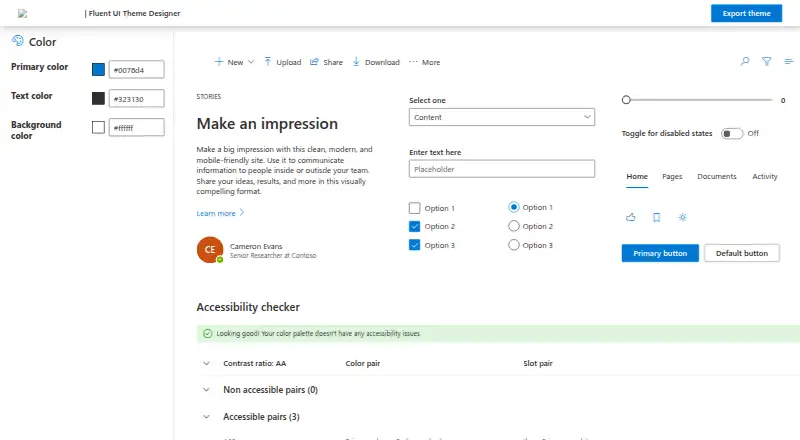
Fluent UI Theme Designer is a free web tool for creating themes from selected primary, text, and background colors. Its controls let you adjust Fluent UI palette slots, while a preview renders sample components with the generated theme. An accessibility checker is included. The designer uses Fluent UI ThemeGenerator to produce a theme and expose its result as JSON; it can also export a customized theme as PowerShell code. The exported palette can be added to SharePoint with Add-SPOTheme and applied to a site. Microsoft describes the generator as a way to create custom themes for SharePoint sites, and Microsoft Q&A provides guidance on using the designer and applying themes. The source code is in Microsoft’s public fluentui GitHub repository. This is a web-based, open-source project. It generates palettes from chosen colors, but does not extract colors from images or offer saved palettes or a brand color library.
Who it suits
It suits people creating color themes for Fluent UI or SharePoint sites, especially those who want to check accessibility and export a theme. SharePoint users can apply an exported palette through Add-SPOTheme.
What it does well
- Edits primary, text, and background colors.
- Previews sample components using the generated theme.
- Includes an accessibility checker.
- Exports themes as JSON and PowerShell code.
What to know first
- Does not extract colors from images.
- Does not save palettes.
- No brand color library is listed.
Verdict
Fluent UI Theme Designer focuses on generating and previewing themes, with accessibility checks and code-oriented exports. Its listed workflow does not include image extraction or palette libraries.
Facts from Fluent UI Theme Designer's own pages
- Accessibility
- The designer includes an accessibility checker for the generated theme. · github.com, 9 Oct 2026
- Color controls
- The designer interface includes controls for primary, text, and background colors. · github.com, 8 Oct 2026
- Color inputs
- The app provides controls for changing the primary, text, and background colors. · learn.microsoft.com, 9 Oct 2026
- Export
- The designer can export a customized theme as PowerShell code. · learn.microsoft.com, 9 Oct 2026
- Intended audience
- Microsoft describes the theme generator as a way to create a custom theme for SharePoint sites. · learn.microsoft.com, 9 Oct 2026
- Maker founded
- Microsoft was founded in 1975. · news.microsoft.com, 9 Oct 2026
- Maker headquarters
- Microsoft’s global headquarters are in Redmond, Washington. · microsoft.com, 9 Oct 2026
- Maker repository
- The source code is in the public microsoft/fluentui GitHub repository. · github.com, 8 Oct 2026
- Palette editing
- The interface allows editing Fluent UI palette slots. · github.com, 8 Oct 2026
- Purpose
- The designer lets users create a custom color ramp for a SharePoint site theme. · learn.microsoft.com, 9 Oct 2026
- SharePoint integration
- The exported palette can be added to SharePoint with Add-SPOTheme and applied to a site. · learn.microsoft.com, 9 Oct 2026
- Support
- Microsoft Q&A provides guidance for using the designer and applying its themes to SharePoint. · learn.microsoft.com, 9 Oct 2026
- Theme generation
- The code uses Fluent UI ThemeGenerator to create a theme from selected colors and expose the result as JSON. · github.com, 8 Oct 2026
- Theme palette
- The app generates theme palette values from the selected colors. · github.com, 9 Oct 2026
- Theme preview
- The designer displays sample UI components using the selected theme colors. · github.com, 9 Oct 2026
Where Fluent UI Theme Designer stands on Freedom251
- Color Palette Generators#34 of 34