Freedom251 › User Flow Software

FlowDraft
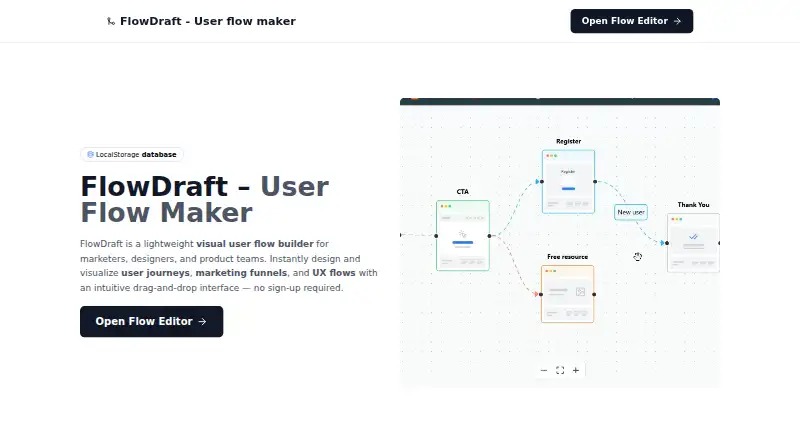
What FlowDraft is
FlowDraft is a browser-based visual builder for user journeys, marketing funnels, and UX flows. Its drag-and-drop editor lets users arrange nodes and connectors or start with a prebuilt funnel or onboarding template. Finished flows can be exported as PNG or PDF files, or shared through a public link. The editor can be used without creating an account, and the free plan is listed as free. Projects are stored in the browser using LocalStorage rather than on FlowDraft’s servers; users can delete saved projects by clearing local storage. The maker describes the tool for marketers, designers, and product teams, and also names UX designers, product managers, freelancers, consultants, and growth teams as intended users. FlowDraft may collect anonymous analytics such as browser type or visit count, without personally identifiable information. It uses minimal cookies for basic preferences and says it does not use advertising or tracking cookies. The service runs on the web, and its contact page says it usually responds within 24–48 hours on business days.
Who it suits
FlowDraft suits marketers, UX designers, product managers, and other teams or independent professionals who want to map journeys, funnels, or UX flows visually. It is also suitable for people who want to build and share a flow without signing up.
What it does well
- Drag-and-drop editing for nodes and connectors.
- Prebuilt funnel and onboarding templates.
- Exports flows as PNG or PDF.
- Public share links are available.
- No account is required to build flows.
What to know first
- Projects are stored in browser LocalStorage.
- Clearing local storage deletes saved projects.
- Available on web only.
Plans
| Plan | Billed and limits | Price |
|---|---|---|
| Free | No signup required · Projects stored in browser · PNG and PDF export · Public share links | Free |
As flowdraft.online lists them, read 7 Oct 2026. The maker's own page has the final word.
Getting started
- Open the FlowDraft website in a browser.
- Launch the editor without signing up.
- Drag nodes and connectors into a flow, or start with a template.
- Export the flow as PNG or PDF, or copy a public share link.
Verdict
FlowDraft offers a free, no-signup way to build and share visual flows. Its browser-based storage means saved projects reside locally rather than on the service’s servers.
Questions
How much does FlowDraft cost?
Its free plan costs nothing.
Do I need an account to use FlowDraft?
No. You can open the editor and build a flow without signing up.
Which platforms does FlowDraft support?
FlowDraft is available on the web.
What export formats does FlowDraft offer?
You can export flows as PNG or PDF, or copy a public share link.
Where are projects stored?
Projects are saved in your browser using LocalStorage, not on FlowDraft’s servers. Clear the browser’s local storage to delete saved projects.
Does FlowDraft use tracking cookies?
It uses minimal cookies for basic preferences and says it does not use advertising or tracking cookies. It may collect anonymous analytics such as browser type or visit count.
Facts from FlowDraft's own pages
- Account requirement
- The maker says users can open the editor and build a flow without signing up. · flowdraft.online, 7 Oct 2026
- Accounts
- The privacy policy says no account is required and FlowDraft does not ask for a name, email, or password. · flowdraft.online, 7 Oct 2026
- Analytics
- The privacy policy says FlowDraft may collect anonymous analytics such as browser type or visit count, without personally identifiable information. · flowdraft.online, 7 Oct 2026
- Analytics and cookies
- The privacy policy says FlowDraft may collect anonymous analytics and uses minimal cookies for basic functionality, with no advertising or tracking cookies. · flowdraft.online, 7 Oct 2026
- Audience
- The site describes FlowDraft as intended for marketers, UX designers, product managers, freelancers, consultants, and growth teams. · flowdraft.online, 7 Oct 2026
- Cookies
- The privacy policy says FlowDraft uses minimal cookies for basic preferences and does not use advertising or tracking cookies. · flowdraft.online, 7 Oct 2026
- Data storage
- The privacy policy says projects are stored in the browser using LocalStorage and are not stored on FlowDraft's servers. · flowdraft.online, 7 Oct 2026
- Deleting data
- The privacy policy says users can delete saved projects by clearing their browser’s local storage. · flowdraft.online, 7 Oct 2026
- Editing
- The editor lets users drag and drop nodes, connectors, and templates. · flowdraft.online, 7 Oct 2026
- Export
- Users can export flows as PNG or PDF, or copy a public share link. · flowdraft.online, 7 Oct 2026
- Export and sharing
- Users can export flows as PNG or PDF, or copy a public share link. · flowdraft.online, 7 Oct 2026
- Flow editing
- Users can drag and drop nodes, connectors, and templates to design flows. · flowdraft.online, 7 Oct 2026
- Intended users
- The maker describes it for marketers, designers, and product teams. · flowdraft.online, 7 Oct 2026
- Local storage
- The privacy policy says projects and data are stored locally in the browser using LocalStorage, and are not collected, accessed, or stored on FlowDraft’s servers. · flowdraft.online, 7 Oct 2026
- Product
- FlowDraft is a visual user flow builder for designing user journeys, marketing funnels, and UX flows. · flowdraft.online, 7 Oct 2026
- Purpose
- FlowDraft is a browser-based visual user-flow builder for designing and sharing user journeys, marketing funnels, and UX flows. · flowdraft.online, 7 Oct 2026
- Support
- The contact page says FlowDraft usually responds within 24–48 hours on business days. · flowdraft.online, 7 Oct 2026
- Templates
- The maker says users can start from prebuilt funnel or onboarding templates. · flowdraft.online, 7 Oct 2026
Where FlowDraft stands on Freedom251
- User Flow Software#9 of 20