Freedom251 › Remote desktop software
FlashDesk
by FlashDesk
What FlashDesk is
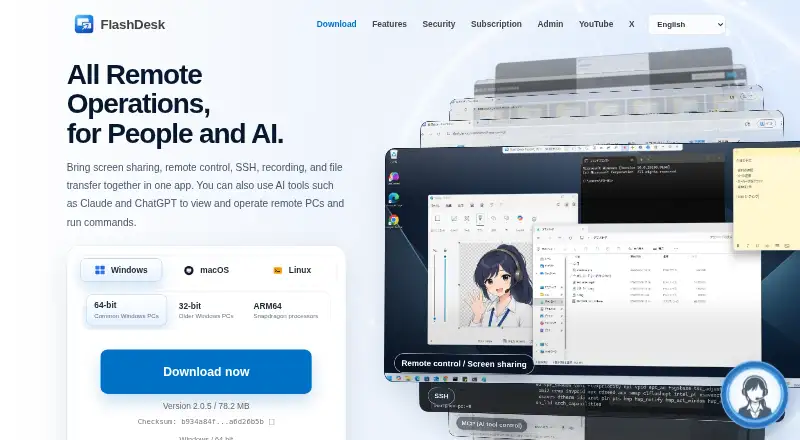
FlashDesk is a remote-access application from a Japan-based maker. It combines screen sharing and remote control with SSH, session recording, file transfer, and chat. Desktop and mobile access are available across Windows, macOS, Linux, Android, and iOS, including Linux Wayland environments. The free plan costs nothing and includes those core functions, but free use is limited to personal, non-commercial activity. FlashDesk also connects AI tools through MCP: Claude, ChatGPT, Cursor, and Windsurf can view remote screens, control input, transfer files, and run SSH commands. AI Workspace supports commands and remote project-file editing through Codex, Claude Code, or VS Code, with rules saved per device. Connections may require approval or a preset password, restrict access to approved IDs, and disconnect automatically after a set time. An SDK API can embed remote access in internal tools, customer portals, and support systems.
Who it suits
FlashDesk suits people needing personal remote computer access, family assistance, remote-server checks, or multi-device maintenance. Businesses need the Pro plan for commercial use.
What it does well
- Works across Windows, macOS, Linux, Android, and iOS
- Combines remote control, SSH, transfer, recording, and chat
- MCP connects several AI tools to remote devices
- AI Workspace edits remote projects with saved device rules
- SDK API supports embedded remote access
What to know first
- Free use is limited to personal, non-commercial activity
- Data-saver mode may apply to long-running or high-traffic use
Plans
| Plan | Billed and limits | Price |
|---|---|---|
| Pro | Monthly subscription; price includes tax · Teams and business · admin console · seat and license management · session logs · usage visibility · billing and contract management · SDK API · no additional charge based on number of Hosts | ¥980 a month |
| Free | Personal, non-commercial use · screen sharing / remote control · SSH · file transfer · recording / playback · chat | On request |
As flashdesk.io lists them, read 11 Oct 2026. The maker's own page has the final word.
Verdict
FlashDesk combines broad platform support with remote control, administration, recording, and AI-assisted workflows. Its free plan covers personal use, while commercial users need the separately priced Pro plan.
Facts from FlashDesk's own pages
- Access mode
- both · flashdesk.io, 20 Sept 2026
- AI integrations
- Its MCP integration lets Claude, ChatGPT, Cursor, and Windsurf view screens, control input, transfer files, and run SSH commands on remote devices. · flashdesk.io, 11 Oct 2026
- AI Workspace
- AI Workspace lets users run commands and edit remote project files using Codex, Claude Code, or VS Code, with saved rules per device. · flashdesk.io, 11 Oct 2026
- Connection controls
- Connections can require manual approval or a preset password, and access can be limited to approved IDs with time-based automatic disconnects. · flashdesk.io, 11 Oct 2026
- Data handling
- FlashDesk says its servers do not store remote screen video, keyboard or mouse input, file-transfer contents, SSH tunnel payloads, or recorded session video during ordinary remote connections. · flashdesk.io, 11 Oct 2026
- File transfer
- Yes · flashdesk.io, 20 Sept 2026
- Free plan
- Yes · flashdesk.io, 20 Sept 2026
- Headquarters
- Japan · flashdesk.io, 28 Sept 2026
- Intended users
- The maker lists home-PC access, unpaid family assistance, remote-server checks, and multi-device maintenance as suitable uses; business and commercial use requires Pro. · flashdesk.io, 11 Oct 2026
- Mobile apps
- Yes · flashdesk.io, 20 Sept 2026
- Notable usage limit
- Free is limited to personal, non-commercial use, and data-saver mode may apply when usage is long-running or traffic is large. · flashdesk.io, 11 Oct 2026
- Platform detail
- FlashDesk supports Windows, macOS, Linux, Android, and iOS, including Linux Wayland environments. · flashdesk.io, 11 Oct 2026
- Product
- FlashDesk combines remote screen sharing and control, SSH, recording, file transfer, and chat in one app. · flashdesk.io, 11 Oct 2026
- SDK
- The SDK API can embed remote access into internal tools, customer portals, and support systems. · flashdesk.io, 11 Oct 2026
- Security
- Session media and control traffic use ECDH P-256 key exchange, HKDF-SHA256 key derivation, and AES-256-GCM encryption. · flashdesk.io, 11 Oct 2026
- Security testing
- The maker says it tested its public website and related endpoints with OWASP ZAP and reports A-or-higher ratings on Mozilla Observatory, SSL Labs, and Security Headers. · flashdesk.io, 11 Oct 2026
- Session recording
- Yes · flashdesk.io, 20 Sept 2026
- Support
- The contact page accepts support, billing, and security inquiries by email in Japanese or English and gives a typical reply time of 1–2 business days. · flashdesk.io, 11 Oct 2026
- Supported platforms
- Windows,macOS,Linux,Android,iOS · flashdesk.io, 20 Sept 2026
Where FlashDesk stands on Freedom251
- Remote desktop software#31 of 135