Freedom251 › Video Production Management Software
FilmSchedule
What FilmSchedule is
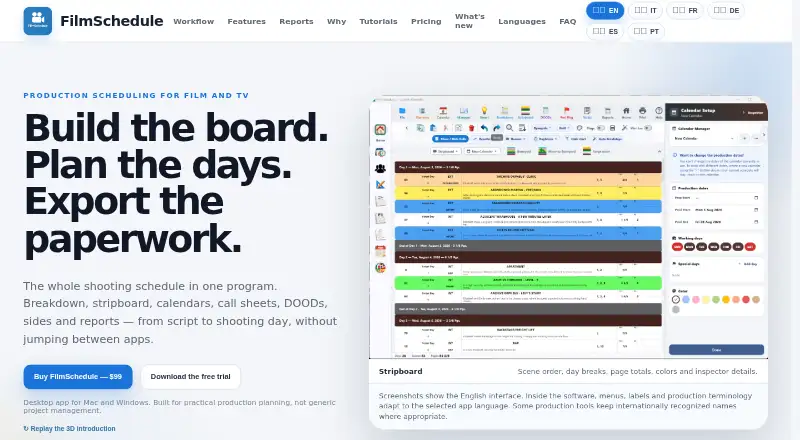
FilmSchedule is desktop software for breaking down scripts and planning film production. Its workflow includes stripboard scheduling, production calendars, call sheets, DOODs, sides, location management, and crew and cast management. It imports PDF scripts, Final Draft .fdx files, and tagged .sex scheduling files. Scriptation breakdown data can be imported through an .sss export option, which the maker describes as non-native during its stated testing phase. The connected stripboard and calendar show day breaks, off days, page totals, and unscheduled scenes. Smart Schedule previews proposals based on cast and location availability, while DOODs track cast work patterns. Production-ready PDF and Excel exports include schedules, call sheets, sides, and reports. The app works offline; its maker says scripts are not uploaded to the web, though first license activation requires internet. Projects can be shared through Dropbox or another file-sync service, with a lock to prevent concurrent writing. FilmSchedule costs $99.00 USD as a single payment for a license that activates one computer at a time.
Who it suits
FilmSchedule suits production teams planning scripts, locations, schedules, cast, and crew on Windows or macOS. It may fit users who want offline desktop work and exports for production documents.
What it does well
- Imports PDF and Final Draft scripts
- Connects stripboard and production calendar
- Previews schedules using cast and location availability
- Exports PDFs and Excel files
- Works offline after activation
What to know first
- Costs $99.00 USD as a single payment
- License activates one computer at a time
- Trial viewing is limited to 25 scenes
- Trial disables PDF export
Limits
The free trial allows viewing up to 25 scenes and disables PDF export. A paid license activates one computer at a time and is platform-specific.
Plans
| Plan | Billed and limits | Price |
|---|---|---|
| FilmSchedule | One single payment · License activates one computer at a time · platform-specific license | $99, paid once |
As filmschedule.app lists them, read 8 Oct 2026. The maker's own page has the final word.
Getting started
- Download FilmSchedule for Windows 10 or 11 64-bit, or macOS 11 Big Sur or later
- Start the free trial without a license key
- Activate the license with an internet connection
- Import a PDF, Final Draft .fdx, tagged .sex, or supported Scriptation export
- Share projects through Dropbox or another file-sync service if needed
Verdict
FilmSchedule brings script preparation, scheduling, and production documents together in a desktop workflow. Check the one-computer license, platform requirements, and trial export limits before choosing it.
Questions
How much does FilmSchedule cost?
The FilmSchedule plan costs $99 as one single payment. The license activates one computer at a time and is platform-specific.
Is there a free trial?
Yes. The trial requires no license key, lets you view up to 25 scenes, and disables PDF export.
Which operating systems are supported?
FilmSchedule supports Windows 10 or 11 64-bit and macOS 11 Big Sur or later. Voice Move is Windows-only.
Can FilmSchedule work offline?
Yes. The app works offline on the computer, but internet access is required for first license activation.
What files can it import?
It imports PDF scripts, Final Draft .fdx files, tagged .sex scheduling files, and Scriptation breakdown data through the .sss export option.
How can teams share projects?
Projects can be shared through Dropbox or another file-sync service. A locking system prevents two people from writing at the same time.
Facts from FilmSchedule's own pages
- Language support
- The interface is available in English, Italian, French, German, Spanish and Portuguese. · filmschedule.app, 8 Oct 2026
- Local use and privacy
- The app works offline on the computer, and the maker says scripts are not uploaded to the web; an internet connection is needed for first license activation. · filmschedule.app, 8 Oct 2026
- Maker
- Marco Bargellini identifies himself as FilmSchedule’s creator and a DGA 1st Assistant Director. · filmschedule.app, 8 Oct 2026
- Planning tools
- Smart Schedule previews proposals using cast and location availability, and DOODs track cast work, start, hold and finish patterns. · filmschedule.app, 8 Oct 2026
- Platform requirements
- The app supports Windows 10 or 11 (64-bit) and macOS 11 Big Sur or later; Voice Move is Windows-only. · filmschedule.app, 8 Oct 2026
- Purpose
- FilmSchedule combines script breakdown, stripboard scheduling, production calendars, call sheets, DOODs, sides and report exports in a desktop workflow. · filmschedule.app, 8 Oct 2026
- Reports
- It exports production-ready PDFs and Excel outputs, including shooting schedules, call sheets, sides and reports. · filmschedule.app, 8 Oct 2026
- Scheduling
- The stripboard and calendar are connected, with day breaks, off days, page totals and unscheduled scenes visible. · filmschedule.app, 8 Oct 2026
- Scriptation compatibility
- During its stated testing phase, Scriptation breakdown data can be imported through its .sss export option, which the maker says is not a native FilmSchedule format. · filmschedule.app, 8 Oct 2026
- Script import
- It imports PDF scripts, Final Draft .fdx files, tagged .sex scheduling files and Scriptation workflows. · filmschedule.app, 8 Oct 2026
- Support and refunds
- The site lists [email protected] and says refund requests can be made within 14 days of purchase by email. · filmschedule.app, 8 Oct 2026
- Team sharing
- Projects can be shared through Dropbox or another file-sync service; a locking system prevents two people from writing at the same time. · filmschedule.app, 8 Oct 2026
- Trial limits
- The free trial requires no license key, allows viewing up to 25 scenes and disables PDF export. · filmschedule.app, 8 Oct 2026
Where FilmSchedule stands on Freedom251
- Video Production Management Software#19 of 29
- Film Production Scheduling Software#19 of 24