Freedom251 › Podcast Cover Maker Software

FeatureImg
What FeatureImg is
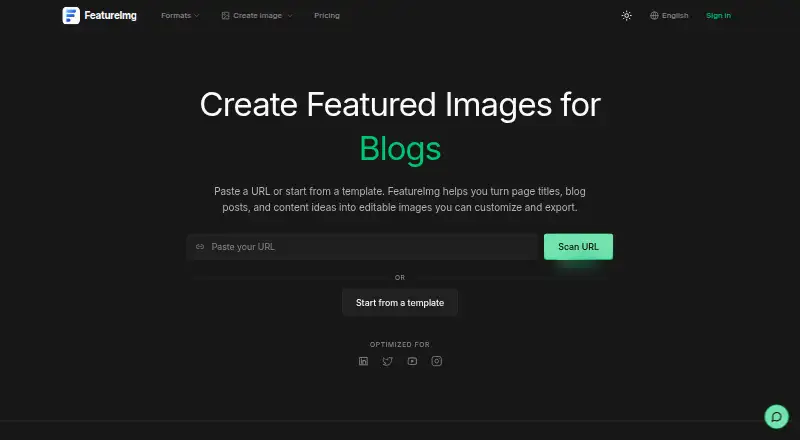
FeatureImg is a browser-based editor for making featured images and graphics for online content. Users can paste a URL to pull in page details or begin with a template, then adjust text and backgrounds, preview the result and download it. Output types include blog featured images, Open Graph images, YouTube thumbnails, LinkedIn and X posts, podcast covers, Instagram Reels covers and Xiaohongshu covers. Template layouts include Hero Split, Full Image Split, Split CTA and Clean Editorial. Images export as PNG, JPEG or WebP, with compression for smaller exports. The homepage says users can work in the editor and download images without signing up. FeatureImg is aimed at creators, builders, bloggers and small teams looking for everyday visuals without a heavy design tool; its stated goal is not to replace full design software. The Free plan includes basic template and background presets. Professional costs $5 a month, billed monthly, and includes all background presets. Both plans list the same export formats and compression.
Who it suits
FeatureImg suits creators, bloggers, builders and small teams who need graphics for posts, covers or blog pages. It is intended for everyday visual creation rather than replacing full design software.
What it does well
- Can import page details from a URL.
- Exports PNG, JPEG and WebP images.
- Includes layouts for podcast and social covers.
- Editor and downloads are available without signup.
- Free plan includes basic template and background presets.
What to know first
- All background presets require the Professional plan.
- Professional costs $5 a month, billed monthly.
Limits
The Free plan includes only basic template and background presets. Professional costs $5 a month, billed monthly, for all background presets; both plans list PNG, JPEG, WebP export and compression.
Plans
| Plan | Billed and limits | Price |
|---|---|---|
| Free | Basic template & background presets · PNG, JPEG & WebP export · Compression for smaller exports | Free |
| Professional | Billed annually · All background presets · PNG, JPEG & WebP export · Compression for smaller exports | $30 a year |
| Professional | Billed monthly · All background presets · PNG, JPEG & WebP export · Compression for smaller exports | $5 a month |
As featureimg.com lists them, read 9 Oct 2026. The maker's own page has the final word.
Getting started
- Open the FeatureImg website
- Paste a URL or choose a template
- Edit the copy and background
- Preview the image
- Download as PNG, JPEG, or WebP
Verdict
FeatureImg offers a straightforward browser editor for common content graphics, with URL import, templates and several export formats. The Free plan has basic presets; all background presets are included with Professional.
Questions
Does FeatureImg have a free plan?
Yes. The Free plan costs nothing and includes basic template and background presets, plus PNG, JPEG, WebP export and compression.
How much is Professional?
Professional costs $5 a month, billed monthly. It includes all background presets and the same listed export formats and compression.
Can I use it without an account?
The homepage says you can use the editor and download images without signing up.
Which formats can it export?
FeatureImg exports PNG, JPEG, and WebP images.
What can I make with it?
Supported outputs include blog featured images, Open Graph images, YouTube thumbnails, LinkedIn and X posts, podcast covers, Instagram Reels covers, and Xiaohongshu covers.
Facts from FeatureImg's own pages
- Account requirement
- The homepage says users can use the editor and download images without signing up. · featureimg.com, 9 Oct 2026
- Design scope
- The maker says its goal is to make everyday visual creation faster and easier, rather than replace full design software. · featureimg.com, 9 Oct 2026
- Editing
- FeatureImg is browser-based and lets users adjust copy and backgrounds and preview images before downloading. · featureimg.com, 9 Oct 2026
- Formats
- The editor exports images as PNG, JPEG, or WebP. · featureimg.com, 9 Oct 2026
- Intended users
- The maker says FeatureImg is built for creators, builders, bloggers, and small teams who need featured images without a heavy design tool. · featureimg.com, 9 Oct 2026
- Output types
- Supported formats include blog featured images, Open Graph images, YouTube thumbnails, LinkedIn and X posts, podcast covers, Instagram Reels covers, and Xiaohongshu covers. · featureimg.com, 9 Oct 2026
- Pricing distinction
- The pricing page lists basic template and background presets on Free and all background presets on Professional. · featureimg.com, 9 Oct 2026
- Purpose
- FeatureImg creates editable featured images for blog posts, social posts, covers, and other content. · featureimg.com, 9 Oct 2026
- Support
- The contact page invites users to email or message the maker on X with feedback, bug reports, or template suggestions. · featureimg.com, 9 Oct 2026
- Templates
- The template gallery includes layouts such as Hero Split, Full Image Split, Split CTA, and Clean Editorial. · featureimg.com, 9 Oct 2026
- URL workflow
- The homepage says users can paste a URL to pull page details before customizing an image. · featureimg.com, 9 Oct 2026
- Workflow
- Users can paste a URL to pull page details or start from a template, edit the content and styling, and export an image. · featureimg.com, 9 Oct 2026
Where FeatureImg stands on Freedom251
- Podcast Cover Maker Software#17 of 35