Freedom251 › JavaScript Build Tools

esbuild
What esbuild is
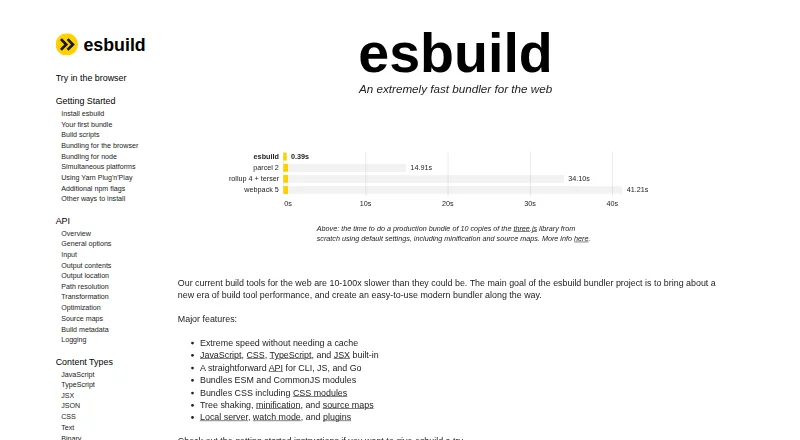
esbuild is a free web bundler designed to improve build-tool performance while remaining straightforward to use. It has built-in support for JavaScript, CSS, TypeScript, and JSX, and bundles ESM and CommonJS modules, including CSS modules. Its optimization features include tree shaking, minification, and source maps. Developers can also use a local server, watch mode, and plugins. The interface is available through the command line, JavaScript, and Go. The recommended installation is the native executable installed with npm; the esbuild-wasm package works across platforms but can be substantially slower than the native package. esbuild is provided under the MIT License. It does not perform TypeScript type checking, so its FAQ recommends running tsc separately. Its code-splitting support is described as primitive. The maintainer says it is actively maintained with periodic releases, though active feature development is not currently underway. The FAQ notes that the project is primarily built by one developer and may not suit organizations seeking a larger or more active community.
Who it suits
esbuild suits developers looking for a free bundler with built-in support for common web languages and optimization features. Teams needing TypeScript type checking or a larger, more active project community should account for its stated limits.
What it does well
- Built-in support for JavaScript, CSS, TypeScript, and JSX
- Bundles ESM, CommonJS, and CSS modules
- Includes tree shaking, minification, and source maps
- Interfaces available through CLI, JavaScript, and Go
- MIT-licensed software
What to know first
- Does not type-check TypeScript
- Code-splitting support is described as primitive
- Active feature development is not currently underway
- Primarily built by one developer
Limits
The free esbuild plan has no stated usage quota. It does not type-check TypeScript, and its code-splitting support is described as primitive; the WebAssembly version can be substantially slower than the native package.
Plans
| Plan | Billed and limits | Price |
|---|---|---|
| esbuild | MIT-licensed software · native executable or WebAssembly version · no paid tiers stated | Free |
As esbuild.github.io lists them, read 28 Sept 2026. The maker's own page has the final word.
Getting started
- Visit https://esbuild.github.io/.
- Install the native executable using npm, the recommended installation method.
- Use the command line, JavaScript API, or Go API.
- For a cross-platform WebAssembly option, use the esbuild-wasm package.
esbuild is a web bundler for developers who want a fast build tool with built-in support for common web languages and formats. It is strongest for projects that value straightforward bundling and optimization over advanced code splitting or integrated TypeScript checks. Its free MIT-licensed offering makes it an accessible option, but those limits matter when choosing a wider build pipeline.
Overview
esbuild handles JavaScript, CSS, TypeScript, and JSX, and bundles both ESM and CommonJS modules, including CSS modules. Tree shaking, minification, and source maps cover core optimization needs, while a local server, watch mode, and plugins support development workflows. That range makes it useful as a focused build tool, though projects with more demanding code-splitting needs may find its support too primitive.
Developers can use the command line or JavaScript and Go APIs. The recommended installation is the native executable through npm. The WebAssembly package works across platforms but can be substantially slower than the native package, so portability may come at a performance cost. esbuild is actively maintained and receives periodic releases, although active feature development is not currently underway.
Key features
Bundling and optimization
Built-in language and format support lets esbuild cover common web build inputs without requiring those basics to be added separately. Bundling ESM and CommonJS, including CSS modules, suits projects with varied module formats. Tree shaking and minification help reduce output, while source maps support debugging. These capabilities make esbuild a practical choice for a lean build workflow, but they do not compensate for limited code splitting in applications that rely on more advanced chunking.
Development workflow and interfaces
A local server, watch mode, and plugins extend esbuild beyond one-off production builds. The command line and JavaScript or Go APIs give teams different ways to incorporate it into their workflow. Its use by projects including Vite, Amazon CDK, and Phoenix shows it can serve as part of larger tools and systems, rather than only as a standalone command.
TypeScript and project status
esbuild can process TypeScript, but it does not perform type checking; projects that need that assurance should run tsc separately. The project receives periodic releases, but active feature development is not underway. It is primarily built by one developer, a consideration for organizations that require a larger or more active community.
Pricing
esbuild: free. The plan provides MIT-licensed software in native executable or WebAssembly form, with no paid tiers stated. The MIT license permits use, copying, modification, distribution, sublicensing, and sale subject to its conditions. With no paid tier, esbuild suits individuals and teams seeking a no-cost bundler; the trade-off is not a reduced feature tier, but the need to assemble separate tooling for TypeScript type checking and to accept limited code splitting.
Platforms
esbuild supports Android, API, Linux, macOS, self-hosted environments, the web, and Windows. The native executable is the recommended installation; the WebAssembly package offers cross-platform consistency but may be substantially slower.
Who it's for
Choose esbuild when you want a free bundler with built-in JavaScript, CSS, TypeScript, and JSX handling, standard optimization features, and command-line or API access. It is a less suitable fit for projects that need type checking bundled into the build tool, advanced code splitting, or an especially large and active maintainer community.
Pros and cons
- Pros: Bundles ESM and CommonJS as well as CSS modules, covering a broad set of web project inputs.
- Pros: Tree shaking, minification, source maps, watch mode, a local server, and plugins support both optimization and development work.
- Pros: Free MIT-licensed software can be used through the CLI, JavaScript API, or Go API.
- Cons: TypeScript type checking is absent, so projects needing it must run tsc separately.
- Cons: Code splitting support is described as primitive, which can rule it out for workflows that depend on more advanced splitting.
- Cons: Active feature development is not underway, and a primarily single-developer project may not suit organizations seeking a larger community.
Alternatives
For another free, open-source bundler, compare Rolldown; its listed platforms differ from esbuild's, so platform fit may help decide. SWC is a free, open-source Rust-based developer toolchain for readers considering a broader toolchain instead of esbuild's focused bundling offer.
Rspack is a free MIT-licensed alternative to consider if its listed platform coverage better fits your environment. Terser is a free JavaScript minifier toolkit, a narrower option when minification rather than bundled build workflows is the priority.
Vite is another free, MIT-licensed option to compare for a different build-tool choice. Google Closure Compiler is a free open-source Java application, Bazel library, and NPM package for readers who prefer those forms.
Grunt is a free open-source JavaScript task runner, while Oxc is a free and open-source alternative. For more options, browse JavaScript Build Tools.
Verdict
esbuild is a strong choice for developers who want a free, capable bundler with broad web-format support and useful optimization and development features. Choose it for a focused build pipeline where separate TypeScript checking and basic code-splitting support are acceptable. Look elsewhere if advanced splitting, integrated type checking, or a larger and more active maintainer community is central to your project.
Verdict
esbuild combines bundling and optimization features in free MIT-licensed software. Its lack of TypeScript type checking and limited code splitting are important considerations for project setup.
Questions
How much does esbuild cost?
The esbuild plan is free. No paid tiers are stated.
Is esbuild open source?
The repository provides esbuild under the MIT License, subject to the license conditions.
Which platforms can run esbuild?
The listed platforms are Android, API, Linux, macOS, self-hosted, web, and Windows. The esbuild-wasm package works across platforms.
How can developers use esbuild?
It has command line, JavaScript, and Go interfaces. The recommended installation is the native executable installed using npm.
Does esbuild type-check TypeScript?
No. Its FAQ recommends running tsc separately for type checking.
Which projects are named as esbuild users?
Its FAQ names Vite, Amazon CDK, and Phoenix.
Facts from esbuild's own pages
- Built-in formats
- JavaScript, CSS, TypeScript, and JSX support is built in. · esbuild.github.io, 28 Sept 2026
- Bundling
- It bundles ESM and CommonJS modules, including CSS modules. · esbuild.github.io, 28 Sept 2026
- Cross-platform option
- The esbuild-wasm package works the same way across platforms, but can be substantially slower than the native package. · esbuild.github.io, 28 Sept 2026
- Development tools
- Its features include a local server, watch mode, and plugins. · esbuild.github.io, 28 Sept 2026
- Installation
- The recommended installation method is the native executable installed using npm. · esbuild.github.io, 28 Sept 2026
- Integrations
- The FAQ names Vite, Amazon CDK, and Phoenix as projects that use esbuild. · esbuild.github.io, 28 Sept 2026
- Interfaces
- The API is available through the command line, JavaScript, and Go. · esbuild.github.io, 28 Sept 2026
- License
- The repository provides esbuild under the MIT License, which permits use, copying, modification, distribution, sublicensing, and sale subject to the license conditions. · github.com, 28 Sept 2026
- Limit: code splitting
- The FAQ describes code splitting support as currently pretty primitive. · esbuild.github.io, 28 Sept 2026
- Limit: type checking
- esbuild does not include TypeScript type checking; its FAQ recommends running tsc separately. · esbuild.github.io, 28 Sept 2026
- Optimization
- It supports tree shaking, minification, and source maps. · esbuild.github.io, 28 Sept 2026
- Platforms
- The documented native executable packages include Windows, macOS, and Linux builds for multiple architectures. · esbuild.github.io, 28 Sept 2026
- Project status
- The maintainer says esbuild is actively maintained with periodic releases, while active feature development is not currently underway. · esbuild.github.io, 28 Sept 2026
- Purpose
- esbuild is an extremely fast bundler for the web designed to improve build tool performance and be easy to use. · esbuild.github.io, 28 Sept 2026
- Support model
- The FAQ says esbuild is primarily built by one developer and may not suit organizations that need a larger or more active community. · esbuild.github.io, 28 Sept 2026
Where esbuild stands on Freedom251
- JavaScript Build Tools#1 of 27