Freedom251 › Learning Analytics Software
EdOptimize
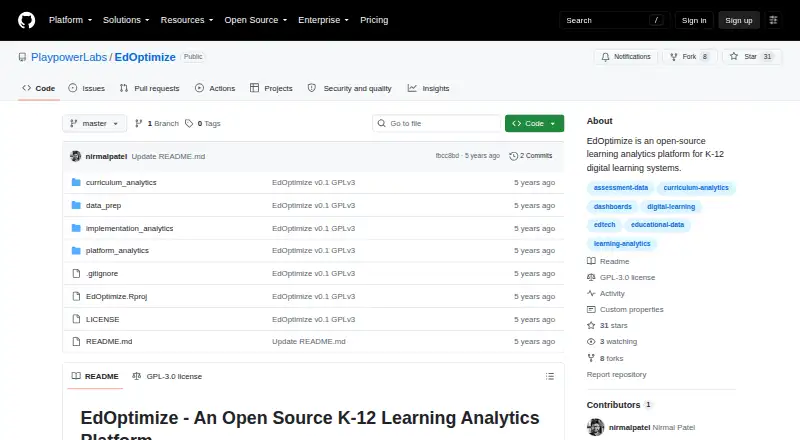
What EdOptimize is
EdOptimize is a free, open-source learning analytics platform for K-12 digital learning systems. It provides three dashboards: Platform Analytics, Curriculum Analytics, and Implementation Analytics. Platform Analytics reports overall usage, trends, geography, product and content-type usage, and leaderboards. Curriculum Analytics covers content use, assessment and item analysis, skill performance, curriculum pacing, and leaderboards. Implementation Analytics helps district leaders and success managers track activity across a district, schools, and classes. The dashboards use online platform event-log data and assessment item-response data. To set them up, users prepare the input data, run the R data-preparation script for each dashboard, and then run that dashboard’s app.R file. The geography view supports US states by default, although the repository says it can be changed for other geographies. The maker links to live demos of all three dashboards hosted on shinyapps.io. EdOptimize is self-hosted and web-based, and is intended for EdTech product teams, curriculum teams, district leaders, and success managers. Its GPLv3 license requires modifications and copies to retain the license and disclose source code.
Who it suits
EdOptimize is intended for EdTech product teams, curriculum teams, district leaders, and success managers who need analytics from platform events and assessment responses. It suits users prepared to set up the input data and run dashboard-specific R scripts.
What it does well
- Includes three distinct analytics dashboards.
- Covers platform use, curriculum, and implementation.
- Live demos are linked for all three dashboards.
- Available free under GPLv3.
What to know first
- Users must prepare dashboard input data.
- Setup requires running R preparation scripts.
- Geography supports US states by default.
- Copies and modifications must disclose source code.
Limits
The geography view is configured for US states by default, though the repository says it can be modified for other geographies. Modifications and copies must retain the GPLv3 license and disclose their source code.
Plans
| Plan | Billed and limits | Price |
|---|---|---|
| Open source (GPLv3) | GPLv3 license · Modifications and copies must use GPLv3 and disclose source code | Free |
| Free | $0 /student/year · Unlimited OMR & MCQ grading · unlimited worksheets · learning analytics · available in beta | Free |
| Standard | $0 /student/year + applicable sales tax (~~$12~~; free during beta) · Unlimited OMR & MCQ grading · 300 AI handwriting pages/student/year · unlimited worksheets · learning analytics · individual feedback · email reports · advanced handwriting analysis | Free |
| Plus | Contact Us for pricing · Unlimited OMR & MCQ grading · flexible AI handwriting pages/student/year · unlimited worksheets · learning analytics · individual feedback · email reports · advanced handwriting analysis · report cards · AI question generation and paper import · multi-school campus management · enterprise user management | On request |
As github.com lists them, read 4 Oct 2026. The maker's own page has the final word.
Getting started
- Open the EdOptimize repository on GitHub.
- Prepare online platform event-log data and assessment item-response data.
- Run the R data-preparation script for the dashboard you want to use.
- Run that dashboard's app.R file.
- Use the linked live demos on shinyapps.io to view the dashboards.
EdOptimize is a self-hosted analytics option for teams working with K–12 digital learning data. It is most compelling when product, curriculum, and district staff can prepare data and operate R scripts. Its three dashboards span usage, learning content, and implementation, though the setup and open-source license call for more technical ownership than a ready-made service.
Overview
Rather than combining every report into one view, EdOptimize splits analytics across product activity, curriculum performance, and adoption across district structures. That division can serve teams with different questions about the same digital learning system. The dashboards draw on platform event logs and assessment item-response data, so teams need access to those inputs and a process for preparing them.
For each dashboard, the workflow is to prepare its input data, run its R data-preparation scripts, and then run its app.R file. This makes the tool a better fit for organizations able to manage data preparation and R than for teams seeking a plug-and-play reporting service. Live demos for all three dashboards are hosted on shinyapps.io.
Key features
Platform Analytics
This dashboard reports overall usage, trends over time, geography, product and content-type usage, and leaderboards. It gives EdTech product teams several ways to examine engagement patterns, while the US-state geography view may need modification for teams working elsewhere.
Curriculum Analytics
Curriculum Analytics covers content usage, assessment and item analysis, skill performance, curriculum pacing, and leaderboards. The range makes it useful to curriculum teams connecting content activity with assessment and pacing questions; it depends, however, on supplying the platform and item-response data the dashboards use.
Implementation Analytics
For district leaders and success managers, this dashboard tracks usage across a district, schools, and classes. That scope helps examine adoption at multiple organizational levels rather than only at the platform or content level.
Pricing
EdOptimize is free and open source. Its Open source (GPLv3) plan costs nothing. The price removes a subscription charge, but does not remove the work of preparing data and running the applications. The GPLv3 terms require modifications and copies to retain the license and disclose their source code, a significant consideration for organizations that redistribute or adapt the software.
Platforms
EdOptimize is web-based and self-hosted. Teams looking for a service they can use without managing the data-preparation and app-running workflow may prefer a different approach. Its geography view supports US states by default and can be modified for other geographies.
Who it's for
EdTech product teams can use the platform dashboard to review usage; curriculum teams get views of content, assessments, skills, and pacing; and district leaders and success managers can follow usage across schools and classes. The common requirement is an ability to prepare the underlying data and run the R scripts, making it a poor fit for teams without that technical capacity or those looking for a turnkey hosted analytics product.
Pros and cons
- Pros: Three dashboards cover product usage, curriculum performance, and implementation across district, school, and class levels.
- Pros: The tool is free and open source, and live demos are available for all three dashboards.
- Cons: Each dashboard requires prepared inputs, R data-preparation scripts, and running its app.R file.
- Cons: Modifications and copies carry GPLv3 license-retention and source-code-disclosure requirements.
- Cons: The geography view defaults to US states, so other geographies require modification.
Maintainers invite users to open a GitHub issue for help modifying dashboards and provide an email contact for professional help.
Alternatives
For a free option with Android as well as web support, consider DHIS2-Ed; its free and open-source offering also requires some technical infrastructure. Teams comparing learning analytics products can browse Learning Analytics Software.
Enflux is a paid web and extension option with a free CompetencyGenie Chrome extension and an Enflux platform with custom pricing. D2L Brightspace is a paid Android, API, iOS, and web option with customized pricing based on learners, licenses, features, add-ons, and services. PowerSchool Behavior Support is a paid Android, iOS, and web alternative. Civitas Learning Student Impact Platform is a paid web platform subscription billed annually, with pricing shaped by institution size, scope, and integrated systems. Ellucian Advising is a paid web alternative. LinkIt! is another paid web option. Canvas Intelligent Insights is a paid web alternative; its legacy add-on has been superseded by advanced analytics in Canvas Plus and Canvas Next, with AI-powered Insights in Canvas Next.
Verdict
Choose EdOptimize if your K–12 team needs distinct views of platform use, curriculum activity, and district implementation and can handle the data and R workflow. Its strongest case is focused analytics without a subscription price; look elsewhere if self-hosting, setup work, or GPLv3 disclosure obligations do not fit your organization.
Verdict
EdOptimize offers a focused set of K-12 analytics dashboards, with setup that requires data preparation and R scripts. Its GPLv3 terms include source-code disclosure requirements for modifications and copies.
Questions
How much does EdOptimize cost?
The listed plan is free under GPLv3.
Is EdOptimize open source?
Yes. It is open source under GPLv3. Modifications and copies must retain that license and disclose their source code.
What platforms does it support?
EdOptimize is listed for self-hosted and web use.
What data do the dashboards use?
They use online platform event-log data and assessment item-response data.
Who is EdOptimize for?
Its intended audiences include EdTech product teams, curriculum teams, district leaders, and success managers.
How can I get help?
The maintainers invite users to open a GitHub issue for dashboard modification help and provide an email contact for professional help.
Facts from EdOptimize's own pages
- AI grading
- Smart Paper suggests rubric-based scores, detects common errors and lets teachers edit the AI suggestions. · getsmartpaper.com, 15 Oct 2026
- API integration
- The maker says Smart Paper API works with web and mobile platforms and can be integrated in about one hour. · getsmartpaper.com, 15 Oct 2026
- API throughput
- The OMR page claims the API can scan up to 10,000 worksheets per minute and return real-time grading. · getsmartpaper.com, 15 Oct 2026
- Audience
- The dashboards are intended for EdTech product teams, curriculum teams, district leaders, and success managers. · playpowerlabs.com, 4 Oct 2026
- Community support
- For dashboard modification help, the project directs users to open a GitHub issue and offers professional help by email. · github.com, 15 Oct 2026
- Company founded
- EdOptimize's own About page says the company was started in 2024. · edoptimize.com, 15 Oct 2026
- Company headquarters
- The company privacy policy identifies India as headquarters, while its corporate address is in Vadodara, Gujarat. · getsmartpaper.com, 15 Oct 2026
- Company legal entity
- Google Play identifies the developer as EdOptimize Solutions Private Limited and gives a Vadodara, Gujarat, India address. · play.google.com, 15 Oct 2026
- Company registration
- ZaubaCorp lists EdOptimize Solutions Private Limited with CIN U62091GJ2024PTC152820 and a Vadodara address. · zaubacorp.com, 15 Oct 2026
- Crunchbase funding
- Crunchbase describes Playpower Labs as a private pre-seed company with one listed funding round and investors including Kaplan EdTech Accelerator and Techstars, while amounts are obscured. · crunchbase.com, 15 Oct 2026
- Curriculum Analytics
- Curriculum Analytics covers product usage, content utilization, assessment statistics, item analysis, skills, curriculum pacing and district leaderboards. · github.com, 15 Oct 2026
- Dashboards
- The platform includes Platform Analytics, Curriculum Analytics, and Implementation Analytics dashboards. · github.com, 4 Oct 2026
- Data inputs
- The dashboards use online platform event-log data and assessment item-response data. · github.com, 4 Oct 2026
- Data isolation
- EdOptimize says customer data is separated through isolated cloud databases or row-level security and is not sold or shared with advertising brokers. · getsmartpaper.com, 15 Oct 2026
- Data retention
- The privacy policy says terminated-account data is deleted or anonymized within 90 days unless law requires retention. · getsmartpaper.com, 15 Oct 2026
- Documentation depth
- The README documents dashboard functions, data architecture, sample data, processing scripts and local run steps, but does not expose a separate API reference or SDK documentation. · github.com, 15 Oct 2026
- Founded
- 2021 · github.com, 28 Sept 2026
- Free-beta deadline
- The pricing page says the free beta ends August 31, 2026. · getsmartpaper.com, 15 Oct 2026
- Geography limit
- The geography view supports US states by default, and the repository says it can be modified for other geographies. · github.com, 4 Oct 2026
- Google Play app status
- Mathship Numberline shows 100+ downloads, Smart Paper - AI Grading shows 5K+ downloads, Grow Vitals shows 10+ downloads and Smart Paper - Tick OMR Grader shows 5K+ downloads. · play.google.com, 15 Oct 2026
- Google Play listing
- EdOptimize's developer page lists Mathship Numberline, Smart Paper - AI Grading, Grow Vitals and Smart Paper - Tick OMR Grader. · play.google.com, 15 Oct 2026
- Handwriting digitization
- Smart Paper converts photographed handwriting into searchable digital text and keeps a digital archive of student work. · getsmartpaper.com, 15 Oct 2026
- Implementation Analytics
- Implementation Analytics focuses on district-level adoption, teacher and student activity, curriculum insights and school or class leaderboards. · github.com, 15 Oct 2026
- Integration case
- A published Rajasthan case study says the API was integrated into an existing government mobile app in less than one afternoon. · getsmartpaper.com, 15 Oct 2026
Where EdOptimize stands on Freedom251
- Learning Analytics Software#2 of 25