edjing Mix
What edjing Mix is
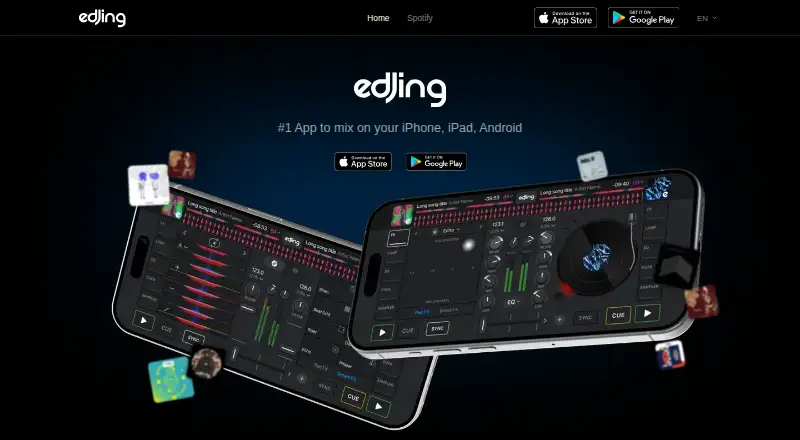
edjing Mix is a mobile DJ mixing app from MWM for Android and iOS. Its two decks are paired with a crossfader, 3-band EQ, hot cues, loops, sampler pads, and live effects. Automatic BPM detection analyzes both decks, while Sync locks them together for transitions. Automix sequences selected tracks and handles playlist transitions, with duration and playback options set on the device. Stemz uses AI to separate vocals, drums, or bass on supported tracks. The music library connects to Spotify, SoundCloud, TIDAL, Beatport, Dropbox, and Google Drive, with account requirements varying by service. Spotify mixing requires an active Spotify Premium subscription and an internet connection, and is for personal, non-commercial use. Mixes containing Spotify tracks cannot be recorded or exported, and Stemz cannot be used with them. The Free plan includes core two-deck tools, Sync, BPM detection, local and connected sources, hot cues, loops, and sampler basics. An optional Pro features subscription provides access to Pro features in edjing Mix and Stemz; music-service subscriptions are separate. edjing Mix dates to 2012.
Who it suits
It suits mobile users who want to mix tracks with two decks and use features such as Sync, loops, effects, and Automix. Users mixing Spotify tracks need a separate active Spotify Premium subscription and internet access.
What it does well
- Two decks with crossfader and 3-band EQ.
- Automatic BPM detection and Sync.
- Automix manages selected-track transitions.
- Stemz separates parts of supported tracks.
- Free plan includes core mixing tools.
What to know first
- Spotify mixing requires Premium and internet.
- Spotify mixes cannot be recorded or exported.
- Stemz is unavailable with Spotify tracks.
- Music-service subscriptions are separate.
Limits
The Free plan includes two decks, core controls, Sync, BPM detection, music sources, hot cues, loops, and sampler basics. Spotify tracks cannot be recorded or exported in mixes, and Stemz cannot be used with them.
Plans
| Plan | Billed and limits | Price |
|---|---|---|
| Free | Two decks, crossfader, 3-band EQ, Sync, automatic BPM detection, local and connected music sources, hot cues, loops, sampler basics | Free |
| Pro features subscription | Price and billing period shown in the app; subscriptions may renew weekly, monthly, or yearly depending on the offer. · Unlimited access to all Pro features of edjing Mix and Stemz; optional subscription; music-service subscriptions are separate | On request |
As edjing.com lists them, read 7 Oct 2026. The maker's own page has the final word.
Getting started
- Open edjing.com or install the app on Android or iOS.
- Start with the Free plan, which costs nothing.
- Load local music or connect a supported music or file service; account requirements vary.
- Use the two decks, crossfader, EQ, Sync, and other included mixing tools.
- For Pro features, review the optional subscription offer and its billing period in the app.
- For support, open Settings on iOS or Settings → Help on Android.
Verdict
edjing Mix offers a two-deck mobile setup with beatmatching, effects, Automix, and connected music sources. Spotify-specific restrictions are important: those mixes cannot be recorded or exported, and Stemz does not work with Spotify tracks.
Questions
How much does the Free plan cost?
It costs nothing.
Which platforms does edjing Mix support?
It is available on Android and iOS; supported operating systems are mobile.
Which music sources can I connect?
The library connects to Spotify, SoundCloud, TIDAL, Beatport, Dropbox, and Google Drive. Account requirements vary by service.
Can I mix Spotify tracks?
Spotify mixing requires an active Spotify Premium subscription and an internet connection. It is for personal, non-commercial use.
Can Spotify tracks be recorded or used with Stemz?
Mixes containing Spotify tracks cannot be recorded or exported, and Stemz cannot be used with Spotify tracks.
Who makes edjing Mix, and what does Pro cost?
MWM develops and publishes the app. The Pro subscription price and billing period are shown in the app; music-service subscriptions are separate.
Facts from edjing Mix's own pages
- Automix
- Automix sequences selected tracks and handles playlist transitions, with transition duration and playback options available on the device. · edjing.com, 7 Oct 2026
- Beatmatching
- Automatic BPM detection analyzes both decks and Sync locks them together for transitions. · edjing.com, 7 Oct 2026
- Controller support
- The Spotify integration supports compatible MIDI controllers, including Pioneer DJ, AlphaTheta, Hercules, Numark, and Reloop. · edjing.com, 7 Oct 2026
- Founded
- 2012 · edjing.com, 28 Sept 2026
- Maker
- MWM is a Paris-based mobile studio founded in 2009 by Jean-Baptiste Hironde and Nicolas Dupré. · edjing.com, 7 Oct 2026
- Mixing tools
- The app includes two decks, a crossfader, 3-band EQ, hot cues, loops, sampler pads, and live effects. · edjing.com, 7 Oct 2026
- Music sources
- The library connects Spotify, SoundCloud, TIDAL, Beatport, Dropbox, and Google Drive, with account requirements varying by service. · edjing.com, 7 Oct 2026
- Payment handling
- MWM says Apple or Google processes card and invoice details for in-app purchases and does not share those payment details with MWM. · edjing.com, 7 Oct 2026
- Platforms
- The current app is available for iPhone, iPad, and Android phones and tablets; the maker says there is no current Windows or web version. · edjing.com, 7 Oct 2026
- Privacy
- MWM says it processes personal data under applicable laws including GDPR and CCPA, and provides a DPO contact for privacy requests. · edjing.com, 7 Oct 2026
- Product
- edjing Mix is a mobile DJ mixing app developed and published by MWM. · edjing.com, 7 Oct 2026
- Spotify limits
- Mixes containing Spotify tracks cannot be recorded or exported, and Stemz cannot be used with Spotify tracks. · edjing.com, 7 Oct 2026
- Spotify requirements
- Mixing Spotify requires an active Spotify Premium subscription and an internet connection; Spotify mixing is for personal, non-commercial use. · edjing.com, 7 Oct 2026
- Stemz
- Stemz uses AI stem separation to isolate vocals, drums, or bass on supported tracks while mixing. · edjing.com, 7 Oct 2026
- Support
- Users can contact customer support from Settings in the app on iOS or from Settings → Help on Android. · edjing.com, 7 Oct 2026
Where edjing Mix stands on Freedom251
- DJ Software#9 of 29