
EditPlus
by EditPlus
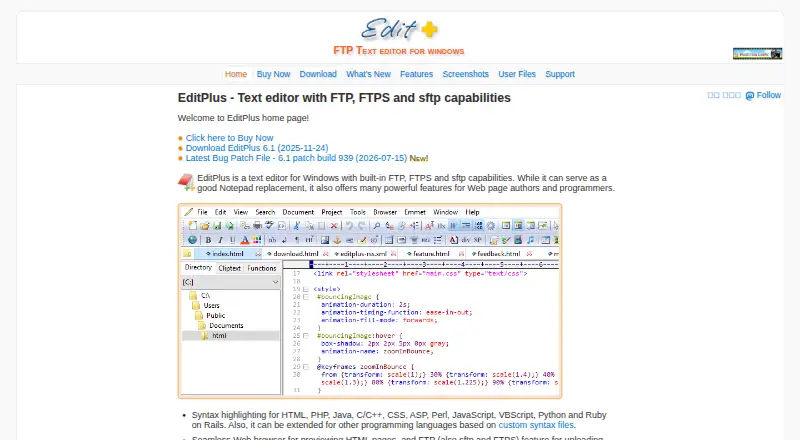
What EditPlus is
EditPlus is a Windows desktop text editor for web page authors and programmers. It combines editing with built-in FTP, FTPS and SFTP, allowing local uploads and direct editing of remote files. Customizable syntax highlighting covers HTML, CSS, PHP, ASP, Perl, C/C++, Java, JavaScript and VBScript, with custom syntax files for other languages. A built-in browser previews HTML documents and Java applets. Editing tools include code folding, auto completion, a Hex Viewer, HTML toolbar, document selector, user-defined tools, cliptext and document templates. It also provides line numbers, a ruler, column selection, search and replace, multiple undo and redo, spell checking and customizable keyboard shortcuts. Extensions and remote development are supported. Windows 10/11 downloads are offered for 64-bit and 64-bit ARM systems. A 30-day trial is available, after which a license is required. Non-expiring licenses range from $35/user per month for one user to larger multi-user plans.
Who it suits
It suits Windows-based web authors and programmers who need syntax-aware editing plus FTP, FTPS or SFTP access. Users wanting built-in previews and customizable editor tools may find the feature set relevant.
What it does well
- Built-in FTP, FTPS and SFTP
- Customizable syntax highlighting
- Browser preview for HTML and Java applets
- Remote file editing
- 30-day trial
What to know first
- Windows only
- No file comparison support
- License required after trial
- Pricing is listed per user
Plans
| Plan | Billed and limits | Price |
|---|---|---|
| 5-user license | Non-expiring license · Free minor upgrades and bug patches · One free upgrade to the next major release · Free technical support by e-mail | $15,030, paid once |
| 10-user license | Non-expiring license · Free minor upgrades and bug patches · One free upgrade to the next major release · Free technical support by e-mail | $23,023, paid once |
| 1-user license | Non-expiring license · Free minor upgrades and bug patches · One free upgrade to the next major release · Free technical support by e-mail | $35, paid once |
| 20-user license | Non-expiring license · Free minor upgrades and bug patches · One free upgrade to the next major release · Free technical support by e-mail | $42,021, paid once |
| 30-user license | Non-expiring license · Free minor upgrades and bug patches · One free upgrade to the next major release · Free technical support by e-mail | $51,017, paid once |
| 50-user license | Non-expiring license · Free minor upgrades and bug patches · One free upgrade to the next major release · Free technical support by e-mail | $70,014, paid once |
| 100-user license | Non-expiring license · Free minor upgrades and bug patches · One free upgrade to the next major release · Free technical support by e-mail | $9,009, paid once |
As editplus.com lists them, read 7 Oct 2026. The maker's own page has the final word.
Verdict
EditPlus brings web-oriented editing, remote file transfer and preview tools into a Windows desktop application. Its broad editing utilities and syntax support are balanced by the lack of built-in file comparison.
Facts from EditPlus's own pages
- Additional features
- It includes line numbers, a ruler, column selection, search and replace, multiple undo and redo, spell checking and customizable keyboard shortcuts. · editplus.com, 7 Oct 2026
- Data location
- The privacy policy says information processing takes place in South Korea and information from users outside South Korea is transferred there for processing and storage. · editplus.com, 7 Oct 2026
- Editing tools
- Features include code folding, a Hex Viewer, an HTML toolbar, document selector, user-defined tools, auto completion, cliptext and document templates. · editplus.com, 7 Oct 2026
- Editor type
- desktop · editplus.com, 20 Sept 2026
- Extension support
- Yes · editplus.com, 20 Sept 2026
- File comparison limit
- The FAQ states that EditPlus does not support file comparison, though an external comparison application can be run as a user tool. · editplus.com, 7 Oct 2026
- Free plan
- No · editplus.com, 20 Sept 2026
- Headquarters
- Jinju-si, Gyeongsangnam-do, South Korea · editplus.com, 28 Sept 2026
- Supported platforms
- windows · editplus.com, 20 Sept 2026
- Privacy and security
- The privacy policy says the application does not collect precise device location and describes physical, electronic and procedural safeguards for information it processes. · editplus.com, 7 Oct 2026
- Product
- EditPlus is a text editor for Windows with built-in FTP, FTPS and SFTP capabilities, positioned for web page authors and programmers. · editplus.com, 7 Oct 2026
- Remote development
- Yes · editplus.com, 20 Sept 2026
- Remote files
- FTP, SFTP and FTPS can upload local files or edit remote files directly. · editplus.com, 7 Oct 2026
- Support
- The maker lists FAQ, bug patches, Emmet for EditPlus, beta testing, and support by email. · editplus.com, 7 Oct 2026
- Supported system
- The download page lists Windows 10/11 as supported operating systems and offers 64-bit and 64-bit ARM downloads. · editplus.com, 7 Oct 2026
- Syntax highlighting
- It provides customizable syntax highlighting by default for HTML, CSS, PHP, ASP, Perl, C/C++, Java, JavaScript and VBScript, with custom syntax files for other languages. · editplus.com, 7 Oct 2026
- Trial
- The shareware evaluation version can be tried for 30 days; a license is required to continue using it afterward. · editplus.com, 7 Oct 2026
- Web preview
- Its built-in browser previews HTML documents and Java applets without leaving the editor. · editplus.com, 7 Oct 2026
Where EditPlus stands on Freedom251
- Editor Software#29 of 32
- Code editors#41 of 45
- FTP and SFTP clients#33 of 36
- Text Editors#78 of 82