PSPad
by PSPad
What PSPad is
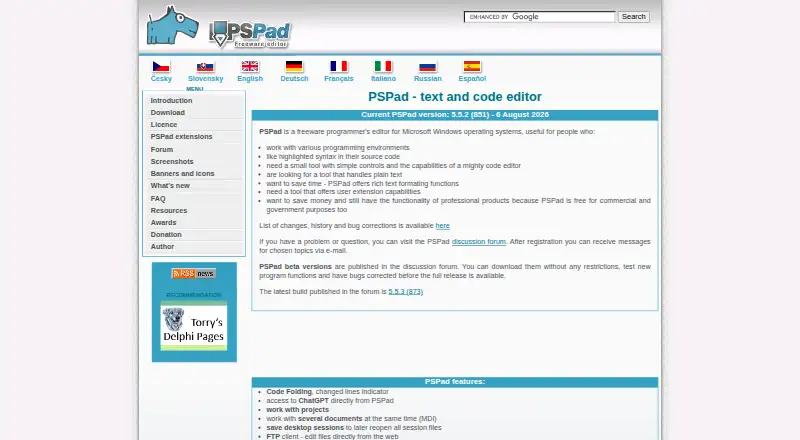
PSPad is a free text and code editor for Windows, aimed at people working with source code or plain text who want a compact tool with simple controls. It highlights syntax for languages including HTML, PHP, XHTML, R, JavaScript, ASP, Perl and C. Editing tools include code folding, multi-document editing, sessions, macros, column editing, templates, search and replace across files, and a HEX editor. For web-related work, it has an FTP client for text files, an internal browser, HTML preview and HTML formatting tools. The FTP client does not transfer binary files. Users can call external programs and configure an external compiler with captured output, a log window and parser. Its feature list includes direct access to ChatGPT, and the maker provides extensions such as scripts, converters and syntax definitions. PSPad is available as 32-bit and experimental 64-bit installers, as well as portable ZIP packages that can run after unpacking. It supports Windows and macro recording.
Who it suits
PSPad suits Windows users who edit code or plain text and prefer a small editor with straightforward controls. Its web tools and external compiler options may also suit people working with HTML or programming tools.
What it does well
- Freeware for commercial and government purposes
- Syntax highlighting for many languages
- Includes macros and column editing
- Portable ZIP packages can run without installation
- Offers HTML preview and formatting tools
What to know first
- Windows only
- FTP client transfers text files only
- 64-bit installer is experimental
Plans
| Plan | Billed and limits | Price |
|---|---|---|
| Freeware | Free for any purpose, including commercial applications · Windows | Free |
As pspad.com lists them, read 11 Oct 2026. The maker's own page has the final word.
Getting started
- Open the PSPad website
- Choose a 32-bit or experimental 64-bit installer, or download a portable ZIP package
- Install PSPad or unpack the portable package
- Launch PSPad on Windows
- Add maker-provided extensions if needed
Verdict
PSPad combines core code and text editing with web tools, macros, extensions and external compiler support at no listed price. Its Windows-only availability and text-only FTP transfer are worth considering before choosing it.
Questions
What does PSPad cost?
PSPad is freeware. The Freeware plan is free for commercial and government purposes.
Which platforms does PSPad support?
PSPad supports Microsoft Windows.
Can PSPad run without installation?
Yes. Portable ZIP packages can run after unpacking.
Does PSPad support extensions and macros?
Yes. It supports macro recording and maker-provided extensions such as scripts, user converters and syntax definitions.
Can PSPad transfer binary files over FTP?
No. Its FTP client handles text files only and has no binary transfer mode.
Is there a free trial?
No free trial is listed; PSPad is offered as freeware.
Facts from PSPad's own pages
- Author
- The author page names Jan Fiala and says he lives in the Czech Republic. · pspad.com, 11 Oct 2026
- ChatGPT
- The feature list says users can access ChatGPT directly from PSPad. · pspad.com, 11 Oct 2026
- Column editing
- Yes · pspad.com, 22 Sept 2026
- Distribution
- The download page offers 32-bit and experimental 64-bit installers, plus portable ZIP packages, and says PSPad can run without installation after unpacking. · pspad.com, 11 Oct 2026
- Editing features
- Features include code folding, multi-document editing, sessions, macros, search and replace across files, templates and a HEX editor. · pspad.com, 11 Oct 2026
- Extensions
- The maker provides user extensions such as scripts, user converters and syntax definitions. · pspad.com, 11 Oct 2026
- Extension support
- Yes · pspad.com, 22 Sept 2026
- External tools
- Users can call external programs and configure an external compiler with output capture, a log window and log parser. · pspad.com, 11 Oct 2026
- File transfer limit
- The FAQ says PSPad's FTP client handles text files only and has no binary transfer mode. · pspad.com, 11 Oct 2026
- Free plan
- Yes · pspad.com, 22 Sept 2026
- Headquarters
- Czech Republic · pspad.com, 28 Sept 2026
- Intended users
- The author describes it as useful for people working in programming environments, editing source code or plain text, and seeking a small tool with simple controls. · pspad.com, 11 Oct 2026
- Languages
- It supports syntax highlighting for many languages, including HTML, PHP, XHTML, R, JavaScript, ASP, Perl and C. · pspad.com, 11 Oct 2026
- Macro recording
- Yes · pspad.com, 22 Sept 2026
- Product
- PSPad is a freeware text and code editor for Microsoft Windows. · pspad.com, 11 Oct 2026
- Security
- The download page states that the installer and PSPad.exe are digitally signed with a Comodo code-signing certificate and that the installer contains no bundled software or malware. · pspad.com, 11 Oct 2026
- Support
- Users with questions or problems can visit the PSPad discussion forum, and registered users can receive email messages about selected topics. · pspad.com, 11 Oct 2026
- Supported platforms
- Windows · pspad.com, 22 Sept 2026
- Web tools
- PSPad includes an FTP client for editing text files from the web, an internal web browser, HTML preview and HTML formatting tools. · pspad.com, 11 Oct 2026
Where PSPad stands on Freedom251
- Text Editors#40 of 82
- Code editors#25 of 45
- Editor Software#25 of 32