Freedom251 › Pixel Art Software
Edge3
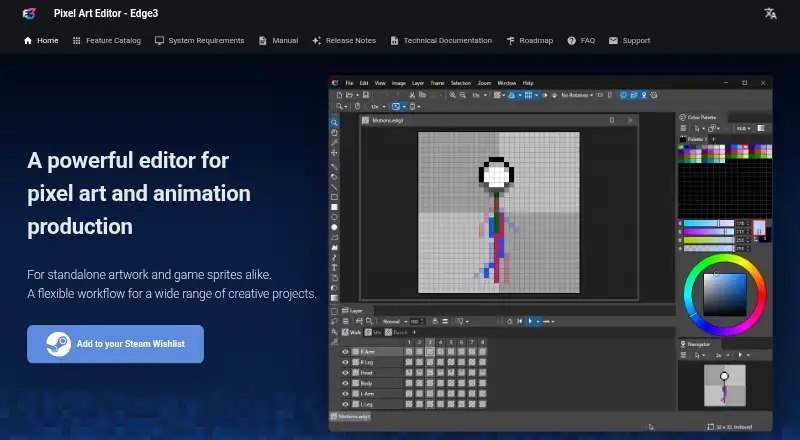
What Edge3 is
Edge3 is a pixel art editor for standalone artwork and game sprites on 64-bit Windows 11. It supports frame-by-frame and part-based sprite animation, with multiple motions saved in one file. An animation timeline and onion skinning support animation work, while tilemap tools target game assets. Indexed-color workflows include multiple palettes and palette control for individual frames. Editing tools include layers, dithering, selection transforms, and RGB, HSV, and Levels adjustments. Animations export as GIF, and sprite sheets export as PNG with JSON; PNG, GIF, and JSON are the listed formats. After installation, the software works offline, though updates and the online manual require internet access. A downloadable demo is available through Steam. Edge3 is Early Access, and the maker warns that bugs, usability problems, and missing features may remain. The Edge3 plan costs A$28.50, paid once. Optional software adds file thumbnails in Windows Explorer.
Who it suits
Edge3 suits artists and game developers creating pixel artwork, animated sprites, or tilemaps on 64-bit Windows 11. It is also relevant to users who need indexed-color and sprite-sheet exports.
What it does well
- Frame-by-frame and part-based animation
- Indexed-color and multiple palette controls
- Tilemap and onion-skinning tools
- Exports PNG, GIF, and JSON
- Works offline after installation
What to know first
- Supports only 64-bit Windows 11
- Early Access may include bugs or missing features
- Internet needed for updates and online manual
- No free plan
Plans
| Plan | Billed and limits | Price |
|---|---|---|
| Edge3 | Early Access software · Windows 11 | A$28.50, paid once |
As edge3.takabosoft.com lists them, read 11 Oct 2026. The maker's own page has the final word.
Verdict
Edge3 focuses on pixel art, sprite animation, indexed palettes, and tilemap production for Windows 11. Buyers should account for its Early Access status and the one-time AUD price before choosing it.
Facts from Edge3's own pages
- Animation
- It supports both frame-by-frame animation and part-based sprite animation, with multiple motions saved in one file. · edge3.takabosoft.com, 11 Oct 2026
- Company
- Takabo Soft describes itself as a personal site rather than a corporation. · takabosoft.com, 11 Oct 2026
- Demo
- A downloadable demo is available on Steam. · store.steampowered.com, 11 Oct 2026
- Early Access
- The product is in Early Access, and the maker says it may still have bugs, usability issues, and missing features. · store.steampowered.com, 11 Oct 2026
- Editing
- Features include layers, dithering, selection transforms, and RGB, HSV, and Levels color adjustments. · edge3.takabosoft.com, 11 Oct 2026
- Export
- Animations can be exported as GIFs, and sprite sheets can be exported as PNG plus JSON. · edge3.takabosoft.com, 11 Oct 2026
- Intended users
- The maker describes Edge3 as suitable for standalone artwork and game sprites. · edge3.takabosoft.com, 11 Oct 2026
- Offline use
- Edge3 can be used offline after installation; an internet connection is needed for updates and the online manual. · edge3.takabosoft.com, 11 Oct 2026
- Operating system
- The listed supported operating system is 64-bit Windows 11. · edge3.takabosoft.com, 11 Oct 2026
- Optional extension
- Separate software can enable Edge3 file thumbnails in Windows Explorer. · edge3.takabosoft.com, 11 Oct 2026
- Palettes
- It supports indexed-color workflows with multiple palettes and per-frame palette control. · edge3.takabosoft.com, 11 Oct 2026
- Product
- Edge3 is a pixel art editor for artwork and game sprites, with palette management and animation tools. · edge3.takabosoft.com, 11 Oct 2026
Where Edge3 stands on Freedom251
- Pixel Art Software#62 of 70