Freedom251 › Photo Editing Software
DxO PhotoLab
by DxO PhotoLab
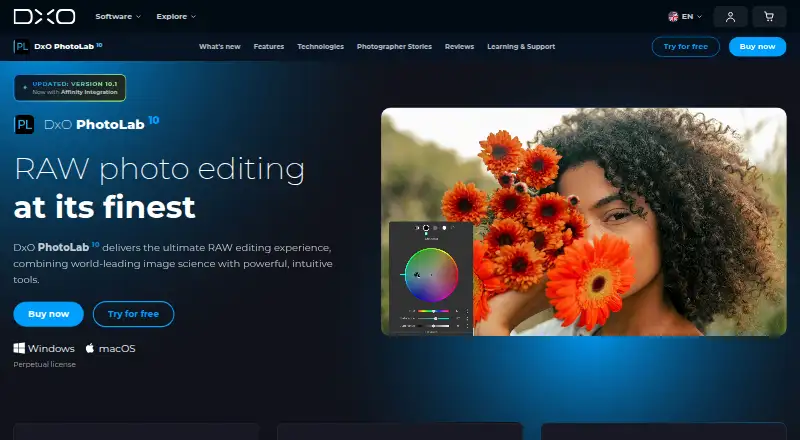
What DxO PhotoLab is
DxO PhotoLab is paid RAW photo editing software for developing and organizing photographs on macOS and Windows. It provides batch editing, image management, non-destructive editing, masking tools, and AI retouching. DeepPRIME 3 and DeepPRIME XD3 use machine learning during RAW conversion to reduce noise, recover detail, and improve color accuracy. DxO Modules apply camera- and lens-specific corrections for distortion, vignetting, chromatic aberration, and lens softness. AI Masks and U Point technology target particular image areas. Version 10 adds depth masks, color grading, and expanded local adjustments for people and facial features. PhotoLab 10.1 can export a native Affinity .af document to Affinity, optionally including the uncorrected original as a second layer. Lightroom Classic integration supports version 3.0 and later for transferring RAW images and returning processed files. A 30-day trial has no feature or file-processing limits and requires no card details. Listed plans include Essential at $159.99 a month, billed as a lifetime license for two computers, and Elite at $249.99 a month, billed as a lifetime license for three computers.
Who it suits
PhotoLab suits photographers who need RAW development, camera and lens corrections, local masking, and batch workflows on Windows or macOS. Its trial allows evaluation without feature or file-processing limits.
What it does well
- RAW conversion with DeepPRIME processing
- Camera- and lens-specific optical corrections
- AI Masks and U Point local editing
- Batch processing and non-destructive editing
- 30-day unrestricted trial
What to know first
- No free plan
- Requires internet activation and periodic reconnection
- New camera models may take weeks to appear
- Listed plans have computer limits
Plans
| Plan | Billed and limits | Price |
|---|---|---|
| Essential | Lifetime license; no subscription · 2 computers | $159.99, paid once |
| Elite | Lifetime license; no subscription · 3 computers | $249.99, paid once |
| DxO PhotoLab 10 Elite upgrade | Upgrade price shown for eligible owners of PhotoLab 8 or 9 · Upgrade eligibility and price depend on existing version | $129.99, paid once |
| DxO PhotoLab 10 Elite | Perpetual license; one-time payment · Activate on up to 3 computers · Windows and macOS | $249.99, paid once |
As dxo.com lists them, read 20 Sept 2026. The maker's own page has the final word.
Verdict
DxO PhotoLab combines RAW processing, optical corrections, local editing, and organized batch workflows. Buyers should review the lifetime-license pricing and activation requirement before choosing a plan.
Facts from DxO PhotoLab's own pages
- Adobe integration
- PhotoLab provides an integrated workflow with Lightroom Classic version 3.0 and later, including a plugin for transferring RAW images and exporting processed files back. · userguides.dxo.com, 11 Oct 2026
- Affinity integration
- PhotoLab 10.1 can export a native Affinity .af document directly to Affinity, with an option to include the uncorrected original as a second layer. · dxo.com, 11 Oct 2026
- AI retouching
- Yes · shop.dxo.com, 20 Sept 2026
- Audience
- DxO describes PhotoLab as software designed for passionate photographers and demanding editing workflows. · dxo.com, 11 Oct 2026
- Batch editing
- Yes · shop.dxo.com, 20 Sept 2026
- Compatibility limit
- New camera models may take a few weeks to appear in PhotoLab’s compatibility database after release. · dxo.com, 11 Oct 2026
- Free plan
- No · shop.dxo.com, 20 Sept 2026
- License and activation
- The software requires an internet connection for activation and must reconnect to DxO servers after up to 37 days of offline use. · shop.dxo.com, 11 Oct 2026
- Local editing
- PhotoLab provides AI Masks and U Point technology for targeting and adjusting specific image areas. · dxo.com, 11 Oct 2026
- Masking tools
- Yes · shop.dxo.com, 20 Sept 2026
- Optical corrections
- DxO Modules apply camera and lens specific corrections for distortion, vignetting, chromatic aberration, and lens softness. · dxo.com, 11 Oct 2026
- Platform
- multi-platform · shop.dxo.com, 20 Sept 2026
- Product
- DxO PhotoLab is RAW photo editing software for developing and organizing photographs. · dxo.com, 11 Oct 2026
- RAW processing
- DeepPRIME 3 and DeepPRIME XD3 use machine learning during RAW conversion to reduce noise, recover detail, and improve color accuracy. · dxo.com, 11 Oct 2026
- RAW photo support
- Yes · shop.dxo.com, 20 Sept 2026
- Support
- DxO offers an online user guide, tutorial videos, a help and support site, and a user forum. · dxo.com, 11 Oct 2026
- Trial
- The 30-day trial has no feature or file-processing limits and does not require card details. · dxo.com, 11 Oct 2026
- Version 10 features
- Version 10 includes depth masks, color grading, and expanded local adjustments for people and facial features. · dxo.com, 11 Oct 2026
- Workflow
- The software supports batch processing, image management, and non-destructive editing. · dxo.com, 11 Oct 2026
Where DxO PhotoLab stands on Freedom251
- Photo Editing Software#126 of 159
- Photo editors#79 of 96