Freedom251 › School Library Management Software
DS School Library Management System
Visit DS School Library Management System Alternatives Pricing
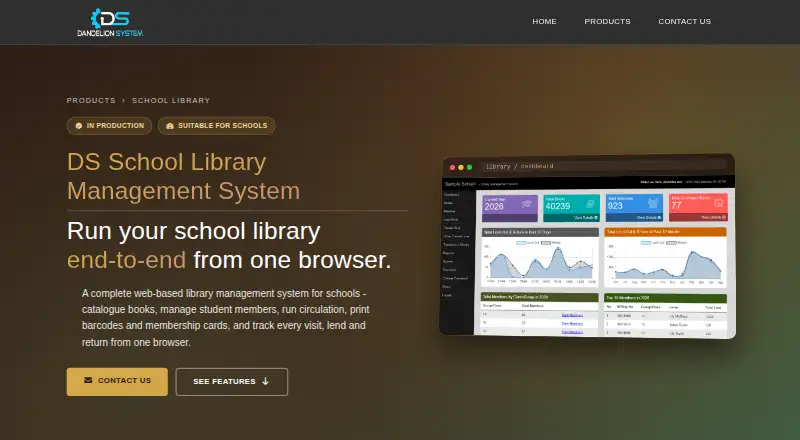
What DS School Library Management System is
DS School Library Management System is a browser-based tool for managing a school library’s catalogue, loans, memberships, and student visits. Staff can record book details such as title, author, publisher, ISBN, Dewey Decimal classification, location, and individual copy barcodes. Barcode scanning supports lending and returns, with due dates and overdue fines calculated from membership settings. Student records can be added, edited, imported from Excel, and promoted to a new academic session individually or by class. Built-in reports cover circulation, overdue books, members, and visitor activity, and reports and records can be exported to Excel. Students can search the catalogue and check a book’s status and location through a login-free OPAC on the school network. Visit tracking offers barcode or ID scanning and a touch-picker kiosk. Staff can create timestamped MySQL backups in the browser and restore from an uploaded file. The system records which staff member performed transactions and provides separate administrator and counter staff access. Pricing is available by quotation.
Who it suits
It suits school libraries that manage circulation and student visits, especially those using barcode scanners and Excel records. Students can search the catalogue on the school network without logging in.
What it does well
- Browser access avoids per-seat installation
- Barcode scanning supports lending and returns
- Excel import and export for student records and reports
- Login-free catalogue search for students
- Browser-based backups and restore
What to know first
- Pricing is available only by quotation
- Student catalogue access is limited to the school network
Plans
| Plan | Billed and limits | Price |
|---|---|---|
| DS School Library Management System | Pricing available by quotation | On request |
As dandelionsystem.com lists them, read 9 Oct 2026. The maker's own page has the final word.
Getting started
- Visit the DS School Library Management System website.
- Request a quotation for the school.
- Access the system through a browser on school computers.
- Use supported barcode scanners or printers if needed.
Verdict
DS School Library Management System combines catalogue, circulation, membership, and visit tracking in one web-based workflow. Schools should request a quotation to learn the price.
Questions
How is the system priced?
Pricing is available by quotation. The product page invites schools to request a quote and says the maker will respond within one working day.
Does it have a student catalogue portal?
Yes. Students can use a login-free OPAC on the school network to search the catalogue and check book status and location.
Can student records be imported?
Yes. Members can be imported from Excel, and students can be promoted between academic sessions individually or by class.
What hardware does it support?
It supports standard USB barcode scanners, TSC thermal barcode printers, and printing through installed Windows printers.
Can staff back up and restore data?
Staff can create timestamped MySQL backups in the browser and restore from an uploaded file.
Facts from DS School Library Management System's own pages
- Audit and roles
- Transactions record the staff user who performed them, and the product provides separate administrator and counter staff access. · dandelionsystem.com, 9 Oct 2026
- Backup and restore
- Staff can create timestamped MySQL backups in the browser and restore from an uploaded file. · dandelionsystem.com, 9 Oct 2026
- Browser access
- School computers can use the system through a browser without a per seat installation. · dandelionsystem.com, 9 Oct 2026
- Cataloguing
- Book records include fields such as title, author, publisher, ISBN, Dewey Decimal classification, location and per copy barcodes. · dandelionsystem.com, 9 Oct 2026
- Circulation
- Lend and return screens use barcode scanning and calculate due dates and overdue fines based on membership settings. · dandelionsystem.com, 9 Oct 2026
- Hardware
- The product supports standard USB barcode scanners, TSC thermal barcode printers and printing through installed Windows printers. · dandelionsystem.com, 9 Oct 2026
- Headquarters
- Tawau, Sabah, Malaysia · dandelionsystem.com, 28 Sept 2026
- Pricing and support
- The product page invites schools to request a quotation and says the maker will respond within one working day. · dandelionsystem.com, 9 Oct 2026
- Purpose
- A web based library management system for school libraries, covering cataloguing, circulation, membership and visit tracking. · dandelionsystem.com, 9 Oct 2026
- Reports
- Built in reports cover circulation, overdue books, members and visitor activity, with Excel export for reports and records. · dandelionsystem.com, 9 Oct 2026
- Student access
- Students can use a login free OPAC to search the catalogue and check book status and location on the school network. · dandelionsystem.com, 9 Oct 2026
- Student records
- Members can be added, edited or imported from Excel, and students can be promoted between academic sessions individually or by class. · dandelionsystem.com, 9 Oct 2026
- Visit tracking
- The system offers barcode or ID scan and touch picker kiosk modes for recording student visits. · dandelionsystem.com, 9 Oct 2026
Where DS School Library Management System stands on Freedom251
- School Library Management Software#19 of 22