Freedom251 › Driver Education Software
DriveSpace
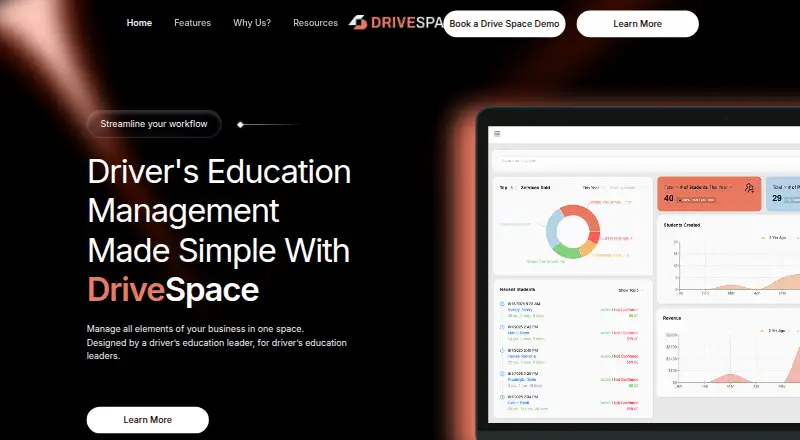
What DriveSpace is
DriveSpace is web-based software for managing a driving school’s business. It is designed for driver education leaders and schools of different sizes, bringing registration and scheduling into the school administration workflow. Instructors can grade students digitally, with work saved automatically during a session if the signal drops. Parents can receive lesson completion notifications that include skills students should practice. Staff can record session progress comments and choose whether each comment is public or internal. They can also apply no-show penalties through automatic fees.
Students have access to online classroom integration, self-scheduling, and notification management across internet-connected devices. DriveSpace says the product reflects more than 20 years of industry experience and that its customer support and technical development teams are in-house. Prospective customers can contact the company to schedule a demo. Pricing is paid and available on request. The company lists [email protected] and (262) 240-8900 for support. Its privacy policy describes administrative, technical, and physical safeguards, while stating that absolute security cannot be guaranteed. It also says personal information is not sold, though it may be shared with service providers or in specified legal and business situations.
Who it suits
DriveSpace suits driver education leaders and schools that want web-based tools for registration, scheduling, student progress, and instructor grading. Its student and parent features may also fit schools that want learners to self-schedule and families to receive lesson progress updates.
What it does well
- Digital instructor grading saves automatically if a session loses signal.
- Parents can receive lesson completion alerts with skills to practice.
- Staff can mark session comments public or internal.
- Students can self-schedule and manage notifications on internet-connected devices.
- Automatic fees can be applied for no-shows.
What to know first
- Pricing is available only on request.
- The listed platform is web.
Getting started
- Visit the DriveSpace website.
- Contact DriveSpace to schedule a demo.
- Request pricing from DriveSpace.
- Use the web platform to manage school administration.
Verdict
Choose DriveSpace if your driving school needs registration, scheduling, digital grading, and progress communication in one web-based system. Contact the company for a demo and quote before deciding whether its paid offering suits your school.
Questions
How much does DriveSpace cost?
DriveSpace is paid, and pricing is available on request.
Which platforms does DriveSpace support?
DriveSpace is listed for the web.
Can prospective customers see a demo?
Yes. DriveSpace invites prospective customers to contact it to schedule a demo.
What can instructors and staff do?
Instructors can grade students digitally, with automatic saving during sessions if signal cuts out. Staff can add progress comments and mark them public or internal.
What can students and parents do?
Students can use online classroom integration, self-schedule, and manage notifications across internet-connected devices. Parents can receive lesson completion notifications with skills to practice.
How can I reach DriveSpace support?
DriveSpace lists [email protected] and (262) 240-8900.
Facts from DriveSpace's own pages
- Administration
- The site highlights support for registration and scheduling as part of the admin experience. · drivespace.com, 4 Oct 2026
- Admin workflow
- The site describes admin support for registration and scheduling. · drivespace.com, 10 Oct 2026
- Audience
- The product is designed for driver’s education leaders and driving schools of different sizes. · drivespace.com, 10 Oct 2026
- Automatic saving
- The site says instructor progress is automatically saved if a signal cuts out while on the road. · drivespace.com, 10 Oct 2026
- Demo
- The company invites prospective customers to contact it to schedule a demo. · drivespace.com, 10 Oct 2026
- Headquarters
- Pewaukee, Wisconsin, USA · drivespace.com, 28 Sept 2026
- Industry experience
- DriveSpace says its software draws on over 20 years of industry experience. · drivespace.com, 4 Oct 2026
- Instructor grading
- Instructors can digitally grade students. · drivespace.com, 10 Oct 2026
- Intended users
- The maker says the product is designed for driver education leaders and schools of different sizes. · drivespace.com, 4 Oct 2026
- No-show fees
- The site describes applying no-show penalties with a button. · drivespace.com, 10 Oct 2026
- Parent reports
- Parents can receive automatic lesson completion notifications that include skills to practice. · drivespace.com, 10 Oct 2026
- Privacy
- DriveSpace says it does not sell personal information and may share it with service providers and in specified legal, safety, or business-transfer circumstances. · drivespace.com, 10 Oct 2026
- Product
- DriveSpace is driver’s education management software for managing a driving school’s business in one place. · drivespace.com, 10 Oct 2026
- Security
- Its privacy policy says it uses reasonable administrative, technical, and physical safeguards, while noting it cannot guarantee absolute security. · drivespace.com, 10 Oct 2026
- Session notes
- Staff can leave session progress comments that are public or internal. · drivespace.com, 10 Oct 2026
- Staff notes
- Staff can leave session progress comments that are public or internal. · drivespace.com, 4 Oct 2026
- Student tools
- Student features include online classroom integration, self-scheduling, and notification management across internet-connected devices. · drivespace.com, 10 Oct 2026
- Support
- DriveSpace says customer support and technical development are handled in-house; it lists [email protected] and (262) 240-8900. · drivespace.com, 10 Oct 2026
Where DriveSpace stands on Freedom251
- Driver Education Software#26 of 27