Freedom251 › DNS Monitoring Software
DriftWatch
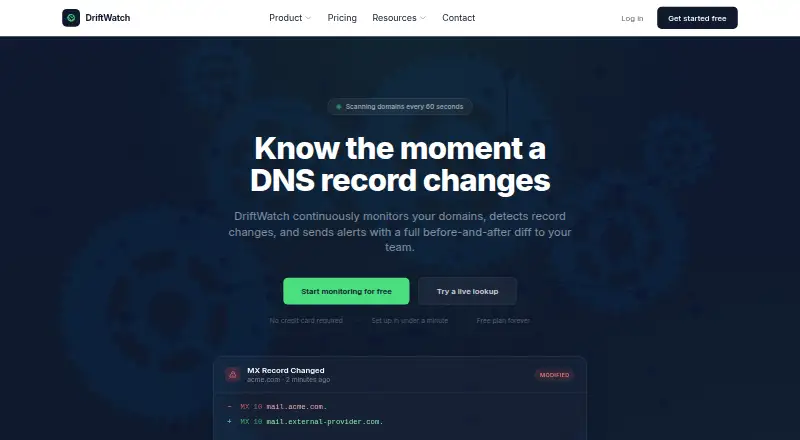
What DriftWatch is
DriftWatch monitors domain DNS records and alerts teams to changes with before-and-after differences. It discovers A, AAAA, MX, CNAME, TXT, NS, SOA, SRV, and CAA records, and detects changes by comparing SHA-256 checksums against stored snapshots. Users can select specific records or monitor an entire domain, with scan intervals configurable for each domain.
Alerts are available through email, Slack, webhooks, and Pushover; Slack and Pushover require Pro or higher. Webhook notifications support HMAC-SHA256 signatures, configurable headers, and exponential backoff retries. Teams can use owner, admin, member, and viewer roles, shared change history, and alert acknowledgements. The REST API supports domain management, change queries, alert configuration, and scan triggers. Free includes three domains, 50 DNS records, hourly scans, one email alert channel, and seven days of history. Pro costs $29 a month; Enterprise costs $99 a month. Subdomains count as separate domains, and limits block additions until items are removed or the plan is upgraded.
Who it suits
DriftWatch identifies MSPs, hosting providers, DevOps and platform teams, and security teams as intended users. It suits teams that need to track DNS changes and route alerts through supported channels.
What it does well
- Monitors nine types of DNS records.
- Scan intervals can be configured per domain.
- Supports email, Slack, webhooks, and Pushover alerts.
- Team roles include owner, admin, member, and viewer.
- Free plan includes three domains and hourly scans.
What to know first
- Free plan is limited to three domains.
- Subdomains count as separate domains.
- Slack and Pushover alerts require Pro or higher.
- Adding domains or channels is blocked at plan limits.
Limits
The Free plan allows three domains, 50 DNS records, hourly scans, one email alert channel, and seven days of change history. Pro includes 25 domains, five-minute scans, ten alert channels, 90-day history, and 1,000 API requests per day; Enterprise includes 100 domains, one-minute scans, unlimited channels, one-year history, and 50,000 daily API requests.
Plans
| Plan | Billed and limits | Price |
|---|---|---|
| Pro | $29/mo · 25 domains · unlimited DNS records · 5-minute scans · 10 alert channels · 90-day change history · Slack, webhooks, Pushover · API: 1k req/day · up to 10 team members | $29 a month |
| Enterprise | $99 /mo · 100 domains included · extra bundles of 25 domains at $25/mo · unlimited DNS records · 1-minute scans · unlimited alert channels · 1-year change history · API: 50k req/day · unlimited team members · SSO/SAML · priority support | $99 a month |
| Free | $0/mo · 3 domains · 50 DNS records · hourly scans · 1 email alert channel · 7-day change history | On request |
As driftwatch.app lists them, read 28 Sept 2026. The maker's own page has the final word.
Getting started
- Open driftwatch.app
- Create an account on the web service
- Choose the Free, Pro, or Enterprise plan
- Add domains and select records or whole-domain monitoring
- Configure scan intervals and alert channels
- Connect API clients with Sanctum token authentication
Verdict
DriftWatch combines DNS change tracking with configurable scans, team access, alerts, and an API. Check domain and channel limits before choosing a plan, since reaching a limit blocks additions until items are removed or the plan is upgraded.
Questions
Is there a free plan?
Yes. The Free plan is billed at $0/mo and includes three domains, 50 DNS records, hourly scans, one email alert channel, and seven days of history.
How much do paid plans cost?
Pro costs $29 a month. Enterprise costs $99 a month, with extra 25-domain bundles at $25/mo.
Which alert channels are available?
Email, Slack, webhooks, and Pushover are available; Slack and Pushover require Pro or higher.
Does DriftWatch provide an API?
Yes. Its REST API uses Sanctum token authentication and supports domain management, change queries, alert configuration, and scan triggers.
Who is DriftWatch intended for?
The maker describes MSPs, hosting providers, DevOps and platform teams, and security teams as intended users.
Facts from DriftWatch's own pages
- Alerts
- Alert channels include email, Slack, webhooks, and Pushover; Slack and Pushover are available on Pro and above. · driftwatch.app, 28 Sept 2026
- API
- The REST API uses Sanctum token authentication and supports managing domains, querying changes, configuring alerts, and triggering scans. · driftwatch.app, 28 Sept 2026
- API limits
- The API allows 1,000 requests per day on Pro and 50,000 per day on Enterprise. · driftwatch.app, 28 Sept 2026
- Change detection
- It compares SHA-256 checksums against stored snapshots to detect DNS changes. · driftwatch.app, 28 Sept 2026
- Headquarters
- Unit 3, Millars Brook, Wokingham, RG41 2AD, United Kingdom · driftwatch.app, 28 Sept 2026
- Monitoring
- Users can choose individual records or monitor an entire domain, with scan intervals configurable per domain. · driftwatch.app, 28 Sept 2026
- Plan limits
- Subdomains count as separate domains, and adding domains or channels is blocked when a limit is reached until the user upgrades or removes items. · driftwatch.app, 28 Sept 2026
- Product
- DriftWatch monitors domains for DNS record changes and alerts teams with before-and-after diffs. · driftwatch.app, 28 Sept 2026
- Record types
- It automatically discovers and monitors A, AAAA, MX, CNAME, TXT, NS, SOA, SRV, and CAA records. · driftwatch.app, 28 Sept 2026
- Support
- The maker lists [email protected] for general enquiries and support and says it typically responds within one business day. · driftwatch.app, 28 Sept 2026
- Team access
- Teams can use owner, admin, member, and viewer roles, shared change history, and alert acknowledgements. · driftwatch.app, 28 Sept 2026
- Use cases
- The maker describes MSPs, hosting providers, DevOps and platform teams, and security teams as intended users. · driftwatch.app, 28 Sept 2026
- Webhook security
- Webhook notifications use HMAC-SHA256 signatures, configurable headers, and exponential backoff retries. · driftwatch.app, 28 Sept 2026
Where DriftWatch stands on Freedom251
- DNS Monitoring Software#12 of 37