Draftside
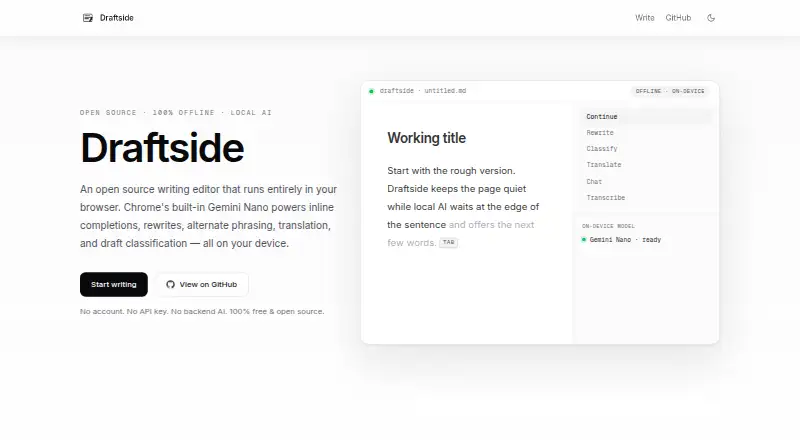
What Draftside is
Draftside is a free, MIT-licensed writing editor that runs in a browser and uses Chrome’s built-in Gemini Nano for on-device AI. Its tools include inline completions, rewrites, alternate phrasing, translation, chat, transcription, and draft classification. The project is made by Colin Armstrong and requires no account or API key. Drafts stay in browser IndexedDB rather than being uploaded by Draftside. An optional Private Vault encrypts drafts on the device and unlocks with a passkey through Touch ID, Windows Hello, or a hardware key. The editor can be installed as a progressive web app and works offline after its app shell is cached. AI features require Chrome, Edge, or another Chromium browser with built-in AI APIs enabled; the first AI session may download Gemini Nano, about 1–2 GB. Draftside is intended for notes, essays, posts, and other drafts needing another pass.
Who it suits
Draftside suits writers working on notes, essays, posts, and similar drafts in a Chromium browser. It also fits users who want local storage, offline access, and optional device encryption.
What it does well
- Free plan costs nothing
- No account or API key
- Many writing and translation tools
- Offline PWA use after caching
- Optional encrypted Private Vault
What to know first
- AI requires a Chromium browser
- Initial Gemini Nano download is about 1–2 GB
- Marketing page loads Google Analytics
- Some security conditions are outside reporting scope
Plans
| Plan | Billed and limits | Price |
|---|---|---|
| Free | No account · no API key · local AI | Free |
As draftside.ai lists them, read 12 Oct 2026. The maker's own page has the final word.
Verdict
Draftside combines browser-based writing tools with local AI and local draft storage at no listed cost. Browser requirements and the possible 1–2 GB model download should be considered before use.
Facts from Draftside's own pages
- Audience
- The maker describes Draftside as suited to notes, essays, posts, and other drafts that benefit from another pass while writing. · draftside.ai, 12 Oct 2026
- Browser requirement
- AI features require Chrome, Edge, or another Chromium browser with the built-in AI APIs enabled; the first AI session may download Gemini Nano, about 1–2 GB. · github.com, 12 Oct 2026
- Draft storage
- Drafts are stored in browser IndexedDB and are not uploaded by Draftside. · github.com, 12 Oct 2026
- Free plan
- Yes · draftside.ai, 20 Sept 2026
- Language support
- multilingual · draftside.ai, 20 Sept 2026
- License and maker
- The project is MIT-licensed and made by Colin Armstrong. · github.com, 12 Oct 2026
- Offline use
- The app can be installed as a PWA and works offline after its app shell is cached. · github.com, 12 Oct 2026
- Privacy detail
- The editor route does not load Google Analytics, while the marketing page does and may send Google normal page-view metadata. · github.com, 12 Oct 2026
- Private Vault
- The optional Private Vault encrypts drafts on the device and unlocks with a passkey using Touch ID, Windows Hello, or a hardware key. · draftside.ai, 12 Oct 2026
- Product
- Draftside is an open-source writing editor that runs in the browser and uses Chrome’s built-in Gemini Nano for on-device AI. · draftside.ai, 12 Oct 2026
- Security reporting
- The security policy asks users to report suspected vulnerabilities by email and says an initial response should arrive within a few days. · github.com, 12 Oct 2026
- Security scope
- The maker’s security policy says Chrome’s built-in AI APIs, Cloudflare hosting, compromised devices, malicious extensions, and physical access are outside its vulnerability-reporting scope. · github.com, 12 Oct 2026
- Writing tools
- It offers inline completions, rewrites, alternate phrasing, translation, chat, transcription, and draft classification. · github.com, 12 Oct 2026
Where Draftside stands on Freedom251
- AI Writing Tools#123 of 269