Freedom251 › Background removers
Don's Tools Background Remover
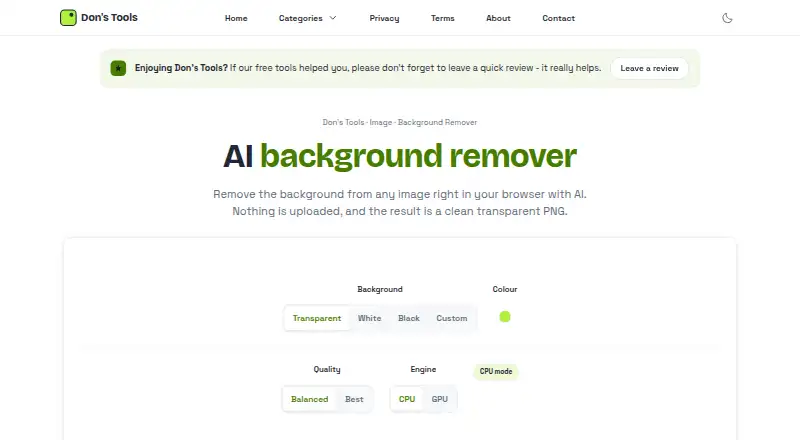
What Don's Tools Background Remover is
Don's Tools Background Remover removes image backgrounds in the browser using an AI segmentation model and creates PNG files. Results can have a transparent, white, black, or custom-colour background, and the tool supports batch processing. Its Free plan costs nothing and allows up to 150 images in a batch. JPG, PNG, and WebP are listed as input formats; PNG is the export format, and results can be downloaded as PNGs or ZIP files.
Processing uses WebGPU when supported and falls back to the CPU otherwise. On first use, the browser downloads the model, which is roughly 45 to 170 MB depending on the selected quality, then caches it. After that download, background removal can work offline until browser data is cleared. The maker says image processing stays in the browser and images are never uploaded to a server. Results may differ from paid services on fine details such as wispy hair or fur. Large batches and very large images take more memory and time, particularly without a graphics card. The tool is listed for Android, iOS, Linux, macOS, web, and Windows. Don invites bug reports and feedback by email and says he started the site after making a batch image resizer for his own website.
Who it suits
This tool suits people who want to remove backgrounds from individual images or batches, choose a replacement background, and download PNG results. It may also suit people who want browser-based processing and offline use after the model has been downloaded.
What it does well
- Free plan supports batches of up to 150 images.
- Background choices include transparent, white, black, or custom colour.
- JPG, PNG, and WebP inputs are supported.
- Images are processed in the browser and are not uploaded to a server.
- The cached model can enable offline use after its first download.
What to know first
- PNG is the listed export format.
- The model download is roughly 45 to 170 MB on first use.
- Large images and batches use more memory and take longer.
- Fine details may differ from results from paid services.
Limits
The Free plan allows up to 150 images per batch. The model download is roughly 45 to 170 MB depending on selected quality, and large images or batches can use more memory and take longer.
Plans
| Plan | Billed and limits | Price |
|---|---|---|
| Free | Up to 150 images per batch · JPG, PNG, WebP · runs in browser | Free |
As donstools.com lists them, read 11 Oct 2026. The maker's own page has the final word.
Getting started
- Open the Background Remover website.
- Select JPG, PNG, or WebP images in the browser.
- Allow the model to download on first use.
- Choose a transparent, white, black, or custom-colour background.
- Download the results as PNGs or a ZIP file.
Verdict
Pick Don's Tools Background Remover for free browser-based background removal, especially when batch processing or offline use after the first download matters. Look elsewhere if fine details such as wispy hair or fur are critical, or if your device struggles with large images and batches.
Questions
How much does Don's Tools Background Remover cost?
The Free plan is listed as free. There is no free trial.
Which platforms does it support?
It is listed for Android, iOS, Linux, macOS, web, and Windows.
Which file formats can I use and export?
JPG, PNG, and WebP are listed as input formats. PNG is the export format, and results can be downloaded as PNGs or ZIP files.
Can it replace the background with a colour?
Yes. Results can use a transparent, white, black, or custom-colour background.
Does the tool upload images to a server?
The maker says images are processed in the browser and never uploaded to a server.
Who makes the tool?
The maker is Don, who says he started the site after building a batch image resizer for his own website.
Facts from Don's Tools Background Remover's own pages
- Background options
- Results can have a transparent, white, black, or custom-colour background. · donstools.com, 11 Oct 2026
- Batch processing
- It accepts up to 150 JPG, PNG, or WebP images at once and processes them in turn. · donstools.com, 11 Oct 2026
- Device limits
- Large batches or very large images use more memory and take longer, especially without a graphics card. · donstools.com, 11 Oct 2026
- Export formats
- PNG · donstools.com, 22 Sept 2026
- Free plan
- Yes · donstools.com, 22 Sept 2026
- Integrations
- The maker's product page describes browser-based file selection and PNG or ZIP downloads; it does not state third-party integrations. · donstools.com, 11 Oct 2026
- Maker background
- Don says he started the site after building a batch image resizer for his own website. · donstools.com, 11 Oct 2026
- Model download
- The AI model downloads on first use, at roughly 45 to 170 MB depending on the selected quality, and is then cached by the browser. · donstools.com, 11 Oct 2026
- Offline use
- After the model has been downloaded, removals can work offline until browser data is cleared. · donstools.com, 11 Oct 2026
- Privacy
- The maker says images are processed in the browser and never uploaded to a server. · donstools.com, 11 Oct 2026
- Processing engine
- It uses WebGPU when supported and falls back to the CPU otherwise. · donstools.com, 11 Oct 2026
- Quality limitation
- The maker says results may differ from paid services on fine details such as wispy hair or fur. · donstools.com, 11 Oct 2026
- Replacement backgrounds
- Yes · donstools.com, 22 Sept 2026
- Support
- The maker invites bug reports and feedback by email at [email protected]. · donstools.com, 11 Oct 2026
- What it does
- Uses an AI segmentation model in the browser to remove image backgrounds and create PNGs. · donstools.com, 11 Oct 2026
Where Don's Tools Background Remover stands on Freedom251
- Background removers#10 of 70
- AI Background Removers#15 of 94