Freedom251 › Disk Space Analyzers
Disk Inventory X
What Disk Inventory X is
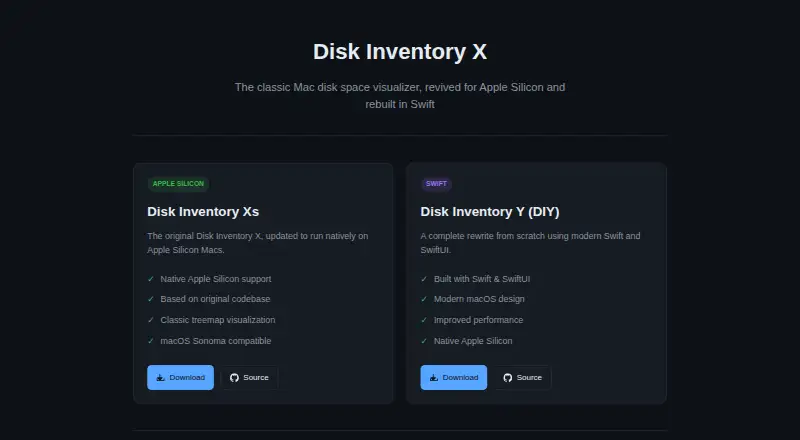
Disk Inventory X is a free macOS utility for visualizing how files and folders use disk space. Its treemap view maps storage items by size, while a file-type breakdown offers another way to inspect usage. The app can scan files and folders, including external drives. Disk Inventory Xs updates the original Objective-C application for Apple Silicon and requires an Apple Silicon Mac with macOS 10.13 or later; its releases are signed, notarized, and stapled. Disk Inventory Y is a separate rewrite using Swift and SwiftUI for macOS 14.0 or later. Y adds a file list with size bars, folder zoom, and moving files to Trash, and it can scan any folder. Protected-folder scans in Y require Full Disk Access permission. The Xs repository is licensed under GPL v3. The listed free download costs nothing.
Who it suits
Disk Inventory X suits Mac users who want a visual view of storage usage, including scans of external drives. Users should choose the Xs or Y edition according to their Mac hardware and macOS version.
What it does well
- Free macOS download
- Treemap storage visualization
- File-type breakdown
- External drive scanning
- Y includes folder zoom and size bars
What to know first
- Mac-only platform
- Xs requires Apple Silicon
- Y requires macOS 14.0 or later
- Protected-folder scans require Full Disk Access
Plans
| Plan | Billed and limits | Price |
|---|---|---|
| Free download | macOS app; Disk Inventory Xs requires an Apple Silicon Mac | Free |
As diskinv.github.io lists them, read 12 Oct 2026. The maker's own page has the final word.
Verdict
Disk Inventory X offers no-cost visual storage inspection through treemaps and file-type views. Its Xs and Y editions have different hardware and macOS requirements, so compatibility matters.
Facts from Disk Inventory X's own pages
- Disk Inventory Y
- Disk Inventory Y is a from-scratch rewrite built with Swift and SwiftUI for macOS. · diskinv.github.io, 12 Oct 2026
- Free plan
- Yes · diskinv.github.io, 23 Sept 2026
- License
- The Disk Inventory Xs repository is licensed under GPL v3. · github.com, 12 Oct 2026
- Maker credits
- The repository credits Tjark Derlien as the original author and Mahmoud Lababidi for the Apple Silicon port and notarized release pipeline. · github.com, 12 Oct 2026
- Original edition
- Disk Inventory Xs updates the original Objective-C app to run natively on Apple Silicon. · github.com, 12 Oct 2026
- Desktop platforms
- macOS · diskinv.github.io, 23 Sept 2026
- Purpose
- Disk Inventory X visualizes disk space usage with treemaps. · github.com, 12 Oct 2026
- Treemap view
- Yes · diskinv.github.io, 23 Sept 2026
- Xs distribution
- The Xs releases are signed, notarized, and stapled. · github.com, 12 Oct 2026
- Xs requirements
- Disk Inventory Xs requires an Apple Silicon Mac and macOS 10.13 or later. · github.com, 12 Oct 2026
- Xs visualization
- Disk Inventory Xs includes the classic treemap visualization. · diskinv.github.io, 12 Oct 2026
- Y features
- Disk Inventory Y offers a disk usage treemap, a file list with size bars, folder zoom, and the ability to move files to Trash. · github.com, 12 Oct 2026
- Y requirements
- Disk Inventory Y requires macOS 14.0 or later. · github.com, 12 Oct 2026
- Y scanning
- Disk Inventory Y can scan any folder, and scanning protected folders requires Full Disk Access permission. · github.com, 12 Oct 2026
Where Disk Inventory X stands on Freedom251
- Disk Space Analyzers#80 of 105