Freedom251 › Disk Space Analyzers
Disk Analyzer
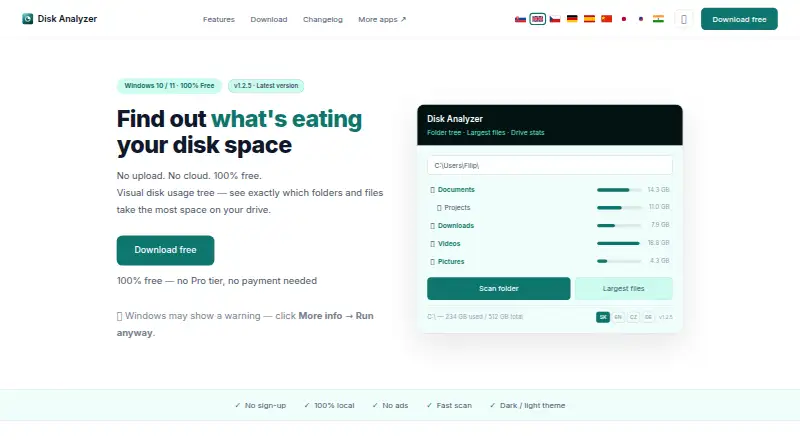
What Disk Analyzer is
Disk Analyzer is a free Windows application for finding which files and folders consume drive space. Its expandable folder tree sorts folders from largest to smallest, while a largest-files list highlights storage hogs. A treemap adds a visual view of usage, and drive statistics show total used and free capacity plus distribution across top-level folders. You can open subfolders and double-click a folder to launch it in Windows Explorer. Reports are exportable. Disk Analyzer only reads and displays usage information; it does not modify or delete files. Scanning is local and works offline, with no telemetry or registration requirement. The maker says parallel scanning handles thousands of files per second, including drives over 1 TB. It requires 64-bit Windows 10 or 11, the .NET 8 Desktop Runtime, and about 40 MB of disk space. The download page provides a SHA-256 checksum, and the installer and application are digitally signed. The free plan costs nothing, billed Free forever, with no Pro tier or sign-up.
Who it suits
It suits Windows users who need to locate large folders and files without changing their data. It is also useful for people wanting offline scans, exported reports, and no account requirement.
What it does well
- Free forever with no sign-up
- Treemap, folder tree, and largest-file views
- Offline local scanning with no telemetry
- Exportable usage reports
- Read-only analysis does not alter files
What to know first
- Windows 10 or 11 64-bit required
- Requires .NET 8 Desktop Runtime
- No macOS, Linux, or mobile platform listed
Plans
| Plan | Billed and limits | Price |
|---|---|---|
| Free | Free forever · Disk Analyzer is free; no Pro tier, payment, or sign-up | Free |
As diskanalyzer.vermels.com lists them, read 12 Oct 2026. The maker's own page has the final word.
Verdict
Disk Analyzer gives Windows users several ways to understand storage usage while keeping scans local and read-only. Its requirements are specific, but the free plan, offline operation, and exportable reports make the scope clear.
Facts from Disk Analyzer's own pages
- Browse folders
- Users can drill into subfolders and double-click to open a folder in Windows Explorer. · diskanalyzer.vermels.com, 12 Oct 2026
- Download integrity
- The current download page provides a SHA-256 checksum for verifying the downloaded file. · diskanalyzer.vermels.com, 12 Oct 2026
- Drive stats
- It displays total used and free space and how usage is distributed across top-level folders. · diskanalyzer.vermels.com, 12 Oct 2026
- Exportable reports
- Yes · diskanalyzer.vermels.com, 23 Sept 2026
- Folder view
- Its expandable folder tree shows folder sizes sorted largest first. · diskanalyzer.vermels.com, 12 Oct 2026
- Free plan
- Yes · diskanalyzer.vermels.com, 23 Sept 2026
- Integrations
- The maker's page mentions opening folders in Windows Explorer; it lists no other integrations. · diskanalyzer.vermels.com, 12 Oct 2026
- Largest files
- It lists the files consuming the most space to help identify storage hogs. · diskanalyzer.vermels.com, 12 Oct 2026
- Offline use
- The app does not need an internet connection to scan and analyze storage. · diskanalyzer.vermels.com, 12 Oct 2026
- Desktop platforms
- windows · diskanalyzer.vermels.com, 23 Sept 2026
- Privacy
- The maker says scanning is local, data does not leave the PC, and the app has no telemetry or registration requirement. · diskanalyzer.vermels.com, 12 Oct 2026
- Publisher signing
- The maker says the installer and app are digitally signed through Azure Trusted Signing under Tobiho store s. r. o. · diskanalyzer.vermels.com, 12 Oct 2026
- Purpose
- Disk Analyzer shows which folders and files use the most disk space. · diskanalyzer.vermels.com, 12 Oct 2026
- Read-only behavior
- The app only reads and displays usage information and does not modify or delete files. · diskanalyzer.vermels.com, 12 Oct 2026
- Requirements
- It requires 64-bit Windows 10 or 11, .NET 8 Desktop Runtime, and about 40 MB of disk space. · diskanalyzer.vermels.com, 12 Oct 2026
- Scan scope
- files_folders · diskanalyzer.vermels.com, 23 Sept 2026
- Scan speed
- The maker says parallel scanning processes thousands of files per second and handles drives over 1 TB quickly. · diskanalyzer.vermels.com, 12 Oct 2026
- Support
- The page lists [email protected] as the contact email. · diskanalyzer.vermels.com, 12 Oct 2026
- Treemap view
- Yes · diskanalyzer.vermels.com, 23 Sept 2026
Where Disk Analyzer stands on Freedom251
- Disk Space Analyzers#64 of 105