Freedom251 › Disk Space Analyzers
lintree
What lintree is
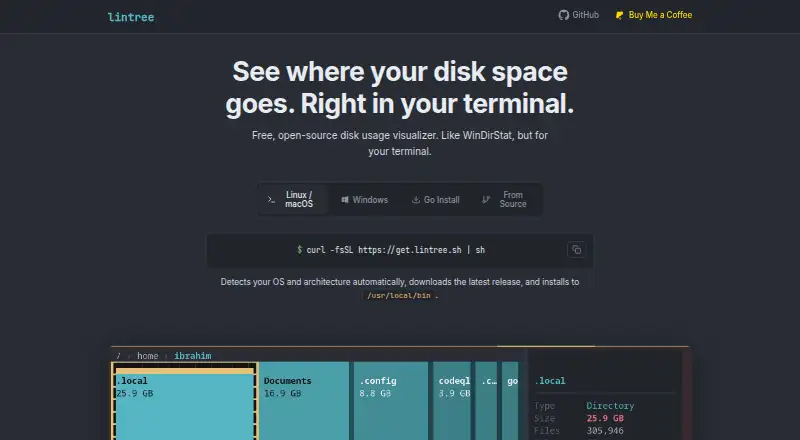
lintree is a free, open-source terminal disk usage analyzer for Linux, macOS, and Windows. It scans files and folders and displays an interactive treemap in which block size reflects file size. Colors distinguish types such as code, video, images, and archives. Keyboard controls let users enter folders, go back, and explore the filesystem. The concurrent scanner is described as handling millions of files, while the project describes minimal CPU and memory use, including on large filesystems. Suggested uses include inspecting Linux servers, working over SSH, checking macOS storage, and examining files in Windows PowerShell. Linux and macOS users can install with a shell command. Windows users can download and extract a release archive, and Go installation is also supported. The FAQ lists amd64 and arm64 builds. lintree is made by the PatchMon team and released under the MIT license, permitting use, modification, and sharing. Its listed plan costs nothing.
Who it suits
lintree suits people who want terminal-based disk inspection on Linux, macOS, or Windows. It is also useful for servers, SSH sessions, macOS storage checks, and Windows PowerShell.
What it does well
- Interactive treemap of filesystem usage
- Color-coded file types
- Scanner described for millions of files
- Minimal stated CPU and memory footprint
- MIT-licensed and free
What to know first
- Terminal-based interface
- Requires installation or archive extraction
- Builds are listed by architecture
Plans
| Plan | Billed and limits | Price |
|---|---|---|
| lintree | Free and open source under the MIT license | Free |
As lintree.sh lists them, read 12 Oct 2026. The maker's own page has the final word.
Verdict
lintree offers a free terminal view of filesystem usage with treemap navigation and broad desktop and server use cases. Its open-source license and low stated resource use make it a practical option for users comfortable with command-line tools.
Facts from lintree's own pages
- File types
- Files are color-coded by type, including code, video, images, and archives. · lintree.sh, 12 Oct 2026
- Free plan
- Yes · lintree.sh, 22 Sept 2026
- Installation
- Linux and macOS users can install with a shell command; Windows users can download and extract a release archive, and Go installation is also supported. · lintree.sh, 12 Oct 2026
- License
- Lintree is open source under the MIT license and can be used, modified, and shared. · lintree.sh, 12 Oct 2026
- Maker
- The site says lintree is made by the PatchMon team. · lintree.sh, 12 Oct 2026
- Navigation
- Users can drill into folders, go back, and explore the filesystem with keyboard controls. · lintree.sh, 12 Oct 2026
- Desktop platforms
- windows,macos,linux · lintree.sh, 22 Sept 2026
- Purpose
- Lintree is a free, open-source terminal disk usage analyzer that displays an interactive treemap of a filesystem. · lintree.sh, 12 Oct 2026
- Resource use
- The site describes lintree as having a minimal CPU and memory footprint, including on large filesystems. · lintree.sh, 12 Oct 2026
- Scanning
- The concurrent scanner is described as handling millions of files. · lintree.sh, 12 Oct 2026
- Scan scope
- files_folders · lintree.sh, 22 Sept 2026
- Support
- The site links to GitHub, Buy Me a Coffee, and a contact link; the GitHub README invites users to support the project. · lintree.sh, 12 Oct 2026
- Supported systems
- Lintree supports Linux, macOS, and Windows, with amd64 and arm64 builds listed in the FAQ. · lintree.sh, 12 Oct 2026
- Treemap
- Colored blocks are proportional to file sizes, helping identify what is using disk space. · lintree.sh, 12 Oct 2026
- Treemap view
- Yes · lintree.sh, 22 Sept 2026
- Use cases
- The site suggests using lintree to inspect disk usage on Linux servers, over SSH, on macOS, and in Windows PowerShell. · lintree.sh, 12 Oct 2026
Where lintree stands on Freedom251
- Disk Space Analyzers#60 of 105