Freedom251 › File Comparison Software
DiffMerge
What DiffMerge is
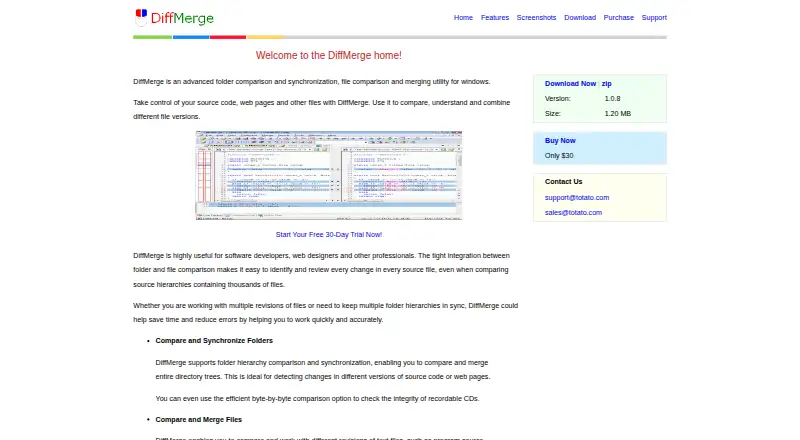
DiffMerge is desktop software for comparing and merging files, as well as comparing and synchronizing folders. It can examine directory trees and synchronize folder hierarchies, helping users review changes at both folder and file level. For text documents, it compares revisions of source code, XML, and HTML, and supports ASCII, MBCS, and Unicode. A color-coded side-by-side display marks differences, including changes within lines. Users can set comparison rules to disregard whitespace, comments, line endings, character case, or lines matching regular expressions. An in-place editor supports unlimited undo and automatically compares the documents again after edits. DiffMerge can also generate HTML comparison reports with syntax highlighting for archiving or distribution.
The desktop utility is available for Linux, macOS, and Windows; listed downloads include Windows, macOS, Ubuntu, and Fedora. Its manual gives integration instructions for Git, Mercurial, TortoiseSVN, Microsoft TFS, and Microsoft VSS 2005. The DiffMerge plan costs $30, paid once, and a 30-day evaluation of all functions is available after downloading the setup program. The listed Windows download is version 1.0.8.
Who it suits
DiffMerge suits software developers, web designers, and other professionals who need to inspect or merge text changes and compare directory trees. It may also fit users who want configurable ignore rules, an editable merge view, or HTML reports.
What it does well
- Compares and synchronizes folder hierarchies.
- Reads source code, XML, and HTML revisions.
- Supports ASCII, MBCS, and Unicode text.
- Ignore rules cover whitespace, comments, and more.
- HTML reports include syntax highlighting.
- Integrations are documented for Git and Mercurial.
What to know first
- No free plan is offered.
- The listed plan costs $30, paid once.
- The listed Windows download is version 1.0.8.
Limits
The 30-day evaluation lasts 30 days after downloading the setup program. The listed DiffMerge plan specifies a Windows download, version 1.0.8.
Plans
| Plan | Billed and limits | Price |
|---|---|---|
| DiffMerge | 30-day evaluation · Windows download · Version 1.0.8 | $30, paid once |
As diffmerge.net lists them, read 11 Oct 2026. The maker's own page has the final word.
Getting started
- Visit https://www.diffmerge.net/.
- Choose a download for Windows, macOS, Ubuntu, or Fedora.
- Download the setup program to begin the 30-day evaluation.
- Purchase the DiffMerge plan for $30, paid once if you want the listed paid plan.
Verdict
Choose DiffMerge if you need file merging alongside folder comparison and synchronization, with configurable change filtering and report creation. Look elsewhere if you need a free plan or a platform-specific listed plan beyond the Windows download.
Questions
How much does DiffMerge cost?
The DiffMerge plan costs $30, paid once. A 30-day evaluation is available after downloading the setup program.
Is there a free plan?
No. Unregistered users can try all functions for 30 days after downloading the setup program.
Which platforms are supported?
DiffMerge is listed for Linux, macOS, and Windows. Downloads are listed for Windows, macOS, Ubuntu, and Fedora.
What kinds of files can it compare?
It compares text revisions including source code, XML, and HTML, with ASCII, MBCS, and Unicode support.
Which integrations are documented?
The manual lists integration instructions for Git, Mercurial, TortoiseSVN, Microsoft TFS, and Microsoft VSS 2005.
Facts from DiffMerge's own pages
- Change highlighting
- File comparisons use a color-coded side-by-side view with detailed highlights of changes within lines. · diffmerge.net, 11 Oct 2026
- Download details
- The listed Windows download is version 1.0.8, 1.20 MB, and a self-extracting setup program. · diffmerge.net, 11 Oct 2026
- Evaluation
- The maker's download page says unregistered users can try all functions for 30 days after downloading the setup program. · diffmerge.net, 11 Oct 2026
- Folder comparison
- It compares and merges directory trees and can synchronize folder hierarchies. · diffmerge.net, 11 Oct 2026
- Ignore rules
- It can ignore whitespace, comments, line endings, character case, and lines matching specified regular expressions. · diffmerge.net, 11 Oct 2026
- Integrations
- The SourceGear DiffMerge manual lists integration instructions for Git, Mercurial, TortoiseSVN, Microsoft TFS, and Microsoft VSS 2005. · sourcegear.com, 11 Oct 2026
- Intended users
- The homepage describes the utility as useful for software developers, web designers, and other professionals. · diffmerge.net, 11 Oct 2026
- Merge editing
- Its in-place editor provides unlimited undo and automatically recompares documents after each edit. · diffmerge.net, 11 Oct 2026
- Other platforms
- SourceGear's DiffMerge download page lists Windows, macOS, Ubuntu, and Fedora downloads. · sourcegear.com, 11 Oct 2026
- Purpose
- DiffMerge compares and synchronizes folders and compares and merges files. · diffmerge.net, 11 Oct 2026
- Reports
- It can create HTML comparison reports with syntax highlighting for archiving or distribution. · diffmerge.net, 11 Oct 2026
- Security
- The opened product pages do not state security certifications or compliance claims. · diffmerge.net, 11 Oct 2026
- Support
- The opened DiffMerge support page currently displays demo-site text rather than product support information. · diffmerge.net, 11 Oct 2026
- Text files
- It compares revisions of text files, including source code, XML, and HTML, with support for ASCII, MBCS, and Unicode. · diffmerge.net, 11 Oct 2026
Where DiffMerge stands on Freedom251
- File Comparison Software#20 of 33
- Diff and Merge Tools#23 of 29