Freedom251 › DevOps analytics software

DevStats
What DevStats is
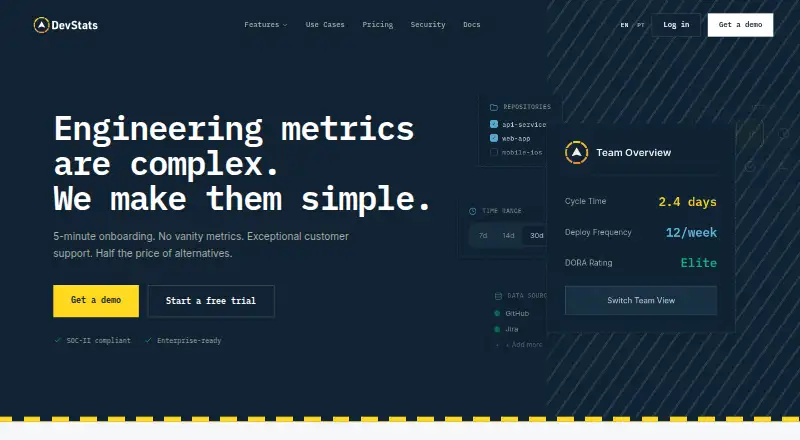
DevStats is an engineering analytics platform for software teams, available through a web app and API and delivered as a cloud service. Its Flow reporting covers pull request cycle time across five stages, issue cycle time, throughput, open pull requests, daily work in progress, and aging issues and branches. Planning reports include sprint health, velocity, completion rates, planning accuracy, and work breakdown. Teams can also review how engineering effort is spread across projects, features, maintenance, initiatives, products, and teams. DevStats reports the DORA measures Deployment Frequency, Lead Time, Change Failure Rate, and MTTR. Integrations cover code repositories, issue trackers, project tools, and AI tools including GitHub Copilot, Cursor, Claude Code, Amazon Q, Cody, and Windsurf. A free Benchmark plan provides team benchmark and peer comparison reports. Standard costs $15 a month per contributor, billed annually, and includes core reports and one-year data retention. Enterprise costs $27 a month per contributor, billed annually, and adds all reports, the DevStats API, dedicated customer success, VIP Slack support, and three-year data retention. DevStats says it is SOC 2 Type II certified, uses read-only repository permissions, and does not access source code.
Who it suits
DevStats suits developers, tech leads, engineering managers, and CTOs who want reporting on delivery, planning, reliability, and engineering investment. Its stated company-size fit spans small teams, mid-market organizations, and enterprises.
What it does well
- Tracks pull request and issue flow across multiple measures.
- Reports sprint health, velocity, completion, and planning accuracy.
- Shows engineering effort across projects, features, and teams.
- Includes the four named DORA metrics.
- Connects to major repository, issue, and project tools.
- SOC 2 Type II certified with read-only repository permissions.
What to know first
- Standard costs $15 a month per contributor, billed annually.
- Enterprise costs $27 a month per contributor, billed annually.
- Standard retains data for one year; Enterprise retains it for three years.
Limits
Benchmark is a free team benchmark report. Standard is $15 a month per contributor, billed annually, and includes core reports with one-year data retention; all reports, the DevStats API, and three-year retention are listed under Enterprise at $27 a month per contributor, billed annually.
Plans
| Plan | Billed and limits | Price |
|---|---|---|
| Benchmark | Free forever · Team benchmark report · Overall percentile vs similar teams · DORA, Flow & Planning benchmarks · Peer comparison · Git and issue tracker integrations | Free |
| Standard | per contributor, billed annually · Core reports and metrics · Docs & email support · 1-year data retention | $15 a month |
| Enterprise | per contributor, billed annually · All reports · DevStats API · Dedicated customer success manager · VIP Slack channel · 3-year data retention | $27 a month |
As devstats.com lists them, read 2 Oct 2026. The maker's own page has the final word.
Getting started
- Open the DevStats website.
- Choose the free Benchmark plan, Standard, or Enterprise.
- Connect a repository or issue-tracking integration such as GitHub, GitLab, Jira, or Linear.
- Use the web platform or API to access the available reports, according to your plan.
Verdict
Choose DevStats if your team needs engineering delivery, planning, allocation, and DORA reporting in one cloud platform. The free Benchmark plan offers team comparisons; teams needing core reports start at $15 a month per contributor, billed annually, while the DevStats API and three-year retention are in Enterprise.
Questions
Is DevStats free?
Yes. Benchmark is free forever and provides a team benchmark report with peer comparison and DORA, Flow, and Planning benchmarks.
How much do the paid plans cost?
Standard costs $15 a month per contributor, billed annually. Enterprise costs $27 a month per contributor, billed annually.
What platforms does DevStats support?
DevStats is available on the web and through an API, and its deployment is cloud-based.
Which tools does it integrate with?
Listed integrations include GitHub, GitLab, Bitbucket, Azure Repos, Jira, Linear, Azure Boards, GitHub Projects, ClickUp, Incident.io, and AI tools such as GitHub Copilot and Cursor.
What security controls does DevStats list?
DevStats says it is SOC 2 Type II certified, uses read-only repository permissions, and does not access source code. Listed controls also include SSO/SAML, two-factor authentication, role-based access control, audit logging, and session management.
How long does DevStats retain data?
Standard includes one-year data retention. Enterprise includes three-year data retention.
Facts from DevStats's own pages
- Access controls
- Listed security controls include SSO/SAML, two-factor authentication, role-based access control, audit logging, and session management. · devstats.com, 2 Oct 2026
- AI tools
- The integrations page lists GitHub Copilot, Cursor, Claude Code, Amazon Q, Cody, and Windsurf among its AI tools. · devstats.com, 2 Oct 2026
- Company size fit
- small, mid market, enterprise · devstats.com, 22 Sept 2026
- Compliance
- SOC 2, sso saml, two factor · devstats.com, 22 Sept 2026
- Data deletion
- DevStats says disconnecting an integration immediately deletes all associated data from its systems. · devstats.com, 2 Oct 2026
- Deployment
- cloud · devstats.com, 22 Sept 2026
- Encryption
- The security page specifies TLS 1.3 encryption in transit and AES-256 encryption at rest, with credentials held in a dedicated vault with hardware security modules. · devstats.com, 2 Oct 2026
- Engineering investment
- Investment and allocation features show how engineering effort is distributed across projects, features, maintenance, initiatives, products, and teams. · devstats.com, 2 Oct 2026
- Headquarters
- Murray, Utah, United States · devstats.com, 28 Sept 2026
- Integrations
- GitHub, GitLab, GitLab Self-Managed, Bitbucket, Bitbucket Data Center, Azure Repos, Jira Cloud, Jira Data Center, Linear, Azure Boards, GitHub Projects, ClickUp, Incident.io · devstats.com, 22 Sept 2026
- Intended users
- DevStats says it is for software teams and names developers, tech leads, engineering managers, and CTOs as intended users. · devstats.com, 2 Oct 2026
- Other integrations
- Listed integrations include GitHub, GitLab, GitLab Self-Managed, Bitbucket, Bitbucket Data Center, Azure Repos, Jira, Linear, Azure Boards, GitHub Projects, and ClickUp. · devstats.com, 2 Oct 2026
- Plan limits
- The pricing page lists one-year data retention for Standard and three-year retention for Enterprise; Benchmark is a free team benchmark report. · devstats.com, 2 Oct 2026
- Planning
- Planning features include sprint health, velocity, completion rates, planning accuracy, and work breakdown. · devstats.com, 2 Oct 2026
- Product
- DevStats describes itself as an end-to-end engineering analytics platform for software teams. · devstats.com, 2 Oct 2026
- Reliability metrics
- DevStats lists Deployment Frequency, Lead Time, Change Failure Rate, and MTTR as its DORA metrics. · devstats.com, 2 Oct 2026
- Security
- DevStats says it is SOC 2 Type II certified, requests read-only repository permissions, and does not store, process, or access source code. · devstats.com, 2 Oct 2026
- Support
- Standard includes docs and email support; Enterprise includes a dedicated Customer Success Manager and VIP Slack channel. · devstats.com, 2 Oct 2026
- Support channels
- email, docs · devstats.com, 22 Sept 2026
- Workflow analytics
- Its Flow features track PR cycle time in five stages, issue cycle time, throughput, open PRs, daily work in progress, and aging issues and branches. · devstats.com, 2 Oct 2026
Where DevStats stands on Freedom251
- DevOps analytics software#15 of 48