Freedom251 › AI PDF Assistants
DeepPDF
What DeepPDF is
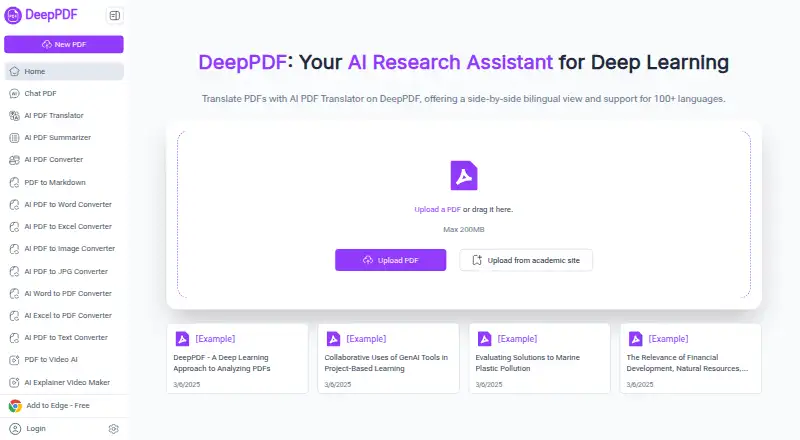
DeepPDF is a browser-based PDF assistant for asking questions about documents, creating summaries, comparing translations, explaining terms, and analyzing images and formulas. It supports multiple PDFs in a chat and provides source citations. OCR converts scanned, image-based PDFs into searchable text, while its translator displays bilingual text side by side in more than 100 languages. Other listed tools convert PDFs to Word, Excel, PowerPoint and other formats, or convert Word files to PDF. Users can also compress, merge and split PDFs, delete pages, add watermarks, sign documents and edit text online. DeepPDF offers access to Google Scholar for academic paper searches and recommendations. The browser upload area states a maximum PDF size of 200 MB, though plan limits vary. Free costs nothing and lists 10 PDFs up to 5 MB each with limited AI and features. Pro is free during beta, with 200 PDFs up to 50 MB each; Max is free during beta, with 1,000 PDFs up to 200 MB each. Email and Discord support are available.
Who it suits
DeepPDF may suit researchers, students, educators, legal teams, business professionals and content creators who work with PDFs. Its OCR, translation and academic search tools are especially relevant to document-heavy tasks.
What it does well
- Chats can use multiple PDFs and provide source citations.
- OCR makes scanned PDFs searchable.
- Side-by-side translation supports more than 100 languages.
- Includes PDF conversion and editing tools.
- Free plan includes 10 PDFs.
What to know first
- Free plan limits PDFs to 5 MB each.
- Free plan has limited AI and features.
- Pro and Max are billed during beta.
- Collected data may be stored or transferred internationally.
Limits
The Free plan allows 10 PDFs up to 5 MB each and lists limited AI and features. Pro lists 200 PDFs up to 50 MB each, while Max lists 1,000 PDFs up to 200 MB each; both list unlimited AI and features and are billed during beta.
Plans
| Plan | Billed and limits | Price |
|---|---|---|
| Pro | during beta · 200 PDFs · 50 MB/PDF · Unlimited AI · Unlimited Features | Free |
| Free | 10 PDFs · 5 MB/PDF · Limited AI · Limited Features | Free |
| Max | during beta · 1000 PDFs · 200 MB/PDF · Unlimited AI · Unlimited Features | Free |
As deeppdf.ai lists them, read 3 Oct 2026. The maker's own page has the final word.
Getting started
- Open the DeepPDF website in a browser.
- Upload a PDF, up to the stated 200 MB maximum.
- Use the Free plan, or review Pro and Max plan limits.
- Add the extension through the homepage’s Add to Edge link.
DeepPDF is a browser-based PDF workspace that combines document chat with OCR, translation, conversion, and editing utilities. It is best suited to researchers, students, and professionals who regularly handle scanned, multilingual, or citation-sensitive documents. The broad toolkit is useful, but the Free plan’s low file limits and cross-border processing terms make careful plan and privacy review essential.
Overview
DeepPDF lets users upload PDFs in a browser and ask questions about one or several documents in the same chat. It can summarize material, explain terminology, compare translations, and analyze images and formulas. Source citations provide a way to trace an answer to its document, which matters when using AI output for academic, legal, or business work.
Beyond chat, the service brings together OCR, translation, conversion, and common PDF maintenance tasks. That breadth can replace several narrowly focused tools for routine workflows. The limitation is capacity: the entry plan restricts both document count and file size, and the privacy policy permits storage in the United States or other territories plus transfers to processors or affiliated companies in other countries.
Key features
PDF chat, citations, and OCR
Multiple PDFs can be included in one conversation, allowing comparisons or questions spanning a document set rather than a single file. Summaries, explanations, image and formula analysis, and source citations make it more useful for study and review than a basic text extractor. OCR converts scanned or image-based PDFs into searchable text, opening the assistant to archival scans and paper-originated files. Users with large scans may quickly outgrow the Free plan’s 5 MB file ceiling.
Translation and academic work
The translator presents source and translated text side by side and supports more than 100 languages. That layout suits bilingual checking and reading foreign-language papers, while the Google Scholar connection can help users search for academic papers and receive recommendations. It is a practical combination for students and researchers, although the quality of any generated explanation or translation still warrants human checking for high-stakes work.
Conversion and PDF utilities
DeepPDF lists conversion from PDF to Word, Excel, PowerPoint, PNG, and other formats, along with Word-to-PDF conversion. Its online utilities include compression, merging, splitting, page deletion, watermarks, signatures, and text editing. These functions are valuable for document preparation and cleanup, especially when switching between analysis and final delivery in one service. The homepage accepts PDFs up to 200 MB, but plan-specific caps can be lower.
Pricing
DeepPDF uses a freemium model with three published tiers. Free costs nothing and permits 10 PDFs, with a 5 MB limit per PDF, plus limited AI and limited features. It is suitable for occasional, lightweight experiments, not substantial research collections or large scans.
Pro costs nothing, billed during beta. It raises the allowance to 200 PDFs and 50 MB per PDF, with unlimited AI and unlimited features. This is the sensible middle option for regular individual work that fits within a few hundred documents.
Max also costs nothing, billed during beta. It allows 1,000 PDFs, 200 MB per PDF, unlimited AI, and unlimited features. It is aimed at heavy users and larger source files. The beta billing wording means readers should confirm renewal and post-beta terms before relying on it for an ongoing workflow.
Platforms
DeepPDF is available on the web and as an extension. Browser upload is central to the experience, and the homepage provides an “Add to Edge” option. It supports PDF files up to 200 MB at the upload level, subject to the smaller limits on some plans.
Who it's for
Researchers and academics can use multi-document chat, citations, OCR, translation, and academic search in one workflow. Students benefit from summaries, term explanations, and bilingual reading. Business professionals and legal teams may value conversion, signatures, watermarks, and organized document analysis. Educators and content creators can use the same tools for preparing, comparing, and repurposing source material. Confidential-document users should first assess the policy’s overseas storage and processor transfers.
Pros and cons
- Pro: Combines chat, OCR, translation, conversion, and editing instead of requiring separate PDF tools.
- Pro: Multi-PDF conversations and source citations support cross-document review and verification.
- Pro: More than 100 translation languages and Google Scholar access suit academic and multilingual work.
- Con: The Free plan allows only 10 PDFs at 5 MB each and limits AI and features.
- Con: Data may be stored or processed across countries, which can conflict with strict confidentiality requirements.
- Con: Pro and Max are marked as billed during beta, so their longer-term commercial terms need checking.
Alternatives
Browse AI PDF Assistants for a wider category comparison. Choose ChatPDF instead if you need broad operating-system coverage, including mobile and desktop apps, or its Plus tier’s unlimited document analysis. Anara is a better fit when you want extension, iOS, and macOS access plus Google Drive, Notion, and OneDrive connectors on its $20 a year Pro plan. Pick AskYourPDF for a $11.99 a year Premium plan with up to 2,500 pages per document, 31 MB uploads, and 50 documents per day. Audeus is an alternative centered on document listening and text-to-speech across devices. DeinPDF suits users who prefer pay-as-you-go billing with a €0 monthly base fee and usage charges. ChatDOC offers a defined free daily quota and an $8.99 a month Pro monthly plan. docAnalyzer provides document analysis, chat, notes, and monthly credits, with an $8 a month Basic tier. Doxy is a simpler web option whose $4.99 a month Pro plan raises storage and question limits.
Verdict
DeepPDF is a strong choice for users who want one browser service for PDF questioning, scanned-document OCR, multilingual reading, academic discovery, and file preparation. Its main reason to choose it is the unusually broad combination of analysis and utilities, with citations and multi-PDF chat. Look elsewhere if the Free plan’s 5 MB files and 10-document allowance are too restrictive, or if international storage and processing are unacceptable for your documents.
Verdict
DeepPDF brings document Q&A, OCR, translation, academic search and PDF utilities together in a browser service. Check the tier limits and data-handling terms against your needs before uploading documents.
Questions
Is DeepPDF free?
Yes. The Free plan is listed as free and allows 10 PDFs up to 5 MB each, with limited AI and features.
What do Pro and Max cost?
Pro and Max are each listed as free during beta. Pro lists 200 PDFs up to 50 MB each; Max lists 1,000 PDFs up to 200 MB each.
Which platforms can I use?
DeepPDF is available on the web and as an extension. The homepage provides an Add to Edge link.
Can DeepPDF handle scanned PDFs and multiple documents?
Yes. It supports scanned PDFs through OCR and allows multiple PDFs in one chat. It also provides source citations.
What languages does the translator support?
The translator supports more than 100 languages and presents a side-by-side bilingual view.
Who operates DeepPDF?
Its privacy policy identifies the operator as ZINGDECK INTL PTE.LTD. DeepPDF Inc Sub.
Facts from DeepPDF's own pages
- Academic search
- DeepPDF says users can access Google Scholar to search for academic papers and get recommendations. · deeppdf.ai, 3 Oct 2026
- Browser access
- The homepage provides PDF upload in the browser and offers an “Add to Edge” link. · deeppdf.ai, 3 Oct 2026
- Conversion
- The site lists tools to convert PDFs to Word, Excel, PowerPoint, and other formats, and convert Word files to PDF. · deeppdf.ai, 3 Oct 2026
- Data handling
- The privacy policy says collected data may be stored on servers in the United States or other territories and may be transferred to third-party processors or group companies in other countries. · deeppdf.ai, 3 Oct 2026
- File size
- The homepage upload area states a maximum PDF size of 200 MB. · deeppdf.ai, 3 Oct 2026
- Intended users
- The site names researchers, academics, business professionals, legal teams, educators, students, and content creators as potential users. · deeppdf.ai, 3 Oct 2026
- Maker identity
- The privacy policy identifies the operator as “ZINGDECK INTL PTE.LTD. DeepPDF Inc Sub.” · deeppdf.ai, 3 Oct 2026
- OCR
- Its OCR feature can turn scanned, image-based PDFs into searchable text documents. · deeppdf.ai, 3 Oct 2026
- PDF assistant
- DeepPDF lets users chat with PDFs, generate summaries, compare translations, explain terms, and analyze images and formulas. · deeppdf.ai, 3 Oct 2026
- PDF utilities
- The site says users can compress, merge, and split PDFs, delete pages, add watermarks, sign documents, and edit text online. · deeppdf.ai, 3 Oct 2026
- Security measures
- The privacy policy lists internal reviews, server firewalls, physical security for data facilities, and regular security assessments and updates. · deeppdf.ai, 3 Oct 2026
- Support
- DeepPDF offers email support and a Discord community; it says email replies typically arrive within 24 hours during business days. · deeppdf.ai, 3 Oct 2026
- Translation
- The PDF translator offers a side-by-side bilingual view and supports more than 100 languages. · deeppdf.ai, 3 Oct 2026
Where DeepPDF stands on Freedom251
- AI PDF Assistants#9 of 27