Paperpal
by Paperpal
What Paperpal is
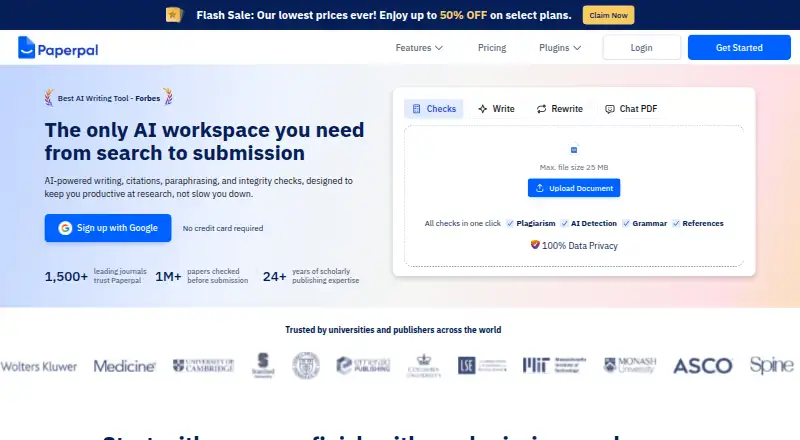
Paperpal is an AI research and academic writing workspace for students and researchers. Users can upload PDFs and references, ask questions, and get cited findings drawn from more than 300 million verified research articles. For drafting and revision, it offers academic writing suggestions, paraphrasing, tone changes, word reduction, grammar correction, proofreading, and citation formatting. Its checks cover plagiarism, AI-writing patterns, references, and journal submission readiness. Paperpal is available on the web and as a browser extension, with a Microsoft Word add-in and extension support for Google Docs and Overleaf. The free plan includes 200 language suggestions, five generative AI uses daily, 7,000 plagiarism-check words monthly, and five daily AI-detection scans of up to 1,200 words each. Prime is $12 a year (billed $144 a year ($12/month; billed annually)) or $25 a month (billed $25 a month (billed monthly)). Paperpal says user documents are not used to train its AI and can be deleted.
Who it suits
It suits students and researchers who want writing, citation, and submission-check tools alongside research discovery. Institutions and publishers can also explore its solutions.
What it does well
- Cited findings from over 300 million research articles
- Writing, citation, paraphrasing, and integrity checks
- Works on web and through browser extensions
- Free plan includes 200 language suggestions
What to know first
- Free AI use is limited to five times daily
- Free plagiarism checks cover 7,000 words monthly
- No desktop or mobile app is listed
Limits
The free plan has 200 language suggestions, five generative AI uses per day, 7,000 plagiarism-check words per month, and five AI-detection scans per day, each up to 1,200 words. Citation generation is unlimited on Free. The listed included word limit is 10,000 words per month.
Plans
| Plan | Billed and limits | Price |
|---|---|---|
| Free | No credit card required · 200 grammar edits/month · Lite plagiarism report · Preview AI detection · Lite Journal Fit · 5 daily writing/research uses · 5 PDF files/month · 300 MB library | Free |
| Prime | $144 billed annually · 20,000 grammar/consistency edits/month · 10,000 plagiarism words/month · 25,000 AI-detection words/month · 10,000 reference-check words/month · 500 writing uses/month · 500 research uses/month · 150 PDF files/month · 2 GB library | $12 a month |
| Prime Annual | Annual · 1 user | $139 a year |
| Paperpal Prime | $144 a year ($12/month; billed annually) · Regular research and writing needs | $144 a year |
| Prime Monthly | Monthly · 1 user | $25 a month |
| Paperpal Prime | $25 a month (billed monthly) · Regular research and writing needs | $25 a month |
| Pro | $348 billed annually · Unlimited grammar/consistency edits · 30,000 plagiarism words/month · Unlimited AI detection · Unlimited Journal Fit with full report · 30,000 reference-check words/month · Unlimited writing/research usage during promotional period · 500 files/month · 10 GB library | $29 a month |
| Paperpal Pro | $348 a year ($29/month; billed annually) · High-stakes research writing, including journal articles, theses, and clinical documents | $348 a year |
The first 8 of 10 plans, as paperpal.com lists them, read 14 Oct 2026. The maker's own page has the final word. Every plan
Getting started
- Open paperpal.com on the web or use a browser extension
- Choose the free plan or a paid plan
- Upload references or PDFs to ask questions and get cited findings
- Use the writing and checking tools as needed
- Add the Microsoft Word add-in, or use the browser extension with Google Docs or Overleaf
Paperpal is an academic research and writing workspace that combines literature discovery with editing and submission checks. It is best suited to students and researchers who want those tasks together, particularly when preparing formal academic work. Its broad toolkit is useful, but the free plan’s quotas make it a limited option for regular drafting.
Overview
Paperpal goes beyond proofreading by pairing writing support with research discovery, citation tools and submission checks. That makes it a stronger fit for an academic workflow than for someone seeking only a general-purpose paraphraser. Students and researchers are its stated audience; institutions and publishers can also access tailored solutions.
Key features
Users can upload references and PDFs, ask questions and receive cited findings from more than 300 million verified research articles. This brings source exploration into the same workspace as writing support, though citations and findings still need to be assessed in context before they inform an argument.
Writing tools include academic suggestions, paraphrasing, tone changes, word reduction, grammar correction, proofreading and citation formatting. Plagiarism and AI-writing checks, reference checking and journal-readiness assessment extend that support into submission preparation. The range is useful for researchers working through several stages of a paper, but may be more than needed for a one-off rewrite.
A Microsoft Word add-in and browser extensions for Google Docs and Overleaf let users work across common academic writing environments; Microsoft Edge is supported for the Google Docs and Overleaf extensions. Paperpal says it does not use documents, uploads or personal information to train its AI models, and lets users delete documents. It states that data is encrypted in transit with 256-bit encryption and at rest with KMS keys, and that it uses SSAE 18/SOC1-certified data centers. Its stated compliance credentials include GDPR, PECR readiness, ISO/IEC 27001:2022, CSA STAR Level 1, FERPA and ISO/IEC 42001:2023.
Pricing
The Free plan costs nothing. It includes 200 language suggestions, five daily generative AI uses, unlimited citation generation, 7,000 plagiarism-check words per month and five AI-detection scans per day, each covering up to 1,200 words. Those allowances are enough to try the workflow or handle occasional checks, but the limited suggestions and generative uses are restrictive for sustained writing.
Prime costs $144 a year, billed as $144 a year ($12/month; billed annually), or $25 a month when billed monthly. Both are aimed at regular research and writing needs. Choosing annual billing lowers the monthly equivalent, but commits the buyer to a year; monthly billing costs more over a year and avoids that annual commitment.
Pro costs $348 a year, billed as $348 a year ($29/month; billed annually), or $59 a month when billed monthly. It is positioned for high-stakes research writing, including journal articles, theses and clinical documents. The higher price makes it the plan to consider when that more demanding writing context fits; the cheaper Prime is the more proportionate option for regular work that does not call for Pro. A 10,000-word monthly limit is stated for the paid offering, so users with larger workloads should account for that cap. A free trial is offered.
Institutions can contact sales for shared libraries, access management, institution-wide pricing and a free trial. Paperpal also provides a Help Center and lists [email protected] as its contact email.
Platforms
Paperpal is available on the web and as a browser extension, with a Microsoft Word add-in and extension support for Google Docs and Overleaf. That mix suits writers who want to use the tools alongside their document workflow rather than only in a separate web workspace.
Who it's for
Paperpal is a sensible choice for students and researchers who need academic editing, citation support and submission checks in one product. Its research discovery and journal-readiness tools are particularly relevant to paper preparation. It is less compelling for people who only need occasional paraphrasing, or whose writing workload would quickly outgrow the stated monthly word limit.
Pros and cons
- Pros: Research discovery, writing support and submission checks sit in one workspace, reducing the need to switch between separate academic tools.
- Pros: Word, Google Docs and Overleaf support fits established writing workflows.
- Pros: The free plan includes unlimited citation generation and defined plagiarism and AI-detection allowances, making it possible to try several parts of the product without paying.
- Cons: The free plan limits language suggestions and generative AI uses, which can interrupt regular drafting.
- Cons: Paid plans carry a 10,000-word monthly limit, a constraint for users with heavier workloads.
- Cons: Annual billing is cheaper per month but requires a year-long commitment; monthly billing is substantially more expensive.
Alternatives
For a narrower paraphrasing need, QuillBot is a freemium alternative with a free plan that allows paraphrasing up to 100 words and includes two modes and basic grammar support. For broader comparisons, see Paraphrasing Tools, AI Writing Tools, AI writing assistants, AI PDF Assistants, AI Citation Generators and AI Essay Writers.
Trinka, Paraphrasing.io, RewriteGuru, Paraphrase Online, Wordtune, Clever AI Humanizer and ParaFree are also alternatives to consider.
Verdict
Choose Paperpal if you are a student or researcher who wants academic discovery, writing support and submission checks under one roof. Its academic breadth and document integrations are the main reasons to choose it; the free quotas and paid monthly word limit are the main reasons to look elsewhere if you write frequently or need only a focused rewriting tool.
Verdict
Paperpal brings research discovery, academic writing support, and submission checks into one workspace. Its free plan has defined usage limits, while paid options include both annual and monthly billing.
Questions
Is Paperpal free?
Yes. Its free plan includes 200 language suggestions, five daily generative AI uses, unlimited citation generation, and monthly and daily checking allowances.
How much do paid plans cost?
Prime is $144 per year when billed annually or $25 per month when billed monthly. Pro is $348 per year billed annually or $59 per month billed monthly.
Which platforms does Paperpal support?
Paperpal is available on the web and as a browser extension. It also offers a Microsoft Word add-in and browser-extension support for Google Docs and Overleaf.
Who makes Paperpal?
Paperpal is made by Paperpal, whose headquarters are in Singapore. The maker was founded in 2002.
Does Paperpal train its AI on uploaded documents?
Paperpal says it does not use user documents, uploads, or personal information to train its AI models.
Can institutions use Paperpal?
Yes. Its institutional offering lists shared libraries, access management, institution-wide pricing, and a free trial available by contacting sales.
Facts from Paperpal's own pages
- Academic language editing
- Its language tools provide grammar, clarity, style, vocabulary and consistency suggestions tuned to scholarly writing. · paperpal.com, 14 Oct 2026
- API and SDKs
- The public product, support and integration pages reviewed describe user-facing add-ins and extensions but do not publish API or SDK documentation. · paperpal.com, 14 Oct 2026
- Audience
- Paperpal describes its tools as designed for students and researchers, and offers solutions for universities and publishers. · paperpal.com, 30 Sept 2026
- Browser extension
- Yes · support.paperpal.com, 23 Sept 2026
- Chat with PDFs
- Users can upload or open full-text PDFs, ask questions, extract findings and generate summaries. · chromewebstore.google.com, 14 Oct 2026
- Chrome extension
- The Chrome extension provides grammar, paraphrasing, PDF chat, citation notetaking and reference-finder functions inside browser workflows. · chromewebstore.google.com, 14 Oct 2026
- Citation styles
- Its citation generator supports more than 10,000 citation styles. · chromewebstore.google.com, 14 Oct 2026
- Compliance
- Paperpal states that it is GDPR compliant, PECR ready, ISO/IEC 27001:2022 certified, CSA STAR Level 1 listed, FERPA compliant, and ISO/IEC 42001:2023 certified. · paperpal.com, 30 Sept 2026
- Documentation and support
- Paperpal maintains a Help Center with FAQ categories for features, free usage, data privacy and security, plus email support at [email protected]. · support.paperpal.com, 14 Oct 2026
- Document Health Check
- Document Health Check combines plagiarism, AI-writing, grammar and reference verification in one document workflow. · paperpal.com, 14 Oct 2026
- Encryption and access controls
- Paperpal states that traffic uses TLS 1.2 with 2048-bit RSA/SHA-256 certificates and that employee access is restricted under confidentiality agreements. · support.paperpal.com, 14 Oct 2026
- Enterprise
- The pricing page offers institutions shared libraries, access management, institution-wide pricing, and a free trial by contacting sales. · paperpal.com, 30 Sept 2026
- Founded
- 2002 · paperpal.com, 28 Sept 2026
- Free limits
- The free plan includes 200 language suggestions, five daily generative AI uses, 7,000 plagiarism-check words per month, and five AI-detection scans per day of up to 1,200 words each. · paperpal.com, 30 Sept 2026
- Free plan
- Yes · support.paperpal.com, 23 Sept 2026
- Hands-on review limits
- Canopyne reports that some AI actions felt slower than ChatGPT or Gemini, free usage limits appeared quickly and AI-detection results should not be treated as definitive proof. · canopyne.com, 14 Oct 2026
- Hands-on review rating
- Canopyne gives Paperpal 4.6 out of 5 after testing rewriting, grammar, research, PDF chat, plagiarism and AI detection. · canopyne.com, 14 Oct 2026
- Headquarters
- Singapore · paperpal.com, 28 Sept 2026
- Independent review limits
- WritingStudio reports that free limits are reached quickly, the $25 monthly price is high for students, research answers require verification and citation checking remains necessary. · writingstudio.com, 14 Oct 2026
- Independent review rating
- WritingStudio rates Paperpal as a solid academic-language editor but says it is less suitable as a complete source-management and drafting workspace. · writingstudio.com, 14 Oct 2026
- Integrations
- Official pages list a web app, Microsoft Word add-in, Google Docs support, Chrome extension and Overleaf support. · paperpal.com, 14 Oct 2026
- Journal readiness
- The manuscript checker runs more than 30 checks across language, references, structure, figures, disclosures and metadata. · paperpal.com, 14 Oct 2026
- Limit: G2 speed and scope
- G2 reviewers report slow initial scanning, occasional difficulty with complex ideas, limited usefulness for creative writing and weak integration with related tools. · g2.com, 14 Oct 2026
- Limit: Software Advice pricing and coverage
- Software Advice reviewers describe the subscription as expensive, request lifetime purchasing, and report limited integrations and cross-platform support. · softwareadvice.com, 14 Oct 2026
Where Paperpal stands on Freedom251
- AI Writing Tools#6 of 269
- Paraphrasing Tools#2 of 24
- AI writing assistants#5 of 25
- AI PDF Assistants#8 of 27
- Writing Assistants Software#8 of 26
- Proofreading Software#10 of 30
- Citation generators#21 of 57
- AI Essay Writers#11 of 29
- AI Citation Generators#12 of 30