Freedom251 › Debt Management Software
Debt Ladder
What Debt Ladder is
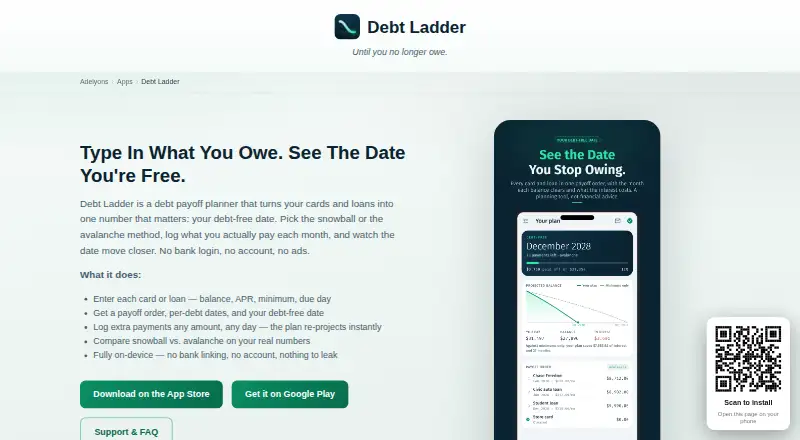
Debt Ladder is a mobile planning tool that turns entered card and loan details into a payoff order, projected payoff dates for each debt, total interest, and a debt-free date. It supports the debt snowball and debt avalanche methods and compares their results using the user’s numbers. Users can record an extra payment of any amount on any day; the payoff plan and projected debt-free date then update. A monthly check-in shows expected payments and lets users record payments as they make them. Optional reminders can be scheduled on the device for monthly check-ins and individual debt due dates.
Users type in their balances themselves. Debt Ladder has no bank login, aggregator, or bank-linking feature. Debts, balances, rates, payment history, strategies, projections, and settings are stored on the device and are not sent to a server. The app contains no advertising, does not track users, and does not sell or share personal information. The Free plan supports up to three debts, with monthly check-ins, a debt-free date, and reminders. Monthly, Annual, and Lifetime plans support unlimited debts and add strategy comparison, what-if sliders, interest projections, and balance charts. Debt Ladder describes itself as a planning and calculation tool rather than financial advice.
Who it suits
Debt Ladder suits people who want to organize card and loan balances, compare snowball and avalanche payoff approaches, and follow a projected payoff schedule. It is available on Android and iOS, and requires users to enter their balances themselves.
What it does well
- Compares snowball and avalanche results using your numbers.
- Updates the plan after an extra payment is recorded.
- Monthly check-ins show expected payments and record completed ones.
- Debt and planning data stay on the device.
- Optional reminders cover check-ins and debt due dates.
What to know first
- The Free plan supports up to three debts.
- Balances must be entered manually; bank linking is unavailable.
- Counselor workspace is not available.
Limits
The Free plan covers up to three debts and includes monthly check-ins, a debt-free date, and reminders. Unlimited debts, strategy comparison, what-if sliders, interest projections, and balance charts are included in Monthly, Annual, and Lifetime plans; the Annual plan has a 7-day free trial, then bills yearly.
Plans
| Plan | Billed and limits | Price |
|---|---|---|
| Free | up to 3 debts · monthly check-in · debt-free date · reminders | Free |
| Debt Ladder Pro Annual | annual after 7-day trial · unlimited debts · strategy comparison · what-if simulations · interest-saved projections · balance charts | 129.90 BRL a year |
| Debt Ladder Pro Lifetime | one-time purchase · unlimited debts · strategy comparison · what-if simulations · interest-saved projections · balance charts | 249.90 BRL, paid once |
| Debt Ladder Pro Monthly | monthly · unlimited debts · strategy comparison · what-if simulations · interest-saved projections · balance charts | 29.90 BRL a month |
| Annual | 7-day free trial, then yearly · unlimited debts · strategy comparison · what-if sliders · interest projections · balance charts | On request |
| Lifetime | One payment, yours for good · unlimited debts · strategy comparison · what-if sliders · interest projections · balance charts | On request |
| Monthly | Billed monthly · unlimited debts · strategy comparison · what-if sliders · interest projections · balance charts | On request |
As adelyons.com lists them, read 15 Oct 2026. The maker's own page has the final word.
Getting started
- Open the Debt Ladder website or choose the Android or iOS app.
- Enter your card and loan balances, rates, and payment details.
- Review the payoff order, projected dates, total interest, and debt-free date.
- Choose the snowball or avalanche strategy and compare results where available.
- Use the monthly check-in to record payments, and add optional reminders.
Debt Ladder is a mobile planner for turning credit-card and loan figures into a payoff sequence, interest estimate, and projected debt-free date. It suits people who will maintain their own balances and want snowball and avalanche calculations without connecting a bank account. Its strongest case is private, responsive planning; its main compromises are manual updates and a three-debt ceiling on the free tier.
Overview
Enter your cards and loans and Debt Ladder produces an ordered payoff plan, per-debt payoff dates, total interest, and an overall debt-free date. Comparing two established strategies on your own numbers gives a more useful basis for choosing a method than following a generic rule. Because there is no bank login, aggregator, or account-linking feature, every balance and rate must be entered and maintained by you.
The app presents itself as a planning and calculation tool rather than financial advice. Debts, balances, rates, payment history, strategies, projections, and settings remain on the device instead of being sent to a server. There is no advertising, user tracking, or sale or sharing of personal information. That privacy model has a real housekeeping cost: uninstalling the app removes the local records. Apple or Google handles Pro purchases, while RevenueCat validates them through a purchase record and anonymous app-instance identifier. Support is provided by email at [email protected].
Key features
Snowball and avalanche comparisons
Debt Ladder supports both the debt snowball and debt avalanche methods and compares their results using your figures. That helps you see the projected interest and timing trade-offs before committing to a payoff order. The comparison is included with Pro plans, not the Free plan.
Payment updates and check-ins
You can log an extra payment of any amount on any day. The app immediately recalculates the plan and debt-free date, so occasional windfalls or larger-than-planned payments are reflected without rebuilding the schedule. A monthly check-in lists expected payments and lets you record them as they occur. Optional on-device notifications can remind you about that check-in and individual debt due dates.
Private, manual ledger
Keeping information on-device is a clear advantage for users who do not want financial data transmitted. It also means no automatic synchronization with creditors or bank accounts: accuracy depends on timely manual entries. Off-device purchase records can be deleted by email, with confirmation within 30 days.
Pricing
| Plan | Price and terms | Includes |
|---|---|---|
| Free | free | Up to three debts, monthly check-in, debt-free date, reminders |
| Monthly | Custom pricing; billed monthly | Unlimited debts, strategy comparison, what-if sliders, interest projections, balance charts |
| Annual | Custom pricing; 7-day free trial, then yearly | Unlimited debts, strategy comparison, what-if sliders, interest projections, balance charts |
| Lifetime | Custom pricing; one payment, yours for good | Unlimited debts, strategy comparison, what-if sliders, interest projections, balance charts |
The Free plan is workable for a small debt list and basic reminders, but three debts is a hard cap and it omits the comparison and projection tools that distinguish the paid tiers. Monthly billing suits short-term use; Annual starts with a seven-day trial and then renews yearly; Lifetime avoids recurring billing. Prices for all three paid plans are custom, so cost-sensitive buyers cannot compare them from the published terms alone.
Platforms
Debt Ladder has mobile apps for Android and iOS. It does not offer a web app or desktop workspace, and it has no counselor workspace.
Who it's for
Choose it if you want a phone-based payoff ledger, need both snowball and avalanche calculations, and prefer device-only storage over bank connections. The Free tier fits someone with no more than three debts who mainly needs a schedule, check-in, debt-free date, and reminders. A paid tier is the practical choice for larger debt lists or anyone who needs what-if sliders, interest projections, balance charts, and in-app strategy comparison.
Look elsewhere if automatic account importing, browser access, shared counselor workflows, or a clearly published subscription price is essential. Manual entry also makes this a poor fit for users unwilling to keep balances and payments current.
Pros and cons
- Pro: Snowball and avalanche outcomes are compared against your own numbers, making the strategic choice concrete.
- Pro: Extra payments recalculate the schedule and debt-free date immediately, which accommodates irregular payments.
- Pro: On-device storage, no ads, no tracking, and no sale or sharing of personal information limit data exposure.
- Con: The Free plan allows only three debts and excludes the richer projection and comparison tools.
- Con: Balances and payment records must be typed in because there is no bank connection or aggregator.
- Con: Uninstalling removes local financial records, while paid-plan prices are custom rather than published.
Alternatives
Debt Payoff Planner is the better pick if you want Android, iOS, and web access, with a free plan and a Pro tier from $2 per month for extra features. Monnelia suits users who want web access and a $1.99-per-month equivalent annual Premium option. Undebt.it is an alternative with Android, iOS, and web versions, a free core planner, and a 30-day trial of Undebt.it+.
Debt Organizer is a free iPhone and iPad option for users staying within Apple's ecosystem. Debt Payoff Planner: Tracker offers iOS and web access with a free tier capped at three debts. Payoff is a mobile freemium alternative whose free plan covers two debts, both strategies, reminders, and five AI coach messages per month. DebtClear is a free Android app with no subscription or premium tier. FinEase Advocate Portal is aimed at lender-facing workflows rather than personal payoff planning.
For more choices, see Debt Management Software.
Verdict
Debt Ladder is a strong fit for self-directed borrowers who want private, mobile payoff calculations that can react to extra payments. Choose it for the combination of snowball-versus-avalanche comparison, payment check-ins, and local storage; look elsewhere if you need bank syncing, web access, collaborative counseling, or transparent paid-plan prices.
Verdict
Choose Debt Ladder if you want a mobile payoff plan with both snowball and avalanche calculations, payment check-ins, and on-device data storage. The Free plan is limited to three debts; people who need unlimited debts and balance charts must look at a paid plan.
Questions
Is there a free plan?
Yes. Free costs nothing and supports up to three debts, monthly check-ins, a debt-free date, and reminders.
Which platforms are supported?
Debt Ladder is available on Android and iOS.
Does Debt Ladder connect to bank accounts?
No. It has no bank login, aggregator, or bank-linking feature, so users enter balances themselves.
What do the paid plans include?
Monthly, Annual, and Lifetime include unlimited debts, strategy comparison, what-if sliders, interest projections, and balance charts. The Annual plan has a 7-day free trial, then yearly billing.
Where is my debt information stored?
Debts and related planning information are stored only on the device and are not sent to a server. Uninstalling the app removes on-device data.
Is Debt Ladder financial advice?
Debt Ladder describes itself as a planning and calculation tool rather than financial advice.
Facts from Debt Ladder's own pages
- Accuracy limitation
- The maker warns projections can differ from lender balances because of fees, promotional or variable rates, compounding and posting schedules. · adelyons.com, 15 Oct 2026
- Advice status
- Debt Ladder describes itself as a planning and calculation tool rather than financial advice. · adelyons.com, 30 Sept 2026
- Android data-safety disclosure
- Google Play reports no data shared with third parties, possible collection of financial information and device identifiers, encryption in transit and data-deletion requests. · play.google.com, 15 Oct 2026
- Android listing update
- Google Play records an update on October 9, 2026 and describes a referral feature granting both users 30 days free. · play.google.com, 15 Oct 2026
- Apple privacy disclosure
- Apple's Brazilian listing says purchase history and user identifiers may be collected but are not linked to the user's identity. · apps.apple.com, 15 Oct 2026
- App size
- The Brazilian App Store listing reports a download size of 29.7 MB. · apps.apple.com, 15 Oct 2026
- Avalanche strategy
- The avalanche option prioritizes the highest APR and is described as usually minimizing total interest. · adelyons.com, 15 Oct 2026
- Bank connections
- Debt Ladder has no bank login, aggregator, or bank-linking feature, and users type their balances themselves. · adelyons.com, 30 Sept 2026
- Bank integrations
- The app has no bank connection, Plaid integration, account login or aggregator; balances are typed by the user. · adelyons.com, 15 Oct 2026
- Charts
- The Pro tier includes balance-over-time charts comparing the plan with minimum-payment progress. · play.google.com, 15 Oct 2026
- Check-ins
- The monthly check-in lists expected payments and lets users record payments as they make them. · adelyons.com, 30 Sept 2026
- Data deletion
- Uninstalling removes on-device data; anonymous purchase-validation records can be requested for deletion by email within 30 days. · adelyons.com, 15 Oct 2026
- Data storage
- Debt records, payment history, strategy choices, projections and reminders are stored locally and are not sent to the maker's servers. · adelyons.com, 15 Oct 2026
- Debt entry
- Users enter each debt's name, balance, APR, minimum payment and due day. · adelyons.com, 15 Oct 2026
- Extra payments
- Users can record an extra payment of any amount on any day and have the plan recalculate immediately. · adelyons.com, 15 Oct 2026
- Financial-advice limitation
- Debt Ladder states that it is a planning calculator rather than financial, legal or tax advice. · adelyons.com, 15 Oct 2026
- Headquarters
- Council Bluffs, Iowa, United States · adelyons.com, 28 Sept 2026
- iOS requirements
- The Brazilian App Store listing requires iOS 13 or later and lists iPhone, iPad, Apple Vision and Apple Silicon Mac compatibility. · apps.apple.com, 15 Oct 2026
- License and extensibility
- No open-source license, public API, SDK, developer documentation or self-hosting option is stated on the product, support or privacy pages. · adelyons.com, 15 Oct 2026
- Limit: manual data entry
- Because there is no bank connection, users must enter and update balances, rates and payments themselves. · adelyons.com, 15 Oct 2026
- Limit: narrow platform scope
- The maker presents Debt Ladder as an iPhone and Android app; no web, Linux, Windows or self-hosted edition is documented. · adelyons.com, 15 Oct 2026
- Local storage
- Debts, balances, rates, payment history, strategies, projections, and settings are stored only on the device and are not sent to a server. · adelyons.com, 30 Sept 2026
- Maker catalog
- Adelyons describes itself as an independent studio that designs, builds and supports native iOS and Android apps in-house. · adelyons.com, 15 Oct 2026
- Maker headquarters
- Google Play identifies Adelyons Software LLC at 213 Midland Dr, Council Bluffs, Iowa 51503-0411, United States. · play.google.com, 15 Oct 2026
Where Debt Ladder stands on Freedom251
- Debt Management Software#1 of 23