Freedom251 › Debt Management Software
Debt Blaster
What Debt Blaster is
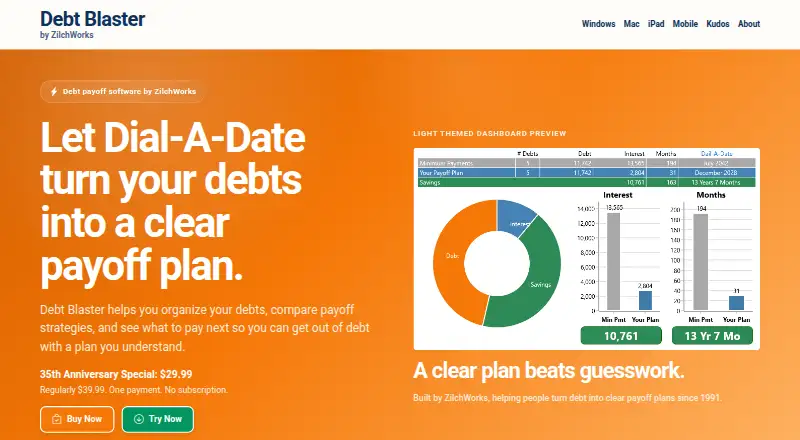
Debt Blaster is Windows payoff-planning software for organizing debts and building a month-by-month repayment plan. Users enter the debts they want to manage, then compare Snowball, Avalanche, and Custom methods. Dial-A-Date lets users set a target debt-free month and see the extra monthly payment needed to reach it. One-off payments can also be added to see how they affect the payoff schedule and interest savings. The software tracks balances and creditors, but does not connect to a bank, so debt details must be entered by the user. Plan information is normally stored on the user's computer, and ZilchWorks says it does not automatically receive it through software use. A free Windows trial is available. The Windows desktop plan costs $29.99, paid once, regularly $39.99, paid once, with no subscription; the pricing note also says From $39.99. Debt Blaster does not lend money, negotiate debt, or repair credit.
Who it suits
Debt Blaster suits Windows users who want to enter their debts themselves and compare payoff schedules. It is for planning repayments, not for debt relief or credit repair.
What it does well
- Compares Snowball, Avalanche, and Custom methods
- Creates a month-by-month payoff plan
- Shows payments needed for a target debt-free month
- Models one-off payments
- Includes a free Windows trial
What to know first
- Windows only
- Users must enter debts; there is no bank connection
- No mobile apps
- Does not lend, negotiate debt, or repair credit
Limits
There is no free plan; the free Windows trial lets you try the payoff-planning workflow before purchase. The paid Windows plan is listed at 29.99 USD for one payment, regularly $39.99, and has no subscription.
Plans
| Plan | Billed and limits | Price |
|---|---|---|
| Debt Blaster for Windows | One payment; regularly $39.99 · Windows desktop payoff planner · no subscription | $29.99, paid once |
As debtblaster.com lists them, read 7 Oct 2026. The maker's own page has the final word.
Getting started
- Visit the Debt Blaster website.
- Use a Windows computer.
- Try the free Windows trial to explore its payoff-planning workflow.
- Enter the debts you want to plan.
- Choose a payoff method or target month and review the plan.
- Purchase the Windows plan for a one-time payment if you want to continue.
Verdict
Debt Blaster provides several ways to model a payoff schedule, with a trial available before purchase. Users need to enter their own debts and should note that it is planning software rather than a debt service.
Questions
How much does Debt Blaster cost?
The Windows plan is listed at $29.99 as a one-time payment, regularly $39.99. The pricing note says From $39.99.
Is there a free plan or trial?
There is no free plan. A free Windows trial is available.
Which platforms does it support?
Windows is the available platform. Mac and iPad versions are listed as coming soon, and a mobile planner is in the design phase.
Does Debt Blaster connect to my bank?
No. You enter the debts you want to plan yourself.
Where is debt plan information stored?
It is normally stored on your computer. ZilchWorks says it does not automatically receive that information through software use.
Does Debt Blaster provide debt relief?
No. It is payoff-planning software and does not lend money, negotiate debt, or repair credit.
Facts from Debt Blaster's own pages
- Bank connection
- Debt Blaster does not connect to a bank; users enter the debts they want to plan themselves. · debtblaster.com, 7 Oct 2026
- Dial-A-Date
- Dial-A-Date lets users choose a target debt-free month and see the monthly extra payment needed to reach it. · debtblaster.com, 7 Oct 2026
- Extra payments
- Users can add one-off payments and see how they affect payoff timing and interest savings. · debtblaster.com, 7 Oct 2026
- Founded
- 1991 · debtblaster.com, 28 Sept 2026
- Headquarters
- Cape Cod, Massachusetts · debtblaster.com, 28 Sept 2026
- Local data
- Debt plan information is normally stored on the user's computer, and ZilchWorks says it does not automatically receive that data through software use. · debtblaster.com, 7 Oct 2026
- Not debt relief
- Debt Blaster is payoff-planning software and does not lend money, negotiate debt, or repair credit. · debtblaster.com, 7 Oct 2026
- Other versions
- The maker lists Mac and iPad versions as coming soon and its mobile planner as in the design phase. · debtblaster.com, 7 Oct 2026
- Payment privacy
- ZilchWorks says payment details are handled by its merchant of record or payment provider and it does not directly store full credit card numbers. · debtblaster.com, 7 Oct 2026
- Payoff strategies
- It offers Snowball, Avalanche, and Custom payoff methods. · debtblaster.com, 7 Oct 2026
- Purpose
- Debt Blaster organizes debts, compares payoff strategies, and creates a month-by-month payoff plan. · debtblaster.com, 7 Oct 2026
- Refunds
- The terms state that a full refund is offered within 30 days after purchase unless a different policy is stated at purchase. · debtblaster.com, 7 Oct 2026
- Security
- ZilchWorks says it uses reasonable administrative, technical, and organizational safeguards, while noting it cannot guarantee absolute security. · debtblaster.com, 7 Oct 2026
- Support
- Users can contact ZilchWorks support and may send information such as product version, operating system, screenshots, or error messages. · debtblaster.com, 7 Oct 2026
- Trial
- A free Windows trial is available to try the payoff-planning workflow before purchase. · debtblaster.com, 7 Oct 2026
Where Debt Blaster stands on Freedom251
- Debt Management Software#15 of 23