Freedom251 › AI Background Removers

Deback
What Deback is
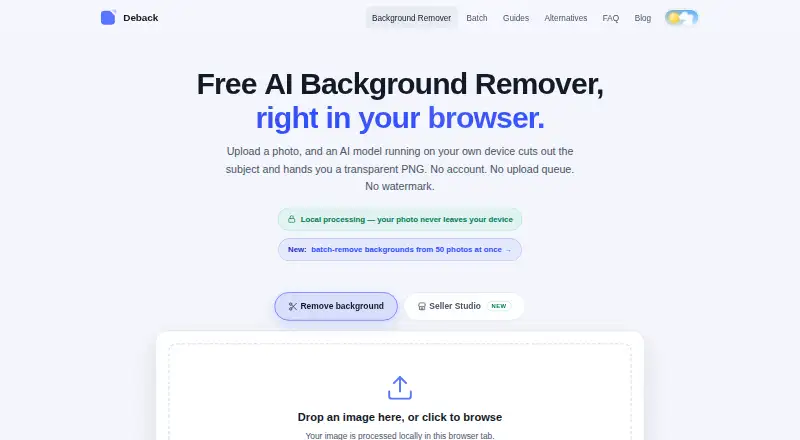
Deback removes photo backgrounds in a browser and creates transparent PNG cutouts. Its AI processes images locally in the browser, so image pixels are not sent to Deback’s servers during processing. The browser downloads an approximately 44 MB segmentation model, caches it, and runs it with WebGPU or WebAssembly acceleration. You can choose replacement backgrounds, reposition and resize the subject, and refine a cutout with erase and restore controls. Deback accepts JPEG, PNG, WebP, and HEIC/HEIF images up to 12 MB each. Batch processing lets you preview and curate cutouts before downloading selected transparent PNGs or a ZIP for the run. Recent Chrome, Edge, Firefox, and Safari versions are supported on desktop and mobile; listed platforms are Android, iOS, and web. The Free plan costs nothing, lasts forever, requires no account, adds no watermark, and allows up to 50 images per batch run. Commercial use is allowed, with PNG and WebP listed as export formats. Deback describes itself as a small independent project run by one operator, with no venture funding. Its anonymous analytics pings for completed runs and star ratings contain no image data or identifiers, according to its policy.
Who it suits
Deback suits people who want to make transparent cutouts in a browser, including users who need to process batches and adjust backgrounds or subject placement. Its free plan allows commercial use and runs without an account or watermark.
What it does well
- Image pixels stay in the browser during processing.
- Batch runs support up to 50 images on the free plan.
- No account is required and exports have no watermark.
- Erase and restore controls allow cutout touch-ups.
- Commercial use is allowed.
What to know first
- Each image is capped at 12 MB.
- Fine hair, fur, translucent materials, and low-contrast scenes can challenge segmentation.
- Very large images may be downscaled.
Limits
The free plan allows up to 50 images per batch run, with a 12 MB cap per image. Very large images may be downscaled, and fine hair, fur, translucent materials, and low-contrast scenes can challenge segmentation.
Plans
| Plan | Billed and limits | Price |
|---|---|---|
| Free | Free forever · no account · no watermark · up to 50 images per batch run · 12 MB per image | Free |
As getdeback.com lists them, read 11 Oct 2026. The maker's own page has the final word.
Getting started
- Open the Deback website in a recent supported browser.
- Add JPEG, PNG, WebP, or HEIC/HEIF images up to 12 MB each.
- Let the browser download and run the segmentation model.
- Choose a background and adjust subject position or size, if needed.
- Use erase or restore controls to refine cutouts.
- Preview and select cutouts to download as transparent PNGs or a ZIP.
Verdict
Choose Deback for browser based background removal with batch review, touch-up controls, and local image processing. Its free plan includes up to 50 images per run, no account, no watermark, and commercial use. Consider another tool if your images exceed 12 MB or contain details the segmentation may struggle with, such as fine hair or translucent materials.
Questions
Is Deback free?
Yes. Its Free plan costs nothing and lasts forever. It allows up to 50 images per batch run.
Do I need an account?
No. The Free plan requires no account and adds no watermark.
Which platforms and browsers does it support?
It is listed for Android, iOS, and web. Recent Chrome, Edge, Firefox, and Safari versions are supported on desktop and mobile.
What image formats can I use and export?
It accepts JPEG, PNG, WebP, and HEIC/HEIF files up to 12 MB each. PNG and WebP are listed as export formats.
Are images uploaded to Deback for processing?
Deback says its AI processes images in the browser and image pixels are not sent to its servers during processing.
Who makes Deback?
The FAQ describes it as a small independent project run by one operator, with no venture funding.
Facts from Deback's own pages
- API access
- No · getdeback.com, 22 Sept 2026
- Batch downloads
- Users can preview and curate cutouts, then download selected transparent PNGs or a ZIP for the run. · getdeback.com, 11 Oct 2026
- Batch processing
- Batch processing handles up to 50 images per run, with as many free runs as users want. · getdeback.com, 11 Oct 2026
- Browser support
- Recent Chrome, Edge, Firefox, and Safari versions are supported on desktop and mobile. · getdeback.com, 11 Oct 2026
- Commercial use
- Deback says cutouts may be used commercially if the user has rights to the source image. · getdeback.com, 11 Oct 2026
- Editing features
- The browser tool offers background choices, subject positioning and sizing, and erase and restore touch-up controls. · getdeback.com, 11 Oct 2026
- Export formats
- PNG,WebP · getdeback.com, 22 Sept 2026
- Free plan
- Yes · getdeback.com, 22 Sept 2026
- Limitations
- The FAQ says uploads are capped at 12 MB, very large images may be downscaled, and fine hair, fur, translucent materials, and low-contrast scenes can challenge segmentation. · getdeback.com, 11 Oct 2026
- Local processing
- The AI processes images in the browser, and the image pixels are not sent to Deback’s servers during processing. · getdeback.com, 11 Oct 2026
- Maker description
- The FAQ describes Deback as a small independent project run by one operator, with no venture funding. · getdeback.com, 11 Oct 2026
- Model and acceleration
- The browser downloads an approximately 44 MB AI segmentation model, caches it, and runs it locally with WebGPU or WebAssembly acceleration. · getdeback.com, 11 Oct 2026
- Privacy and analytics
- Deback says it uses cookie-free Cloudflare Web Analytics and sends anonymous pings for completed runs and star ratings; its policy says these pings contain no image data or identifiers. · getdeback.com, 11 Oct 2026
- Replacement backgrounds
- Yes · getdeback.com, 22 Sept 2026
- Security or compliance
- The opened privacy policy describes local image processing and third-party file delivery, but does not state a security certification or compliance standard. · getdeback.com, 11 Oct 2026
- Support
- The batch page lists an email address for users who need help with larger batch runs. · getdeback.com, 11 Oct 2026
- Supported formats
- The tool accepts JPEG, PNG, WebP, and HEIC/HEIF images up to 12 MB each. · getdeback.com, 11 Oct 2026
- What it does
- Deback removes photo backgrounds in the browser and produces transparent PNGs. · getdeback.com, 11 Oct 2026
Where Deback stands on Freedom251
- AI Background Removers#17 of 94
- Background removers#16 of 70