Freedom251 › Cloud Backup Services
Data Deposit Box
What Data Deposit Box is
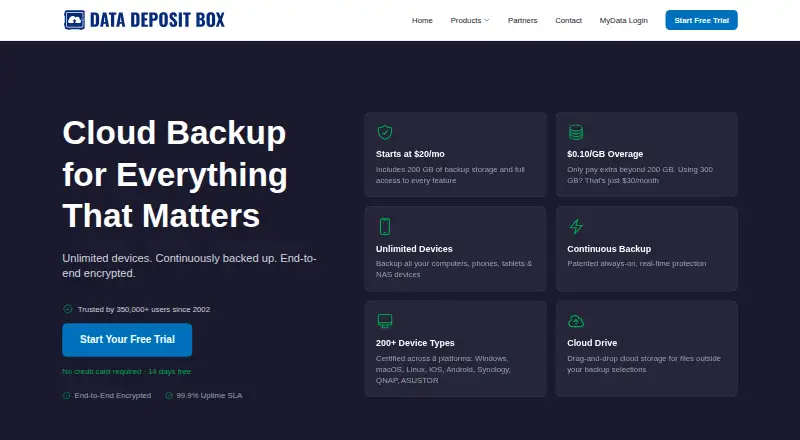
Data Deposit Box provides continuous cloud backup for computers, mobile devices and supported NAS devices under one account. It captures file changes as they occur, without a schedule, and keeps time-stamped versions for restoring earlier files within the retention window. Cloud Drive adds drag-and-drop storage for files outside selected backups. LiveLink provides browser access to files on devices running the agent without a VPN, while sharing supports email or links with optional password protection. The service runs on Android, iOS, Linux, macOS, web and Windows. The company says files are encrypted on the device before upload and protected in transit and at rest, with two-factor authentication available. Data is stored in Canadian data centres under Canadian privacy law, and the service states GDPR compliance. The iOS app backs up photos and contacts, but not videos or documents. Pricing is $20 a month, billed monthly, including 200 GB, unlimited devices and every feature; extra storage costs $0.10/GB.
Who it suits
The company describes Data Deposit Box as suitable for managed service providers and organizations handling backups across clients or departments. It also fits users needing backup, file access and sharing across many platforms.
What it does well
- Continuous backup without scheduling
- Versioned restores within retention window
- Supports six listed platform types
- Unlimited devices on listed plan
- Two-factor authentication supported
What to know first
- No free plan
- iOS excludes videos and documents
- Extra storage costs $0.10/GB
- 200 GB included storage
Limits
The plan includes 200 GB of backup storage; additional storage costs $0.10/GB. On iOS, videos and documents are not backed up.
Plans
| Plan | Billed and limits | Price |
|---|---|---|
| Data Deposit Box | Billed monthly. Cancel anytime — no long-term contracts, no cancellation fees. · 200 GB backup storage included · additional storage $0.10/GB · unlimited devices · full access to every feature | $20 a month |
As datadepositbox.com lists them, read 7 Oct 2026. The maker's own page has the final word.
Getting started
- Open the Data Deposit Box website
- Start the 14-day trial
- Install the app on Android, iOS, Linux, macOS, or Windows devices
- Connect supported NAS devices under the account
- Choose backup selections and use Cloud Drive for other files
- Invite users or create share links when needed
Verdict
Data Deposit Box combines continuous backup, version history, cloud storage and remote access in one account. Its broad platform support is balanced by the iOS backup restrictions and paid storage model.
Questions
How much does Data Deposit Box cost?
The Data Deposit Box plan costs $20 a month, billed monthly. It includes 200 GB, unlimited devices, and every feature; extra storage is $0.10/GB.
Is there a free plan or trial?
There is no free plan. A 14-day trial is available.
Which platforms are supported?
Data Deposit Box supports Android, iOS, Linux, macOS, web, and Windows.
What does the iOS app back up?
The iOS app backs up photos and contacts. Videos and documents are not currently supported on iOS.
Where is customer data stored?
The company says customer data is stored in Canadian data centres governed by Canadian privacy law.
Does it support file sharing?
Files and folders can be shared by email or link, with optional password protection.
Facts from Data Deposit Box's own pages
- Cloud Drive
- Cloud Drive provides drag-and-drop cloud storage for files outside the user's backup selections. · datadepositbox.com, 7 Oct 2026
- Company history
- The company says it has provided cloud backup since 2002 and serves users in 53 countries. · datadepositbox.com, 7 Oct 2026
- Compliance
- The site states that Data Deposit Box is GDPR compliant. · datadepositbox.com, 7 Oct 2026
- Continuous protection
- Its continuous backup captures file changes as they happen, without requiring a schedule. · datadepositbox.com, 7 Oct 2026
- Data location
- The company says customer data is stored in Canadian data centres governed by Canadian privacy law. · datadepositbox.com, 7 Oct 2026
- File sharing
- Users can share files and folders by email or link, with optional password protection. · datadepositbox.com, 7 Oct 2026
- Founded
- 2002 · datadepositbox.com, 28 Sept 2026
- Intended users
- The company describes its multi-tenant platform as built for managed service providers and organizations managing backups across clients or departments. · datadepositbox.com, 7 Oct 2026
- Mobile backup limit
- The iOS app backs up photos and contacts; videos and documents are not currently supported on iOS. · datadepositbox.com, 7 Oct 2026
- Platforms
- The product supports Windows, macOS, Linux, iOS, Android, and Synology, QNAP, and ASUSTOR NAS devices. · datadepositbox.com, 7 Oct 2026
- Remote access
- LiveLink provides secure browser access to files on devices running the Data Deposit Box agent without a VPN. · datadepositbox.com, 7 Oct 2026
- Security
- The company says data is encrypted on the device before upload and protected in transit and at rest, and accounts support two-factor authentication. · datadepositbox.com, 7 Oct 2026
- Support
- The site advertises 24/7 support and provides a searchable knowledge base with billing, setup, backup, restore, and troubleshooting articles. · datadepositbox.com, 7 Oct 2026
- Versioning
- Time-stamped file versions let users restore earlier versions within their retention window. · datadepositbox.com, 7 Oct 2026
- What it does
- Data Deposit Box provides continuous cloud backup for computers, mobile devices, and supported NAS devices under one account. · datadepositbox.com, 7 Oct 2026
Where Data Deposit Box stands on Freedom251
- Cloud Backup Services#20 of 47