Freedom251 › Secure Cloud Storage

DaemonClient Drive
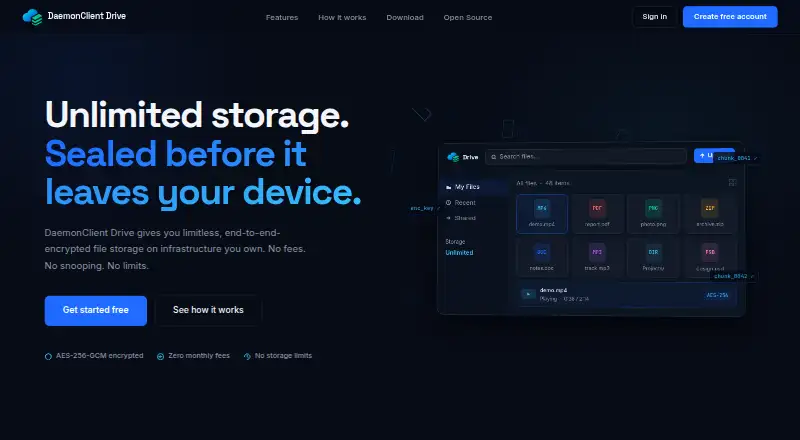
What DaemonClient Drive is
DaemonClient Drive stores files on infrastructure you own, encrypting them on your device before they are uploaded. Files are divided into chunks and protected with AES-256-GCM. The site says the keys remain on your machine; each chunk has a unique nonce, and authentication tags verify integrity when data is downloaded. Its client code—including the encryption, chunking, and key-derivation logic—is public. In a browser, video playback can fetch and decrypt only the chunks needed for streaming. The live command-line client supports scripted uploads, directory synchronization, backups, and remote-file listings.
To set up the service, you connect cloud-provider credentials and a Telegram bot token; it then provisions a private server and database on your infrastructure. The free plan costs nothing, advertises unlimited storage, and does not require a credit card or monthly fee. The web app supports modern browsers, including Chrome, Firefox, and Safari. Standalone CLI binaries are listed for Linux x64, Windows, and macOS. The native desktop sync app and native iOS and Android apps, including Files app integration, are marked as coming soon.
Who it suits
DaemonClient Drive suits people who want encrypted file storage on infrastructure they own, including for sensitive documents, 4K video, or whole-server backups. It may also fit users who need scripted uploads, directory sync, or browser-based video streaming.
What it does well
- Encrypts files on-device with AES-256-GCM before upload.
- Keys stay on the user's machine, according to the site.
- Public client code includes encryption and key-derivation logic.
- Browser streaming fetches and decrypts only required video chunks.
- CLI supports uploads, directory sync, backups, and remote-file listings.
- Free plan advertises unlimited storage without monthly fees.
What to know first
- Setup requires the user's cloud-provider credentials and Telegram bot token.
- Native desktop sync is marked as coming soon.
- Native iOS and Android apps are marked as coming soon.
Limits
The Free plan costs nothing and advertises unlimited storage with no monthly fees. Setup uses your own accounts and infrastructure.
Plans
| Plan | Billed and limits | Price |
|---|---|---|
| Free | $0 · unlimited storage · no credit card | Free |
As drive.daemonclient.uz lists them, read 8 Oct 2026. The maker's own page has the final word.
Getting started
- Open https://drive.daemonclient.uz/ in a supported modern browser.
- Connect your cloud-provider credentials and a Telegram bot token.
- Provision the private server and database on your infrastructure.
- Use the web app or a standalone CLI binary for Linux x64, Windows, or macOS.
Verdict
Choose DaemonClient Drive if you want encrypted storage on infrastructure you own and value its live CLI or chunk-based browser streaming. Look elsewhere if you need a native desktop sync app or native mobile apps now; those are marked as coming soon.
Questions
What does DaemonClient Drive cost?
Its Free plan costs nothing. The site advertises unlimited storage and no monthly fees.
Does the free plan require a credit card?
No credit card is required.
Which platforms are available?
The web app supports modern browsers, including Chrome, Firefox, and Safari. Standalone CLI binaries are listed for Linux x64, Windows, and macOS; native desktop sync and iOS and Android apps are coming soon.
Is DaemonClient Drive open source?
The site says the client is public code, including its encryption logic, chunking, and key derivation.
How is file data protected?
Files are chunked and encrypted on the device with AES-256-GCM before upload. The site says keys stay on the user's machine, and authentication tags are used to verify integrity on download.
What does setup require?
Setup connects cloud-provider credentials and a Telegram bot token, then provisions a private server and database on your infrastructure.
Facts from DaemonClient Drive's own pages
- CLI
- The live command-line client supports scripted uploads, directory sync, backups, and listing remote files. · drive.daemonclient.uz, 8 Oct 2026
- Desktop availability
- Standalone CLI binaries are listed for Linux x64, Windows, and macOS, while the native desktop sync app is marked coming soon. · drive.daemonclient.uz, 8 Oct 2026
- Encryption
- Files are chunked and encrypted on the device with AES-256-GCM before upload, and the site says keys stay on the user's machine. · drive.daemonclient.uz, 8 Oct 2026
- Integrity
- Each chunk has a unique nonce and authentication tags are used to verify integrity on download. · drive.daemonclient.uz, 8 Oct 2026
- Intended workloads
- The site describes the service as built for 4K video, sensitive documents, and whole-server backups. · drive.daemonclient.uz, 8 Oct 2026
- Limits
- The product site advertises unlimited storage and no monthly fees, while setup uses the user's own accounts and infrastructure. · drive.daemonclient.uz, 8 Oct 2026
- Mobile availability
- Native iOS and Android apps, including phone Files app integration, are marked coming soon. · drive.daemonclient.uz, 8 Oct 2026
- Open source
- The site says the client, including its encryption logic, chunking, and key derivation, is public code. · drive.daemonclient.uz, 8 Oct 2026
- Purpose
- DaemonClient Drive provides end-to-end encrypted file storage on infrastructure the user owns. · drive.daemonclient.uz, 8 Oct 2026
- Self-hosting
- The documentation says users can run the stack on accounts they own, using Telegram, Cloudflare Workers and D1, Firebase, and Node 18 or later. · docs.daemonclient.uz, 8 Oct 2026
- Storage integrations
- Setup connects the user's cloud provider credentials and a Telegram bot token, then provisions a private server and database on the user's infrastructure. · drive.daemonclient.uz, 8 Oct 2026
- Streaming
- It can stream video in the browser by fetching and decrypting only the required chunks. · drive.daemonclient.uz, 8 Oct 2026
- Support
- The company site lists Telegram as a support channel. · daemonclient.uz, 8 Oct 2026
- Web compatibility
- The web app works in modern browsers, with Chrome, Firefox, and Safari listed as supported. · drive.daemonclient.uz, 8 Oct 2026
Where DaemonClient Drive stands on Freedom251
- Secure Cloud Storage#5 of 30