
Cursus
What Cursus is
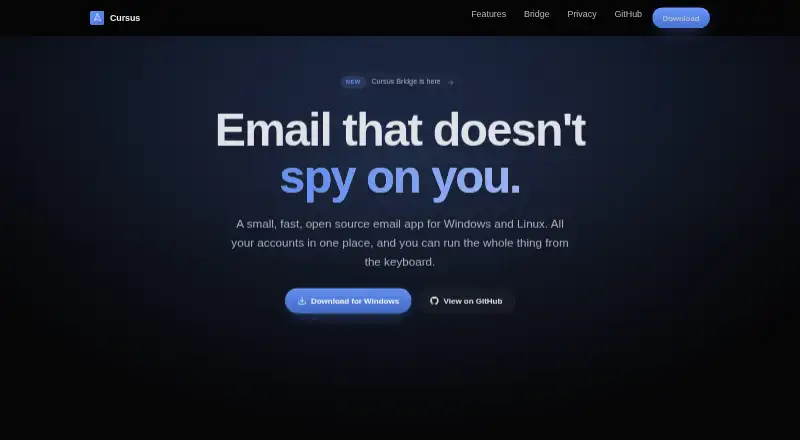
Cursus is a free, open-source desktop email application for Windows and Linux. It combines multiple accounts in one keyboard-oriented inbox, with conversations, attachments, drafts, search, and undo send. Search can cover subjects, senders, and message bodies across accounts, and existing mail can be indexed with one click. Sending works through SMTP or Resend; undo send allows up to half a minute to revise a message. Twenty-two shortcuts cover inbox navigation, replying, archiving, composing, and searching. An optional Cursus Bridge adds a local MCP server and JSON command-line interface for scripts and agents, including tools for reading and sending email. Cursus stores data in a portable folder beside the application, while account passwords use the system keychain. The maker says there is no cloud sync, telemetry, analytics, or crash reporting, and remote images are blocked by default. The Apache-2.0 licensed app requires no account or signup.
Who it suits
Cursus suits people wanting a lightweight, private desktop inbox with keyboard controls and multiple accounts. It also suits users who want local scripting through its optional Bridge.
What it does well
- Free plan with no signup required
- Windows and Linux desktop support
- Search spans messages across accounts
- Twenty-two keyboard shortcuts for inbox actions
- Portable local data and system-keychain passwords
What to know first
- No built-in AI assistant
- No cloud sync
- No calendar tools
- No free trial, though the plan is free
Plans
| Plan | Billed and limits | Price |
|---|---|---|
| Cursus | Free. Always. · Open source · no tier above this one · no trial · no Pro version | Free |
As opencursus.app lists them, read 12 Oct 2026. The maker's own page has the final word.
Verdict
Cursus focuses on a local, keyboard-driven email workflow without a paid tier or account requirement. Its optional Bridge adds scripting capabilities, while users seeking cloud sync or built-in AI will not find those features here.
Facts from Cursus's own pages
- Automation
- The optional Cursus Bridge provides an MCP server and JSON CLI for scripts and agents, including tools to read and send email. · opencursus.app, 12 Oct 2026
- Data storage
- Cursus stores its data alongside the app in a portable folder, so moving the folder moves the data too. · opencursus.app, 12 Oct 2026
- Email features
- It supports multiple accounts, conversations, search, attachments, drafts, and undo send. · opencursus.app, 12 Oct 2026
- Integrations
- The site names Claude and Claude Code as Bridge integrations, and identifies SMTP and Resend as sending options. · opencursus.app, 12 Oct 2026
- Intended users
- The maker describes Cursus as a mail client for people who want a lightweight, private desktop inbox with keyboard controls and no built-in AI. · opencursus.app, 12 Oct 2026
- Keyboard
- The app has 22 keyboard shortcuts for inbox actions, including navigation, reply, archive, compose, and search. · opencursus.app, 12 Oct 2026
- License and signup
- The product is Apache-2.0 licensed and can be used without an account or signup. · opencursus.app, 12 Oct 2026
- Limitations
- Cursus has no built-in AI assistant or cloud sync; the maker says smart replies, summaries, and automatic sorting are not included. · opencursus.app, 12 Oct 2026
- Local operation
- The Bridge runs locally and closes after use; it does not leave a server or port running on the machine. · opencursus.app, 12 Oct 2026
- Privacy
- The maker says Cursus has no cloud sync, telemetry, analytics, or crash reports, and blocks remote images by default to prevent tracking pixels. · opencursus.app, 12 Oct 2026
- Product
- Cursus is a small, open source desktop email app for Windows and Linux that brings multiple accounts into one keyboard-driven client. · opencursus.app, 12 Oct 2026
- Search
- Search covers subjects, senders, and message bodies across accounts, with one-click indexing for existing mail. · opencursus.app, 12 Oct 2026
- Security
- Email account passwords are stored in the system keychain rather than in plain text inside the app. · opencursus.app, 12 Oct 2026
- Sending
- Accounts can send through SMTP or Resend, and undo send gives you up to half a minute to change your mind. · opencursus.app, 12 Oct 2026
Where Cursus stands on Freedom251
- Email clients#109 of 142