
Curio
by Curio
What Curio is
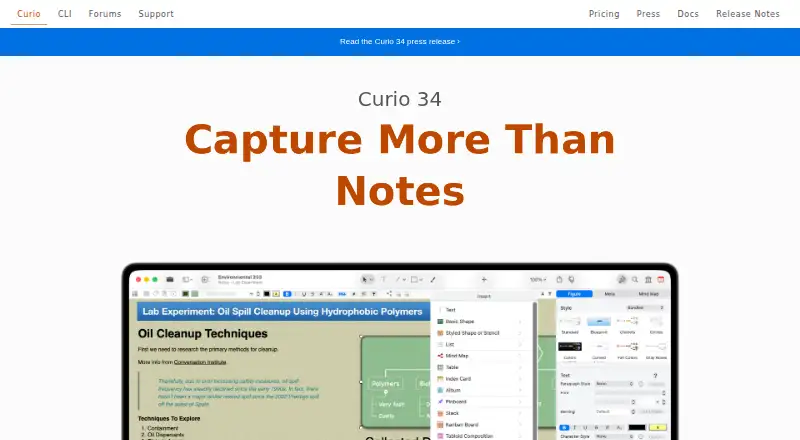
Curio is a macOS freeform notebook for notes, research, brainstorming, mind maps, tasks, and documents. Projects are local Mac files, and the maker says work is not uploaded to remote data centers. You can combine rich text, Markdown, images, PDFs, documents, links, multimedia, lists, tables, index cards, albums, pinboards, and Kanban boards. Curio supports offline access and note sharing, plus integrations with many AI services, Apple Shortcuts, Calendar, Reminders, DEVONthink, TaskPaper, OmniOutliner Pro, Curiota, iCloud, Dropbox, OneDrive, and Google Drive. Its CLI can query, read, update, import, export, and navigate project content, and an MCP server supports eligible AI clients. Free mode allows projects with up to five idea spaces; larger projects open read-only for viewing, exporting, and printing. A two-week fully functioning trial enables Professional features. Standard and Professional subscriptions cost 5.00 USD and $6 a month billed yearly. One-time license keys cost 99.99 USD and $119.99, paid once, each including one year of updates.
Who it suits
Curio suits Mac users organizing research, writing, projects, or visual ideas in local files. Its listed audiences include designers, writers, students, professors, scientists, project managers, programmers, lawyers, and entrepreneurs.
What it does well
- Local projects with offline access
- Rich mix of notes and visual content
- Many AI and productivity integrations
- CLI and MCP automation options
- Free mode available
What to know first
- macOS only
- Free projects limited to five idea spaces
- Larger free projects are read-only
- License updates stop after one year unless renewed
Plans
| Plan | Billed and limits | Price |
|---|---|---|
| Free | No purchase required · projects limited to 5 idea spaces · larger projects open read-only | Free |
| Standard license key | one-time purchase; includes 1 year of updates · Unlimited idea spaces · One year of updates included | $99.99 a month |
| Professional license key | one-time purchase; includes 1 year of updates · Advanced power-user features · Curio CLI and MCP for eligible sustainers · One year of updates included | $119.99 a month |
| Standard subscription | billed yearly · Standard features · Mac App Store subscription · Automatic updates | $5 a month |
| Professional subscription | billed yearly · Professional features · Mac App Store subscription · Automatic updates | $6 a month |
| Professional | One-time purchase; includes 1 year of updates · Includes Standard plus CLI + MCP, Smart Kanban, formulas, synced figures and files, Mermaid diagrams, presentation mode · educational price shown as $99.99 | $119.99, paid once |
| Standard | One-time purchase; includes 1 year of updates · Unlimited idea spaces · educational price shown as $79.99 | $99.99, paid once |
As zengobi.com lists them, read 11 Oct 2026. The maker's own page has the final word.
Verdict
Curio combines freeform organization with local storage, extensive content types, and numerous integrations. Choose between the five-space free limit, yearly subscriptions, or one-time licenses based on project size and update needs.
Facts from Curio's own pages
- AI services
- The product page lists ChatGPT, Claude, Gemini, Copilot, Perplexity, Poe, Groq, Grok, Mistral, DeepSeek, Qwen, and local LLM chat servers through Sleuth. · zengobi.com, 11 Oct 2026
- Automation
- Curio CLI can query, read, update, import, export, and navigate project content, and includes an MCP server for supported AI clients. · zengobi.com, 11 Oct 2026
- Content and collections
- Curio supports rich text, Markdown, images, PDFs, documents, web links, multimedia, mind maps, lists, tables, index cards, albums, pinboards, and Kanban boards. · zengobi.com, 11 Oct 2026
- Founded
- 2004 · zengobi.com, 28 Sept 2026
- Free-mode limit
- Free mode allows creation and editing of projects with up to 5 idea spaces; larger projects open read-only for viewing, exporting, and printing. · zengobi.com, 11 Oct 2026
- Free plan
- Yes · zengobi.com, 20 Sept 2026
- Headquarters
- North Carolina, USA · zengobi.com, 28 Sept 2026
- Integrations
- Curio lists Apple Shortcuts actions, Calendar and Reminders task syncing, TaskPaper and OmniOutliner import/export, and support for DEVONthink items. · zengobi.com, 11 Oct 2026
- Intended users
- The maker describes use by designers, writers, students, professors, scientists, project managers, programmers, lawyers, and entrepreneurs. · zengobi.com, 11 Oct 2026
- License updates
- A website license is a one-time purchase with one year of major updates; after that the app continues working but stops receiving updates until renewal. · zengobi.com, 11 Oct 2026
- Local projects
- Curio projects are local files on the Mac and the maker says work is not uploaded to remote data centers. · zengobi.com, 11 Oct 2026
- Note sharing
- Yes · zengobi.com, 20 Sept 2026
- Offline access
- Yes · zengobi.com, 20 Sept 2026
- Platform and requirements
- Curio 34 runs on macOS 15 Sequoia through macOS 27 Golden Gate on Apple silicon or Intel. · zengobi.com, 11 Oct 2026
- Supported platforms
- macos · zengobi.com, 20 Sept 2026
- Product
- Curio is a freeform notebook for notes, research, brainstorming, mind mapping, tasks, and documents. · zengobi.com, 11 Oct 2026
- Project security
- Professional includes a project password feature. · zengobi.com, 11 Oct 2026
- Security
- The Mac App Store edition is sandboxed; the documentation says sandboxing can impose feature limitations. · zengobi.com, 11 Oct 2026
- Support
- Zengobi directs users to email [email protected] and says it will write back as quickly as possible. · zengobi.com, 11 Oct 2026
- Trial
- Curio starts with a 2-week fully functioning trial that enables Professional features. · zengobi.com, 11 Oct 2026
Where Curio stands on Freedom251
- Note-taking apps#109 of 216
- AI Study Tools#85 of 96