Freedom251 › AI Music Playlist Generators

Cue the Music Man
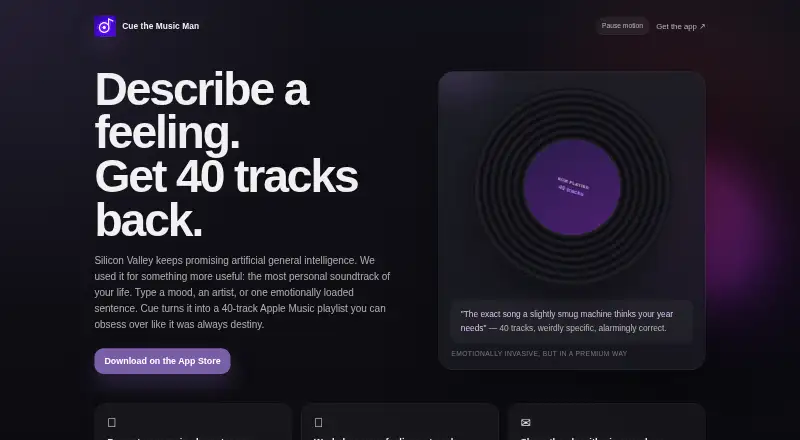
What Cue the Music Man is
Cue the Music Man is a free app for iOS and macOS that creates 40-track playlists from prompts such as a mood, artist, song or feeling. Users can request changes to a playlist with directions such as making it darker, more obscure or more kinetic. Cue connects with Apple Music and YouTube Music to create, update and export playlists. It also supports track previews, playlist saving and management, and sharing playlists or share cards. Tracklists can be imported from images, Markdown, text or CSV files. With microphone access, Shazam can identify a song. Playlist generation and remixing use Gemini through Firebase AI Logic, which receives the prompt and related playlist context. Saved playlists stay on the device unless optional iCloud sync is enabled. Cue says it does not sell personal information, show in-app ads or maintain its own user account system. Optional sharing of qualifying playlist sessions and limited metadata is off by default. YouTube Music features require a connected Google account, and third-party service availability can affect features.
Who it suits
Cue may suit listeners who want to build or reshape playlists from descriptive prompts and manage them through Apple Music or YouTube Music. It is available on iOS and macOS.
What it does well
- Creates 40-track playlists from natural-language prompts.
- Can remix playlists using descriptive directions.
- Imports tracklists from images, Markdown, text and CSV.
- Connects with Apple Music and YouTube Music.
- Optional session sharing is off by default.
What to know first
- YouTube Music features require a connected Google account.
- iCloud playlist syncing is optional.
- Third-party service availability may affect features.
Limits
The Free plan costs nothing and limits generated playlists to 40 tracks. YouTube Music features require a connected Google account; third-party service availability may also affect features.
Plans
| Plan | Billed and limits | Price |
|---|---|---|
| Free | 40-track playlists | Free |
As cuethemusic.app lists them, read 3 Oct 2026. The maker's own page has the final word.
Getting started
- Visit https://cuethemusic.app/.
- Use Cue on iOS or macOS.
- Enter a mood, artist, song, or feeling description to generate a playlist.
- Connect Apple Music or YouTube Music to create, update, or export playlists.
- Optionally enable iCloud sync for saved playlists.
Overview
Cue the Music Man is an iOS and macOS app that builds playlists from moods, artists, songs or free-form descriptions. It suits listeners who want to turn a feeling or a tracklist into a playlist and work with Apple Music or YouTube Music; its 40-track ceiling is the main trade-off.
Alongside generating playlists, Cue supports importing tracklists, making prompt-led changes, and saving or sharing the results. Its free plan makes it a straightforward option for focused playlist creation, but connected services bring their own account and availability requirements.
Key features
Enter a mood, artist, song or emotionally expressive sentence and Cue generates a 40-track playlist. That gives listeners room to explore a theme without assembling every track themselves, though the fixed cap may be restrictive for longer listening sessions or large collections. You can then ask for a remix with a direction such as darker, more obscure or more kinetic, a useful way to steer a playlist without starting over.
Cue can identify a song through Shazam after microphone access is granted. It also imports tracklists from images, Markdown, plain text or CSV, which makes it more than a prompt-only generator. Users can preview tracks, save and manage playlists, and share either playlists or share cards. Editing is basic, so Cue is better suited to shaping and organizing generated lists than to detailed track-by-track curation.
Apple Music and YouTube Music connections let Cue create, update and export playlists. YouTube Music features require connecting a Google account, and third-party service availability can affect connected functions. Playlist generation and remixing use Gemini through Firebase AI Logic, which receives the prompt and relevant playlist context.
Saved playlists remain on the device unless optional iCloud sync through CloudKit is enabled. Cue says it has no in-app advertising, does not sell personal information and does not maintain its own user account system. Its optional Help improve Cue setting is off by default; if enabled, it can upload qualifying playlist sessions and limited related metadata. The app says YouTube access does not extend to Gmail, Drive files, Photos, Contacts or other unrelated Google data. Its privacy policy says sensitive credentials can be stored in the iOS Keychain and Firebase App Check helps protect certain requests from abuse.
Pricing
Free: free. The plan includes prompt-based playlist generation, remixing and basic playlist editing, with playlists limited to 40 tracks. There is no paid Cue tier described, so the cap is the key constraint rather than a distinction between subscription levels. This is a good fit for listeners who want to make compact playlists without paying; look elsewhere if you need longer lists or more extensive editing.
Platforms
Cue is available on iOS and macOS. Its Shazam identification feature requires microphone access, while optional iCloud sync uses CloudKit. YouTube Music features require a connected Google account.
Who it's for
Cue is best for Apple-device users who enjoy discovering music through moods, artists or free-form prompts, and who want to turn existing tracklists into shareable playlists. It is less suitable for listeners seeking extensive manual editing, playlists longer than 40 tracks, or a workflow that avoids connecting to an external music service.
Pros and cons
- Pro: Prompts can start from a mood, artist, song or feeling, offering several natural ways into playlist creation.
- Pro: Image, Markdown, text and CSV imports make existing tracklists usable without re-entering them by hand.
- Pro: Apple Music and YouTube Music connections support creating, updating and exporting playlists.
- Con: Playlists stop at 40 tracks, which limits longer mixes.
- Con: Editing is basic, so users wanting detailed manual control may find it too constrained.
- Con: YouTube Music features depend on connecting a Google account, and third-party availability can affect them.
Alternatives
For a broader comparison of prompt-led playlist tools, start with AI Music Playlist Generators.
- Amazon Music is a better fit for listeners who want a wider-platform music service with ad-free music and podcasts and offline listening for All-Access Playlists included with Prime membership.
- AI Playlist Generator suits users who want to buy playlists in 100- or 200-song sizes rather than work within Cue's 40-track limit.
- Spotify Prompted Playlists is worth considering for Android or iOS users who want Spotify access, with a free ad-supported tier and a Premium Individual plan at $12.99 a month.
- ChatPlaylist is a web option with a free allowance of 3 playlists and 20 messages per month, plus an Unlimited plan at $2.99 a month.
- Harmony is another free iOS option; an Apple Music membership is required.
- Hickery is a web alternative whose free plan allows 10 AI-generated playlists and 100 song likes per month, with basic playlist management and standard recommendations.
- MagicPlayer is a web alternative with a free allotment of 200 track recommendations and one-time paid tiers for larger recommendation allotments.
- Ponla Ya! is a free web option for AI-curated YouTube playlists that requires Google sign-in and accepts voluntary donations.
Verdict
Choose Cue the Music Man if you want a free iOS or macOS tool that turns prompts and imported tracklists into playlists you can connect to Apple Music or YouTube Music. Its combination of prompt-led remixing, import options and sharing makes it more versatile than a generator alone. Look elsewhere if 40 tracks, basic editing or the account requirements for connected services do not fit your listening habits.
Verdict
Cue brings prompt-based playlist creation together with importing, editing and sharing tools. Note the 40-track limit and the account or service requirements for some connected features.
Questions
How much does Cue the Music Man cost?
Its listed Free plan costs nothing.
Which devices does Cue support?
Cue is available on iOS and macOS.
Which music services can it connect to?
Cue can connect to Apple Music and YouTube Music. YouTube Music features require a connected Google account.
Can Cue identify a song?
Yes. It can use Shazam after you grant microphone access.
Where are saved playlists stored?
They stay on the device unless you enable optional iCloud sync through CloudKit.
Does Cue share playlist data?
The optional Help improve Cue setting is off by default. If enabled, it can upload qualifying playlist sessions and related limited metadata.
Facts from Cue the Music Man's own pages
- AI provider
- Playlist generation and remixing use Gemini through Firebase AI Logic, which receives the prompt and relevant playlist context. · cuethemusic.app, 3 Oct 2026
- Imports
- The App Store listing says users can import tracklists from images, Markdown, text, or CSV files. · apps.apple.com, 3 Oct 2026
- Music integrations
- Cue can connect to Apple Music and YouTube Music to create, update, and export playlists. · cuethemusic.app, 3 Oct 2026
- Optional data sharing
- The optional Help improve Cue setting is off by default and can upload qualifying playlist sessions and related limited metadata if enabled. · cuethemusic.app, 3 Oct 2026
- Playlist generation
- Cue turns a typed mood, artist, song, or emotionally loaded sentence into a 40-track playlist. · cuethemusic.app, 3 Oct 2026
- Playlist management
- Users can preview tracks, save and manage playlists, and share playlists or share cards. · cuethemusic.app, 3 Oct 2026
- Privacy choices
- Cue says it does not sell personal information, run in-app advertising, or maintain its own user account system. · cuethemusic.app, 3 Oct 2026
- Provider availability
- YouTube Music features require the user to connect a Google account, and third-party service availability may affect features. · cuethemusic.app, 3 Oct 2026
- Remixing
- Users can remix playlists with directions such as making them darker, more obscure, or more kinetic. · cuethemusic.app, 3 Oct 2026
- Security
- The privacy policy says sensitive credentials can be stored in the iOS Keychain and Firebase App Check helps protect certain app requests from abuse. · cuethemusic.app, 3 Oct 2026
- Song identification
- Cue can use Shazam to identify a song after the user grants microphone access. · cuethemusic.app, 3 Oct 2026
- Storage
- Saved playlists stay on the device unless the user enables optional iCloud sync through CloudKit. · cuethemusic.app, 3 Oct 2026
- Support
- The maker lists [email protected] for questions. · cuethemusic.app, 3 Oct 2026
- YouTube data limit
- Cue says it does not request access to Gmail, Google Drive files, Google Photos, Google Contacts, or other unrelated Google user data. · cuethemusic.app, 3 Oct 2026
Where Cue the Music Man stands on Freedom251
- AI Music Playlist Generators#3 of 23