Freedom251 › Study Guide Websites
Cram
What Cram is
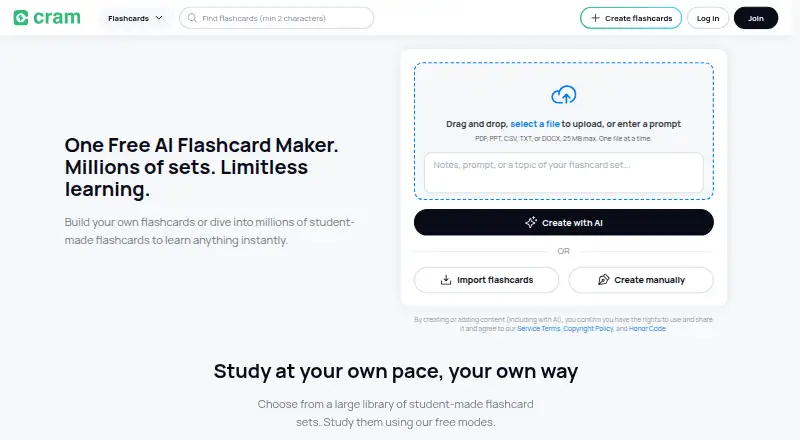
Cram is a flashcard platform for creating, studying and sharing digital cards. Users can build custom decks by entering terms, adding hints and uploading images, or browse more than 7 million sets created by students and educators. Study modes include Card, Memorize, Cram and Games. Cram Mode uses spaced repetition similar to the Leitner system. Flashcards can be studied online or offline, and a user’s library syncs across mobile devices and desktop. Folders help organize sets, while search includes smart filters. Cram is available on Android, iOS, macOS and the web, and the app listing advertises one-tap Google Sign-In. Google Play states that user data is encrypted in transit and that users can request deletion of their data. The free plan is listed as free and includes custom flashcard creation, hints and image uploads, access to 7+ million sets, and mobile/desktop sync. Android support is listed at [email protected].
Who it suits
Cram suits learners who want to create their own flashcards or study existing sets across mixed subjects and school levels. Offline study and library syncing may help people switching between devices.
What it does well
- Access to more than 7 million student- and educator-made sets
- Four study modes, including games
- Offline study and mobile/desktop sync
- Folders and smart-filter search help organize sets
- Free plan includes custom decks and image uploads
What to know first
- Google Play says users must request data deletion
- Listed Android support contact is specific to Android
Plans
| Plan | Billed and limits | Price |
|---|---|---|
| Free | Create, study, print and share flashcards · free accounts | Free |
As cram.com lists them, read 15 Oct 2026. The maker's own page has the final word.
Getting started
- Visit cram.com or use Cram on Android, iOS or macOS.
- Choose the free plan, listed as free.
- Create a deck by entering terms, adding hints or uploading images, or find a set in the library.
- Study with Card, Memorize, Cram or Games mode.
Overview
Cram is a digital flashcard platform for learners who want to build their own study decks or draw on material made by other students and educators. It is best suited to people whose revision works well as short, repeatable card practice; its free access and offline study make it a practical choice, though it is not a substitute for a broader course or exam-preparation resource.
Users can create cards with hints and images, then study in several modes, including one built around spaced repetition. A library of more than 7 million sets broadens the starting point beyond self-made decks, while folders and filtered search help manage them.
For other kinds of revision resources, see Study Guide Websites.
Key features
Build or find study sets
Manual card creation supports terms, hints and image uploads, useful when a learner wants to tailor a deck to a particular class or topic. Alternatively, users can browse a large collection of sets created by students and educators. That breadth can save setup time, but the sets are user-made, so learners seeking a single, consistently structured curriculum may prefer a resource built around a defined syllabus.
Folders provide a way to group sets, and search with smart filters helps narrow the library. These tools matter most to people accumulating decks across subjects; they make a large collection more workable than an undifferentiated list.
Several ways to review
Card, Memorize, Cram and Games modes give learners different formats for working through flashcards. Cram Mode uses spaced repetition similar to the Leitner system, which suits repeated review of material over time. The range is useful for varying practice, but the product’s core remains flashcards rather than a complete lesson sequence.
Study across devices and offline
Cram works online and offline for flashcard study and syncs a user’s library across mobile devices and desktop. That combination supports review away from a connection and continuation on another device. The app listing also advertises one-tap Google Sign-In. Google Play says user data is encrypted in transit and that users can request deletion of their data.
Pricing
Cram uses a freemium model, with a Free plan at no cost. It includes custom flashcard creation, hints and image uploads, access to more than 7 million sets, and mobile and desktop sync. For learners who mainly need to make and review cards, that is a substantive free offering rather than a short trial. No paid Cram plan is presented here, so there is no stated upgrade price or paid tier to weigh against the free option.
Platforms
Cram is available on Android, iOS, macOS and the web. Its cross-device synchronization is useful for learners who alternate between a phone and a computer, while offline study helps when a connection is unavailable.
Who it's for
Cram fits students and self-directed learners who benefit from active recall, want to create image- or hint-supported cards, or would rather start with existing decks. Offline access and sync make it especially suitable for study spread across locations and devices. It is less compelling for someone looking primarily for syllabus-led notes, full lessons or exam papers rather than card-based practice.
Pros and cons
- Pros: A free plan includes creation tools, a large shared set library and device sync, so learners can start building and reviewing without a subscription.
- Pros: Offline access and four study modes, including spaced-repetition review, support different study situations.
- Cons: The library is made by students and educators, so learners wanting a uniform, course-led sequence may need another kind of study resource.
- Cons: Its focus is flashcards; it is not the natural choice for learners whose priority is comprehensive lessons or exam preparation materials.
Alternatives
Choose Save My Exams if a freemium study resource with Premium materials and a free trial better matches your needs. Choose BBC Bitesize for a free alternative with no subscription or payment required and personalised learning through a free BBC account. MathsGenie may suit learners looking for past papers and mark schemes across subjects and exam boards, with a free plan capped at 20 energy a week.
Revision Village offers a free subset of course topics, mobile app access and support for one course. SparkNotes is worth considering for free study guides without sign-up; its PLUS monthly plan is $5.99 a month, billed plus tax, for ad-free access and PLUS study tools. ZNotes offers an Always Free plan with syllabus-aligned notes, chapter-wise quiz questions and limited monthly AI tools.
Cognito is a web-only alternative whose Pro plan costs £9.99 a month, billed monthly, and removes weekly caps on flashcards and exam questions. ExamSolutions is another alternative for web, iOS and Android.
Verdict
Choose Cram if you want a free, flexible flashcard tool with a large collection of shared decks, offline review and synchronization across devices. Its strongest case is the amount of card-based study available without a subscription; look elsewhere if you need structured lessons or exam resources beyond flashcards.
Verdict
Cram combines user-made decks, several study modes and offline access in a free flashcard platform. Its set library, search filters and syncing support study across devices.
Questions
Is Cram free?
Yes. Its Free plan costs nothing and includes custom flashcard creation, hints and image uploads, access to more than 7 million sets, and mobile/desktop sync.
Which platforms support Cram?
Cram is available on Android, iOS, macOS and the web.
Can I study without an internet connection?
Yes. Cram supports offline flashcard study.
Can I make my own flashcards?
Yes. You can enter terms, add hints and upload images when creating custom decks.
Who makes Cram?
Cram’s headquarters are in Menlo Park, California, United States.
Facts from Cram's own pages
- Apple availability
- The Apple listing is free, supports iPhone and iPad, and is not verified for macOS. · apps.apple.com, 15 Oct 2026
- Apple features
- The app version history lists Preview, Learn, Test, Spaced Repetition and Cram modes, folders, media attachments, cloud sync, search, read-aloud and offline support. · apps.apple.com, 15 Oct 2026
- Card creation
- The mobile listing says users can enter terms, add hints and upload images without a premium subscription. · play.google.com, 15 Oct 2026
- Company profile
- Crunchbase describes Cram as a Los Angeles-based for-profit flashcard platform founded in 2001 by Daren Klum, acquired by StudyMode in 2014, with 11–50 employees. · crunchbase.com, 15 Oct 2026
- Data deletion
- Google Play states that users can request deletion of their data. · play.google.com, 1 Oct 2026
- Device sync
- The app listing says a user's library synchronizes between mobile devices and desktop. · play.google.com, 15 Oct 2026
- Flashcard creation
- Users can manually enter terms, add hints and upload images when creating custom decks. · apps.apple.com, 1 Oct 2026
- Flashcard library
- The service is reported to contain more than 68 million flashcards. · en.wikipedia.org, 15 Oct 2026
- Founded
- FlashcardExchange.com, the predecessor to Cram.com, began in January 2001. · en.wikipedia.org, 15 Oct 2026
- Free functionality
- The listed Cram.com functionality is available free of charge, including creating personal flashcards. · en.wikipedia.org, 15 Oct 2026
- GetApp feature coverage
- GetApp lists images, hints, multilingual cards, text-to-speech, folders, privacy controls, spaced repetition, card-range study and mobile apps. · getapp.com, 15 Oct 2026
- Google Play data safety
- Google Play says the app may share personal and activity data, encrypts data in transit and lets users request deletion. · play.google.com, 15 Oct 2026
- Google Play downloads and update
- Google Play shows more than 1 million downloads and an update dated August 25, 2026. · play.google.com, 15 Oct 2026
- Headquarters
- Menlo Park, California, United States · cram.com, 28 Sept 2026
- Integrations and export
- GetApp lists exporting sets to Microsoft Excel or Google Drive, plus merging and copying sets. · getapp.com, 15 Oct 2026
- Languages
- Flashcards can be created in English, French, Spanish, German, Chinese, Polish and Portuguese. · en.wikipedia.org, 15 Oct 2026
- License
- A software comparison table classifies Cram.com as proprietary rather than open source. · en.wikipedia.org, 15 Oct 2026
- Limit: app and subscription complaints
- Trustpilot reviewers report the iOS app becoming unavailable, recurring charges they did not recognize, ads despite payment and weak customer support. · trustpilot.com, 15 Oct 2026
- Limit: browser and printing bugs
- Capterra reviewers report missing cards in Firefox, lost spaces between words and corrupted spacing when printing to PDF. · capterra.com, 15 Oct 2026
- Limit: reliability and ads
- G2 reviewers report cards or saved sets disappearing, slow performance, plain design and advertisements obstructing study material. · g2.com, 15 Oct 2026
- Limit: saving and account reliability
- Trustpilot reviewers describe unexpected logouts, unsaved edits, vanished cards and sets reverting after updates. · trustpilot.com, 15 Oct 2026
- Limit: user-content concern
- A Trustpilot reviewer said an essay containing their full name appeared publicly and that removal assistance was not provided. · trustpilot.com, 15 Oct 2026
- Notable news
- A StudyMode press release dated April 24, 2014 announced the Stellar Speller game, which reused Cram flashcards and followed the Jewels of Wisdom game. · prnewswire.com, 15 Oct 2026
- Offline use
- The app works online and offline for studying flashcards. · apps.apple.com, 1 Oct 2026
Where Cram stands on Freedom251
- Study Guide Websites#2 of 31