Freedom251 › Legal Knowledge Management Software

Coworker AI
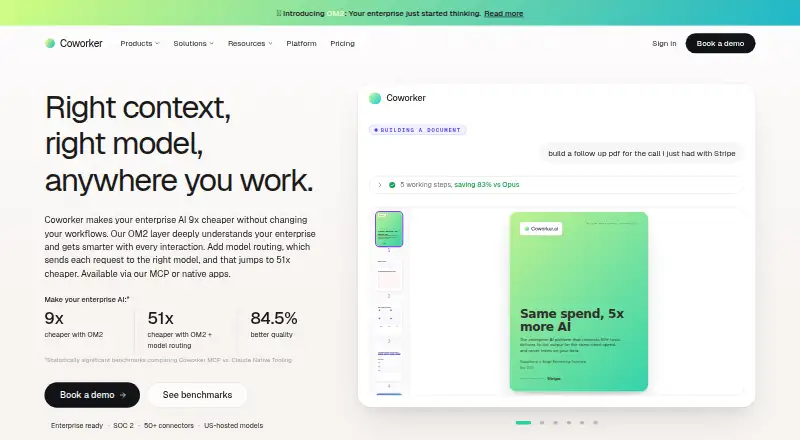
What Coworker AI is
Coworker AI is an enterprise AI workspace that connects company tools with organizational memory, model routing, and apps for Work, Code, Agents, and Meet. Its OM2 system builds a knowledge graph from connected tools and keeps it updated with permissions in view. Tasks can be routed among Anthropic, OpenAI, Google, Moonshot, and Z.ai models, or handled with models an organization brings on its own infrastructure. Coworker lists more than 50 OAuth connectors, including Salesforce, Slack, Jira, Notion, Google Drive, Zoom, and Snowflake. Work can read, write, and act across connected tools through plain-language requests, returning sourced answers and deliverables. Agents can run in the background, start from connected tools, and take actions without code. Meet provides live transcription, summaries, and action items from Zoom, Meet, and Teams, synced to CRM and documents. Coworker states that agents access only data their connected user is authorized to see, and that customer data is encrypted in transit and at rest and not used to train models. Pricing starts at $29.99/user/mo (annual); there is no free plan.
Who it suits
Coworker AI suits organizations that want AI actions and knowledge across connected company tools, with permission-aware access. Its meeting features and enterprise deployment and support options may also suit teams with those needs.
What it does well
- 50+ OAuth connectors are listed.
- Agents can run in the background without code.
- Meet syncs action items to CRM and docs.
- Single-tenant deployment options include on-premises and air-gapped infrastructure.
What to know first
- No free plan is listed.
- Starts at $29.99/user/mo (annual).
- Enterprise plan pricing is tailored and not listed.
Limits
There is no free plan. The listed starting price is $29.99 per user per month when billed annually; Enterprise pricing is tailored to the organization.
Plans
| Plan | Billed and limits | Price |
|---|---|---|
| Enterprise | Tailored to your organization; scoped with your team before you commit. · 20+ models · Coworker MCP and native apps · 50+ connectors plus custom · custom deployment · dedicated support | On request |
As coworker.ai lists them, read 7 Oct 2026. The maker's own page has the final word.
Getting started
- Open the Coworker website
- Choose a paid plan starting at $29.99/user/mo billed annually
- Connect company tools through OAuth connectors
- Select available models or bring models on your infrastructure
- Configure Work, Code, Agents, or Meet workflows
Verdict
Coworker AI combines connected-tool knowledge, model routing, actions, and meeting support in one enterprise workspace. Its listed starting price and lack of a free plan are worth considering before evaluating it.
Questions
Does Coworker AI have a free plan?
No. Coworker AI is listed as paid, with pricing from $29.99/user/mo on an annual term.
Which platforms does Coworker support?
The listed platforms are API and web.
What integrations are available?
Coworker lists more than 50 OAuth connectors, including Salesforce, Slack, Jira, Notion, Google Drive, Zoom, and Snowflake.
Can Coworker use an organization’s own models?
Yes. It supports bringing models running on an organization’s infrastructure, alongside routing to Anthropic, OpenAI, Google, Moonshot, and Z.ai models.
What does Meet provide?
Meet provides live transcription, summaries, and action items from Zoom, Meet, and Teams, with synchronization to CRM and documents.
What security and deployment options are stated?
Coworker states SOC 2 Type II, GDPR, and CASA Tier 2 credentials, encryption in transit and at rest, and deployment options including cloud, private cloud, on-premises, and air-gapped infrastructure.
Facts from Coworker AI's own pages
- Agents
- Agents can run in the background, trigger from connected tools, and take actions across the stack without code. · coworker.ai, 7 Oct 2026
- Deployment
- The platform page describes single-tenant deployment options including cloud, private cloud, on-premises, and air-gapped infrastructure. · coworker.ai, 7 Oct 2026
- Headquarters
- San Francisco, California, United States · coworker.ai, 28 Sept 2026
- Integrations
- Coworker lists 50+ OAuth connectors, including Salesforce, Slack, Jira, Notion, Google Drive, Zoom, and Snowflake. · coworker.ai, 7 Oct 2026
- Meeting support
- Meet provides live transcription, summaries, and action items from Zoom, Meet, and Teams, synced to CRM and docs. · coworker.ai, 7 Oct 2026
- Model routing
- Coworker routes tasks across Anthropic, OpenAI, Google, Moonshot, and Z.ai models, and supports bringing your own models on your infrastructure. · coworker.ai, 7 Oct 2026
- Organizational memory
- OM2 builds a continuously updated, permission-aware knowledge graph from connected company tools. · coworker.ai, 7 Oct 2026
- Permissions
- The site says connectors use scoped OAuth permissions and agents access only data the connected user is authorized to see. · coworker.ai, 7 Oct 2026
- Product
- Coworker is an enterprise AI workspace with organizational memory, model routing, connectors, and apps for Work, Code, Agents, and Meet. · coworker.ai, 7 Oct 2026
- Security
- Coworker states it is SOC 2 Type II certified, GDPR compliant, and CASA Tier 2 certified, encrypts data at rest and in transit, and does not train models on customer data. · coworker.ai, 7 Oct 2026
- Support
- Enterprise includes a dedicated implementation team, a named Customer Success Manager, custom SLAs, and usage analytics for administrators. · coworker.ai, 7 Oct 2026
- Trust documentation
- The trust center lists a SOC 2 Type II report published October 25, 2025, available by request. · village-labs.secureframetrust.com, 7 Oct 2026
- Work actions
- Work reads, writes, and acts across connected tools in plain language and can produce sourced answers and deliverables. · coworker.ai, 7 Oct 2026
Where Coworker AI stands on Freedom251
- Legal Knowledge Management Software#11 of 23
- Sales Follow-Up Software#31 of 42