Freedom251 › Legal Docketing Software
CourtSync Calendar
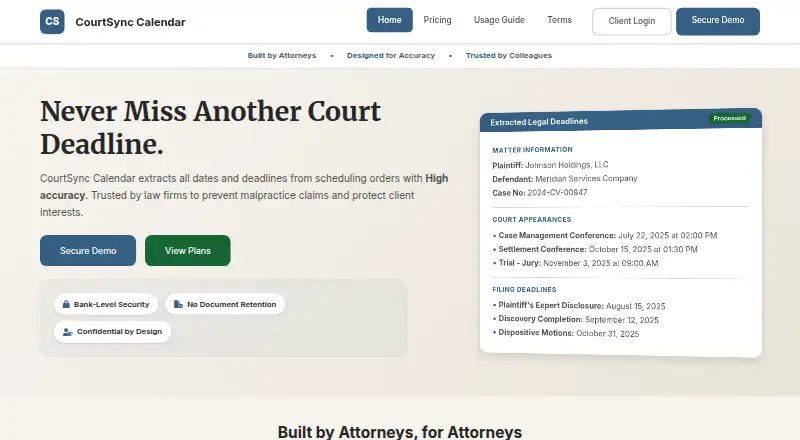
What CourtSync Calendar is
CourtSync Calendar is a web service that turns court scheduling order PDFs into calendar-ready case deadlines for attorneys and law firms. Users upload an order, review the extracted details, select dates, and export them as an .ics file. The service says its patent-pending technology identifies dates, deadlines, and party information, including calculations such as days before trial, and reports over 99% accuracy in testing for those details. The .ics file can be imported into Outlook, Google Calendar, Apple Calendar, Clio, MyCase, PracticePanther, Smokeball, and NetDocuments. The demo accepts PDFs up to 25 MB without registration, but calendar exports require a verified professional account. CourtSync says uploads are encrypted in transit with 256-bit TLS, deleted after processing, and not used for training. The Monthly plan costs $24 a month and includes unlimited processing, .ics export, email support, and up to three users under one firm login. The Annual plan costs $240 a year. Attorneys remain responsible for checking critical dates and complying with applicable rules and deadlines.
Who it suits
CourtSync Calendar is intended for attorneys and law firms managing court deadlines. It may suit teams that want to review extracted dates and move selected deadlines into calendar systems or listed legal software.
What it does well
- Extracts dates, deadlines, and party information from scheduling orders.
- Exports selected dates as an .ics file.
- Monthly plan includes unlimited document processing.
- Demo accepts PDFs up to 25 MB without registration.
- Uploads are deleted after processing, according to the site.
What to know first
- No free plan or free trial is listed.
- Calendar exports require a verified professional account.
- Attorneys remain responsible for verifying critical dates.
Limits
The demo accepts PDF documents up to 25 MB and does not provide calendar exports without a verified professional account. The Monthly and Annual plans support up to 3 users under 1 firm login.
Plans
| Plan | Billed and limits | Price |
|---|---|---|
| Monthly | $24 per month · Unlimited document processing · Up to 3 users (1 firm login) · .ics export · Email support · Encrypted in transit · No document retention | $24 a month |
| Annual | $240 per year · Up to 3 users (1 firm login) · Everything in Monthly · Single annual invoice · Optional onboarding call | $240 a year |
| Custom | Contact for pricing · More than 3 users or multi-login · Custom terms & integrations · Dedicated point of contact · SLA / security reviews supported | On request |
As courtsynccalendar.com lists them, read 4 Oct 2026. The maker's own page has the final word.
Getting started
- Open the CourtSync Calendar website in a web browser.
- Upload a scheduling order PDF of up to 25 MB to try the demo without registration.
- Review the extracted information and select the dates to use.
- Get a verified professional account to export a calendar file.
- Import the .ics file into a supported calendar or legal system.
Verdict
CourtSync Calendar can convert scheduling order PDFs into calendar files and includes a no-registration processing demo. Its extracted dates still require attorney review, and the paid plans have user limits.
Questions
How much does CourtSync Calendar cost?
The Monthly plan is $24 a month. The Annual plan is $240 a year; Custom pricing is available by contacting CourtSync.
Is there a free plan or trial?
There is no free plan or free trial. The demo processes PDFs up to 25 MB without registration, but exports require a verified professional account.
Which platforms does it support?
CourtSync Calendar is available on the web. It generates .ics files that can be imported into Outlook, Google Calendar, Apple Calendar, Clio, MyCase, PracticePanther, Smokeball, and NetDocuments.
How many users are included in the standard plans?
Monthly and Annual each support up to 3 users under 1 firm login.
Do attorneys still need to verify extracted dates?
Yes. Attorneys remain responsible for verifying critical dates and complying with applicable rules and deadlines.
Facts from CourtSync Calendar's own pages
- Accuracy claim
- The site reports over 99% accuracy in testing for extracted dates, deadlines, and party information. · courtsynccalendar.com, 4 Oct 2026
- Demo limits
- The demo accepts PDF documents up to 25 MB, requires no registration to demonstrate processing, and requires a verified professional account for calendar exports. · courtsynccalendar.com, 4 Oct 2026
- Document processing
- Users upload scheduling order PDFs, review extracted information, select dates, and export them to a calendar. · courtsynccalendar.com, 4 Oct 2026
- Export format
- CourtSync generates an .ics calendar file compatible with major calendar systems. · courtsynccalendar.com, 4 Oct 2026
- Extraction
- The site says its patent-pending technology extracts dates, deadlines, and party information, including calculations such as days before trial. · courtsynccalendar.com, 4 Oct 2026
- Integrations
- The implementation guide describes importing .ics files into Outlook, Google Calendar, Apple Calendar, Clio, MyCase, PracticePanther, Smokeball, and NetDocuments. · courtsynccalendar.com, 4 Oct 2026
- Intended users
- The site presents CourtSync Calendar as a tool for attorneys and law firms managing court deadlines. · courtsynccalendar.com, 4 Oct 2026
- Payments
- Payments are handled by Stripe, which the pricing page identifies as PCI DSS Level 1. · courtsynccalendar.com, 4 Oct 2026
- Purpose
- CourtSync Calendar extracts dates and deadlines from court scheduling orders to help law firms manage case deadlines. · courtsynccalendar.com, 4 Oct 2026
- Responsibility
- The implementation guide says attorneys remain responsible for verifying critical dates and complying with applicable rules and deadlines. · courtsynccalendar.com, 4 Oct 2026
- Security
- The site says uploads are encrypted in transit with 256-bit TLS and deleted after processing, and that documents are not used for training. · courtsynccalendar.com, 4 Oct 2026
- Support
- The site lists email support at [email protected] and says priority support is available to subscribers. · courtsynccalendar.com, 4 Oct 2026
Where CourtSync Calendar stands on Freedom251
- Legal Docketing Software#15 of 26