Freedom251 › Logo Design Software
Cool Text
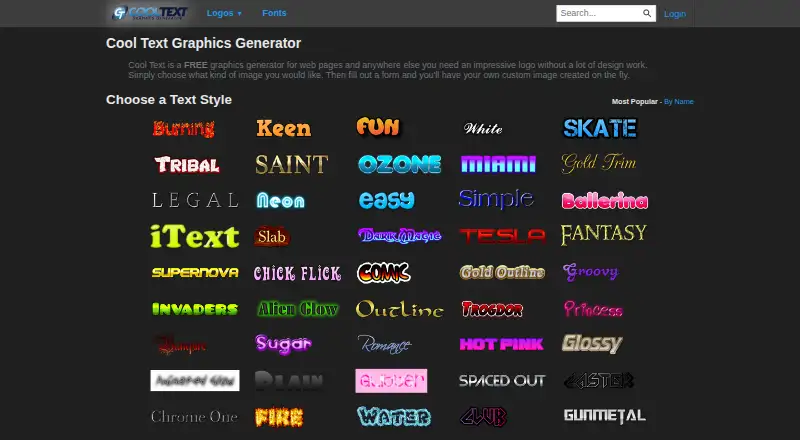
What Cool Text is
Cool Text is a free web-based tool for generating and editing logos. Users select an image style and fill in a form to create graphics intended for web pages and other places that need a logo. Style categories include animated, chrome, fire, glowing, neon, retro, and stencil. The editor provides controls for text, fonts, symbols, size, render effect, fill, outline, and shadow. It also supports layered compositions, including moving and rotating elements and choosing a composite file format. Cool Text says 1,959 fonts are available for use in the generator or download, and individual font pages provide download details and installation instructions for Windows and MacOS X. Custom dimensions are supported, and the site offers HTML snippets to link to Cool Text from a web page. Its Free plan costs nothing; no free trial is listed. The privacy policy says it collects non-personally identifiable information such as ISP, browser type, and operating system for ad targeting and measurement, and uses cookies and third-party advertising companies.
Who it suits
Cool Text suits people who need a web-based logo generator with style choices and editing controls. It may also suit users seeking downloadable fonts with installation instructions for Windows or MacOS X.
What it does well
- Free plan costs nothing.
- Offers animated, chrome, fire, neon, and other styles.
- Editor includes text, fill, outline, and shadow controls.
- Supports custom dimensions and layered compositions.
- Provides 1,959 fonts for use or download.
What to know first
- No free trial is listed.
- Uses cookies and third-party advertising companies.
- Collects non-personally identifiable information for ad targeting and measurement.
Plans
| Plan | Billed and limits | Price |
|---|---|---|
| Free | Free graphics generator; no other plan limits stated | Free |
As cooltext.com lists them, read 4 Oct 2026. The maker's own page has the final word.
Getting started
- Open https://cooltext.com/ in a web browser.
- Choose an image style and fill out the form to generate a logo.
- Use the editor controls to adjust text, effects, fill, outline, shadow, or layers.
- Set custom dimensions or choose a composite file format as needed.
- For a font download, open its individual font page and follow the provided download and installation details.
Verdict
Cool Text combines logo generation, editing controls, downloadable fonts, and custom dimensions in a web tool. Readers should weigh those options against its stated use of cookies and advertising-related information collection.
Questions
How much does Cool Text cost?
Its Free plan costs nothing.
Is there a free plan or trial?
A Free plan is available and described as a free graphics generator. There is no free trial.
Which platforms does Cool Text support?
Cool Text is available on the web.
Can I download fonts?
Yes. Cool Text says 1,959 fonts are available to download or use in the generator. Individual font pages provide download details and installation instructions for Windows and MacOS X.
Can I edit and combine logo elements?
The editor offers controls for text, fonts, symbols, size, render effect, fill, outline, and shadow. It also lets users add logo layers, move and rotate elements, and choose a composite file format.
What information does Cool Text collect for advertising?
Its privacy policy describes obtaining non-personally identifiable information such as ISP, browser type, and operating system for ad targeting and effectiveness measurement. It also describes cookies and third-party advertising companies for serving and targeting ads.
Facts from Cool Text's own pages
- Account deletion
- The privacy policy links to a way to permanently delete an account. · cooltext.com, 4 Oct 2026
- Composite logos
- The editor page includes controls to add logo layers, move and rotate elements, and select a composite file format. · cooltext.com, 4 Oct 2026
- Cookies and advertising
- The privacy policy says Cool Text uses cookies and third-party advertising companies to serve and target ads. · cooltext.com, 4 Oct 2026
- Font downloads
- Individual font pages provide download details and installation instructions for Windows and MacOS X. · cooltext.com, 4 Oct 2026
- Fonts
- Cool Text says it has 1,959 fonts available for download or use with the generator. · cooltext.com, 4 Oct 2026
- Integrations
- The site provides HTML snippets users can copy to link to Cool Text from a web page. · cooltext.com, 4 Oct 2026
- Intended use
- The site describes its graphics as suitable for web pages and anywhere else users need a logo. · cooltext.com, 4 Oct 2026
- Logo editing
- A logo editor page provides controls for text, fonts, symbols, text size, render effect, fill, outline, and shadow. · cooltext.com, 4 Oct 2026
- Logo generator
- Cool Text generates custom logos on the fly after users choose an image style and fill out a form. · cooltext.com, 4 Oct 2026
- Logo styles
- The generator lists categories including animated, chrome, fire, glowing, neon, retro, and stencil. · cooltext.com, 4 Oct 2026
- Privacy
- The privacy policy says Cool Text obtains non-personally identifiable information such as ISP, browser type, and operating system for ad targeting and effectiveness measurement. · cooltext.com, 4 Oct 2026
- Support
- The contact page offers a form for contacting Cool Text and asks users reporting a problem to provide as much detail as possible. · cooltext.com, 4 Oct 2026
Where Cool Text stands on Freedom251
- Logo Design Software#10 of 45