Freedom251 › AI Content Repurposing Tools

ContentFries
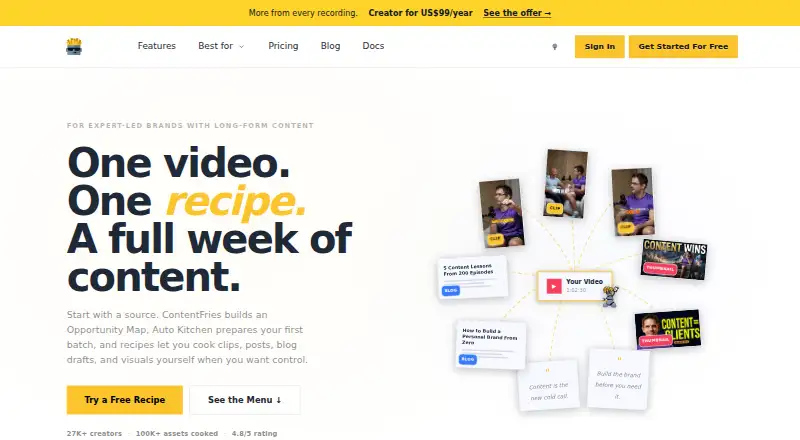
What ContentFries is
ContentFries turns existing video into assets for distribution, including short clips, thumbnails, quote visuals, blog drafts, quote cards, transcripts, and chapters. Users can paste YouTube or Vimeo links or upload an MP4. ContentFries Recipe is designed for long talking-head videos and podcasts, generating multiple outputs from one video; Fry Recipe edits short videos with subtitles, text, GIFs, and layout controls. For consistent styling, users can choose from six starting styles or describe their own and apply it across formats. The homepage also describes an Opportunity Map, a review workflow, a planner, and memory that learns what fits. Listed audiences include coaches and consultants, podcasters, founder brands, agencies and freelancers, and small content teams. Plans include a free tier, one-time credit packs, and monthly subscriptions. Creator and Scale include Agent API, hosted MCP, and webhooks; Scale adds higher fair-use limits and priority. The free tier includes one workspace, one seat, and 50 monthly credits without rollover, alongside 150 permanent signup credits. ContentFries was founded in 2020 and is headquartered in Singapore.
Who it suits
ContentFries suits creators and teams repurposing video into clips and other formats, including podcasters, coaches, agencies, and small content teams. It offers plans ranging from a free tier to monthly subscriptions with API and webhook features.
What it does well
- Accepts YouTube and Vimeo links or MP4 uploads.
- Creates clips, thumbnails, visuals, drafts, and chapters.
- Offers six starting styles and custom style descriptions.
- Creator and Scale include API, MCP, and webhooks.
- One-time credit packs do not require a subscription.
What to know first
- Free plan's 50 monthly credits do not roll over.
- Free plan is limited to one workspace and one seat.
- Scale's higher fair-use limits and priority are on its paid plan.
Limits
The free plan includes 50 monthly credits with no rollover, one workspace, and one seat, plus 150 permanent signup credits. Creator includes 650 monthly credits, rollover up to 1,300, three workspaces, and three seats; Scale includes 2,500 monthly credits, rollover up to 5,000, unlimited internal workspaces, and 10 seats.
Plans
| Plan | Billed and limits | Price |
|---|---|---|
| Free | /mo · 150 one-time permanent signup credits · first activation batch sponsored (0 credits) · 50 monthly credits, no rollover · 1 workspace · 1 seat | Free |
| Pay as you go — Medium | one-time · 110 credits · credits never expire · no subscription required | $10, paid once |
| Pay as you go — Large | one-time · 300 credits · credits never expire · no subscription required | $25, paid once |
| Creator | /mo · 650 monthly credits · rollover up to 1,300 credits · 3 workspaces · 3 seats · Agent API, hosted MCP, and webhooks | $39 a month |
| Pay as you go — Small | one-time · 40 credits · credits never expire · no subscription required | $4, paid once |
| Pay as you go — Power | one-time · 650 credits · credits never expire · no subscription required | $50, paid once |
| Scale | /mo · 2,500 monthly credits · rollover up to 5,000 credits · unlimited internal workspaces · 10 seats · Agent API, hosted MCP, and webhooks with higher fair-use limits and priority | $99 a month |
As contentfries.com lists them, read 9 Oct 2026. The maker's own page has the final word.
Getting started
- Open the ContentFries website.
- Provide a YouTube or Vimeo link, or upload an MP4.
- Choose ContentFries Recipe for long-form video or Fry Recipe for a short video.
- Select one of the six starting styles or describe a custom style.
- Choose the free plan, a one-time credit pack, or a monthly plan.
ContentFries turns existing video into clips and related distribution assets, with separate workflows for long recordings and short edits. It is best suited to coaches, podcasters, founder brands and small content teams that want to reuse video across formats. Its strongest case is the choice between credit packs that do not expire and subscriptions with larger recurring allowances.
Overview
The service accepts video files and links, then produces assets including clips, thumbnails, quote visuals, blog drafts, quote cards, transcripts and chapters. That breadth makes it useful when a video library needs to supply more than social clips. If the need is only occasional editing, the one-time packs avoid a subscription; teams publishing regularly get more capacity and collaboration features from monthly plans.
Key features
Two video workflows
ContentFries Recipe is built around long-form talking-head videos and podcasts, generating multiple outputs from one source. Fry Recipe focuses on short-video editing, with subtitles, text, GIFs and layout controls. Users can provide an MP4 or paste a YouTube or Vimeo link, offering a choice between uploading a file and working from a hosted video.
Style and publishing workflow
Six starting styles and the option to describe a custom style help carry a consistent look across formats. The Opportunity Map, review workflow and planner support selecting and organizing content, while memory is described as learning what fits. These features are more relevant to a recurring content process than to a one-off clip edit.
Automation and data handling
Creator and Scale include Agent API, hosted MCP and webhooks, so they are the plans to consider when connecting ContentFries to automated workflows. Scale adds higher fair-use limits and priority. The privacy policy names Anthropic, AssemblyAI, Deepgram, Google Cloud AI, OpenAI, OpenRouter, xAI, ElevenLabs, fal.ai, Perplexity and Gladia as AI service providers that may process user inputs, outputs and personal information. Servers are located in Germany, the United States, Slovenia, Czech Republic, Slovakia and Finland. The company describes reasonable technical and organizational security measures but does not guarantee that internet transmission or storage is fully secure; teams handling sensitive material should weigh that before uploading it.
Pricing
ContentFries is freemium. The free plan costs nothing, billed /mo, and includes 150 one-time permanent signup credits, a first activation batch sponsored (0 credits), and 50 monthly credits with no rollover. It is limited to 1 workspace and 1 seat. That is a useful way to start within a small, single-user setup, but the monthly allowance expires rather than accumulating.
Three one-time packs keep occasional use separate from a recurring bill: Pay as you go — Small costs $4, paid once for 40 credits; Medium is $10, paid once for 110 credits; Large is $25, paid once for 300 credits. Each pack's credits never expire and require no subscription, which suits uneven workloads. Pay as you go — Power costs $50, paid once for 650 credits, also without expiry or subscription; it offers a larger reserve but not the monthly workspaces, seats or automation of Creator.
Creator costs $39 a month, billed /mo, for 650 monthly credits with rollover up to 1,300 credits, 3 workspaces, 3 seats, Agent API, hosted MCP and webhooks. It is the more natural fit for a small team publishing regularly: its rollover gives some room for fluctuating demand, while its seat and workspace caps keep it from serving a larger group. Scale costs $99 a month, billed /mo, and includes 2,500 monthly credits with rollover up to 5,000, unlimited internal workspaces, 10 seats and the same automation features with higher fair-use limits and priority. It is aimed at teams with sustained volume and more collaborators; the higher monthly commitment is hard to justify for sporadic use.
Platforms
ContentFries is available on web and through an API. The API is particularly relevant to teams considering the automation features on Creator or Scale.
Who it's for
Coaches and consultants, podcasters, founder brands, agencies, freelancers and small content teams are named audiences. It is a stronger fit for people who already have video to repurpose and want several types of outputs from it than for those seeking a general-purpose content tool without a video source.
Pros and cons
- Pros: Long- and short-video workflows cover both repurposing recordings and editing short clips.
- Pros: Outputs span clips, visuals, drafts, transcripts and chapters, making a single source useful across several distribution needs.
- Pros: One-time credit packs never expire, which suits intermittent production better than a monthly allowance.
- Pros: Creator and Scale combine recurring credits, team seats and API, MCP and webhook access.
- Cons: The free plan's 50 monthly credits do not roll over, and it is restricted to one workspace and one seat.
- Cons: Creator is capped at three seats and workspaces; Scale costs $99 a month, a substantial step up for small or irregular workloads.
- Cons: AI service providers may process inputs, outputs and personal information, and full security of transmission or storage is not guaranteed.
Alternatives
For a broader comparison, see AI Content Repurposing Tools.
Consider ZeroTwo instead if the priority is an assistant across Android, iOS, Linux, macOS, web and Windows rather than video repurposing. Splicora is another freemium option to compare for brand-voice and content workflows. Choose PostNext if connected accounts and scheduled posts are the priority. RepurposeAI is an alternative to weigh for brand voice patterns and planning, scheduling and recycling content; its Pro plan is planned pricing and invite-only early access, not yet active. Askube is worth comparing if upload minutes, short clips and 720p are the measures that matter. Letterfork is an alternative for rewriting content for multiple platforms. LoquiHQ is a web option to consider for transcript analysis and Gmail integration. Nova is another video-repurposing choice, with a free plan that specifies monthly clip and source-minute allowances and 1080p vertical exports.
Verdict
Choose ContentFries if you have a continuing supply of video and want one workflow for clips and supporting assets, with the flexibility to buy credits only when needed. Its breadth and non-expiring packs stand out; look elsewhere if your team exceeds the paid seat limits, needs a larger free allowance, or cannot accept the stated AI-provider data processing and security caveats.
Verdict
ContentFries offers multiple ways to turn long or short video into styled distribution assets. Compare the free tier’s credit and seat limits with the one-time packs and monthly plans.
Questions
Does ContentFries have a free plan?
Yes. The Free plan costs nothing and includes 150 permanent signup credits and 50 monthly credits with no rollover.
What does ContentFries cost?
One-time credit packs cost 4.00 USD, 10.00 USD, 25.00 USD, or 50.00 USD. Monthly plans are Creator at $39 a month and Scale at $99 a month.
What platforms are available?
The listed platforms are web and API.
What video inputs can I use?
The homepage says you can paste YouTube or Vimeo links or upload an MP4. Listed source formats are video files and video links.
Which plans include automation connections?
Creator and Scale include Agent API, hosted MCP, and webhooks. Scale also lists higher fair-use limits and priority.
Where is ContentFries based?
It was founded in 2020 and is headquartered in Singapore. Its terms identify ContentFries PTE. LTD. as registered in Singapore.
Facts from ContentFries's own pages
- Additional outputs
- The feature page lists AI thumbnails, quote visuals, blog drafts, and chapters alongside clips. · contentfries.com, 9 Oct 2026
- AI providers
- The privacy policy names Anthropic, AssemblyAI, Deepgram, Google Cloud AI, OpenAI, OpenRouter, xAI, ElevenLabs, fal.ai, Perplexity, and Gladia as AI service providers that may process user inputs, outputs, and personal information. · contentfries.com, 9 Oct 2026
- Audience
- The homepage identifies coaches and consultants, podcasters, founder brands, agencies and freelancers, and small content teams as audiences. · contentfries.com, 9 Oct 2026
- Brand styling
- Users can choose from six starting styles or describe their own, and apply styles across formats. · contentfries.com, 9 Oct 2026
- Company registration
- The terms identify ContentFries PTE. LTD. as a company registered in Singapore at 20A Tg Pagar Rd, Singapore 088443. · contentfries.com, 9 Oct 2026
- Data location
- The privacy policy says its servers are located in Germany, the United States, Slovenia, Czech Republic, Slovakia, and Finland. · contentfries.com, 9 Oct 2026
- Founded
- 2020 · contentfries.com, 28 Sept 2026
- Headquarters
- Singapore · contentfries.com, 28 Sept 2026
- Input sources
- The homepage says users can paste YouTube or Vimeo links or upload an MP4. · contentfries.com, 9 Oct 2026
- Integrations and automation
- Creator and Scale include Agent API, hosted MCP, and webhooks; Scale lists higher fair-use limits and priority. · contentfries.com, 9 Oct 2026
- Long-video workflow
- ContentFries Recipe is presented for long-form talking-head videos and podcasts and generates multiple outputs from one video. · contentfries.com, 9 Oct 2026
- Purpose
- ContentFries turns existing video into clips, thumbnails, quote visuals, blog ideas, and other assets for distribution. · contentfries.com, 9 Oct 2026
- Review and planning
- The homepage describes an Opportunity Map, review workflow, planner, and memory that learns what fits. · contentfries.com, 9 Oct 2026
- Security
- The privacy policy says the company has appropriate and reasonable technical and organizational security measures, while noting that no internet transmission or storage can be guaranteed fully secure. · contentfries.com, 9 Oct 2026
- Short-video workflow
- Fry Recipe is for editing a short video with subtitles, text, GIFs, and layout controls. · contentfries.com, 9 Oct 2026
- Support
- The homepage lists [email protected] as the support contact. · contentfries.com, 9 Oct 2026
Where ContentFries stands on Freedom251
- AI Content Repurposing Tools#2 of 31