Freedom251 › AI Coloring Page Generators

colour.page
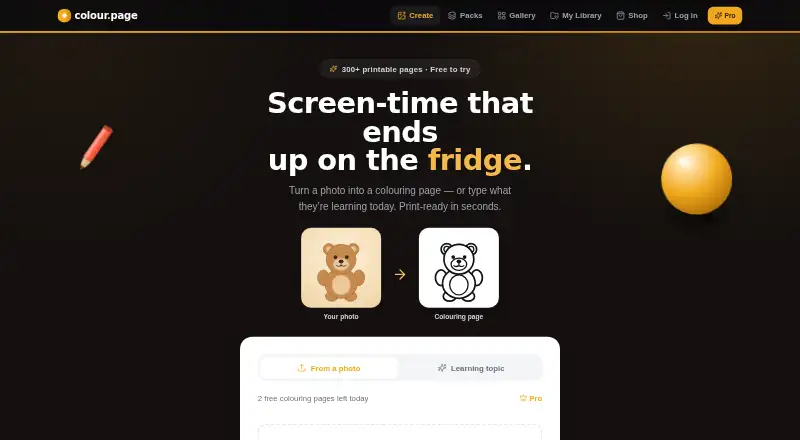
What colour.page is
colour.page turns photos into printable colouring pages and also creates learning sheets, activity sheets, and dot-to-dot puzzles. The web service is intended for parents, carers, and teachers, and accounts are for adults. To create a photo colouring page, users can upload a JPG, PNG, or HEIC image. The service produces print-ready files.
Users can make and preview sheets for free. Downloading requires a free account and is subject to daily limits. Pro is billed monthly or annually through Stripe, renews automatically until cancelled, and includes unbranded downloads and commercial use of generated sheets. Its full price and renewal period are shown before payment. Learning sheets and activity packs stay unlimited on Pro, while AI photo colourings and dot-to-dots may have a fair monthly allowance. The listed monthly generation limit is 100 images.
Uploaded photos are used to create sheets and deleted within 48 hours of processing. The policy says photos are sent to Replicate for line-art processing and are not used to train AI models or for advertising. Photos and generated pages are kept in private storage and accessed through temporary, expiring secure links. Ozeco Ltd is registered with the UK Information Commissioner's Office. Google and Apple sign-in are available by choice.
Who it suits
colour.page suits parents, carers, and teachers who want printable colouring pages, learning materials, activity sheets, or dot-to-dot puzzles. Pro may suit people who want unbranded downloads or commercial use of generated sheets; accounts are intended for adults.
What it does well
- Accepts JPG, PNG, and HEIC photos for colouring pages.
- Creates print-ready colouring and activity materials.
- Free users can make and preview sheets.
- Pro allows commercial use of generated sheets.
- Uploaded photos are deleted within 48 hours of processing.
What to know first
- Free downloads require an account and have daily limits.
- Pro has a fair monthly allowance for AI photo colourings and dot-to-dots.
- Pro renews automatically until cancelled.
- Accounts are for adults only.
Limits
Free downloads require a free account and are subject to daily limits. Pro learning sheets and activity packs are unlimited, but AI photo colourings and dot-to-dots may have a fair monthly allowance; the listed monthly generation limit is 100 images.
Plans
| Plan | Billed and limits | Price |
|---|---|---|
| Free | Make and preview sheets · downloads require a free account · daily download limits | Free |
| Pro | Monthly or annually through Stripe; renews automatically until cancelled · Higher or unlimited limits · unbranded downloads · commercial use · fair monthly allowance for AI photo colourings and dot-to-dots | On request |
As colour.page lists them, read 15 Oct 2026. The maker's own page has the final word.
Getting started
- Visit colour.page in a web browser.
- Make and preview sheets for free.
- Create a free account to download, subject to daily limits.
- Upload a JPG, PNG, or HEIC photo to make a colouring page.
- Choose Pro monthly or annual billing if you want its added benefits; the full price and renewal period are shown before payment.
- Sign in with Google or Apple if you choose.
Verdict
Choose colour.page if you want to turn photos into printable colouring pages or create learning and activity materials on the web. Pro adds unbranded downloads and commercial use, while learning sheets and activity packs remain unlimited. Consider the daily download limits on Free and the fair monthly allowance for some Pro creations when choosing a plan.
Questions
Is colour.page free?
Yes. Users can make and preview sheets for free. Downloads require a free account and are subject to daily limits.
How much does Pro cost?
The pricing note says paid plans start at £4.99/mo. Pro is billed monthly or annually, and its full price and renewal period are shown before payment.
What can I make with colour.page?
It creates printable colouring pages from photos, as well as learning sheets, activity sheets, and dot-to-dot puzzles.
Which photo formats can I upload?
JPG, PNG, and HEIC photos can be uploaded to make a colouring page.
Can I use generated sheets commercially?
Pro subscribers may use their generated sheets commercially. Other users may use them for personal, family, and classroom purposes.
What happens to uploaded photos?
Photos are used to create sheets and automatically deleted within 48 hours of processing. The policy says they are sent to Replicate for line-art processing and are not used to train AI models or for advertising.
Facts from colour.page's own pages
- AI and privacy
- The policy says photos are sent to Replicate for line-art processing and are not used to train AI models or for advertising. · colour.page, 7 Oct 2026
- AI provider
- Uploaded photos are sent to Replicate for conversion into line art. · colour.page, 15 Oct 2026
- AI training policy
- The privacy policy says customer photos are not used to train AI models or for advertising. · colour.page, 15 Oct 2026
- API and SDKs
- The published homepage, privacy policy and terms describe end-user web features and providers but do not document a public API or SDK. · colour.page, 15 Oct 2026
- Audience
- The service is intended for parents, carers and teachers, and accounts are restricted to adults. · colour.page, 15 Oct 2026
- Billing
- Pro subscriptions are processed by Stripe and renew at the end of each monthly or yearly billing period until cancelled. · colour.page, 15 Oct 2026
- Business classification
- The registered SIC activity is Internet and mail-order retail, code 47910. · find-and-update.company-information.service.gov.uk, 15 Oct 2026
- Capital at incorporation
- The incorporation filing records statement of capital of GBP 2. · find-and-update.company-information.service.gov.uk, 15 Oct 2026
- Commercial rights
- Pro subscribers may use their generated sheets commercially; other users receive personal, family and classroom use rights. · colour.page, 15 Oct 2026
- Commercial use
- Pro subscribers may use their generated sheets commercially; other users may use them for personal, family, and classroom purposes. · colour.page, 7 Oct 2026
- Company legal name
- The operator is OZECO LTD, company number 15445991. · find-and-update.company-information.service.gov.uk, 15 Oct 2026
- Company size filing
- The filing history includes micro-company accounts made up to 31 January 2025. · find-and-update.company-information.service.gov.uk, 15 Oct 2026
- Company status
- Companies House lists OZECO LTD as an active private limited company. · find-and-update.company-information.service.gov.uk, 15 Oct 2026
- Compliance
- Ozeco Ltd says it is registered with the UK Information Commissioner's Office under registration number ZC207608. · colour.page, 7 Oct 2026
- Director nationality
- Both listed directors are recorded as British nationals resident in England. · find-and-update.company-information.service.gov.uk, 15 Oct 2026
- Directors
- Companies House lists two active directors, Aqib Hussain and Sana Malik, both appointed on 26 January 2024. · find-and-update.company-information.service.gov.uk, 15 Oct 2026
- Dot-to-dot feature
- Users can create dot-to-dot puzzles. · colour.page, 15 Oct 2026
- Founded
- Companies House records incorporation on 26 January 2024. · find-and-update.company-information.service.gov.uk, 15 Oct 2026
- Free access
- People can create and preview sheets without paying, while downloading requires a free account and is subject to daily limits. · colour.page, 15 Oct 2026
- Free use
- Users can make and preview sheets for free; downloads require a free account and are subject to daily limits. · colour.page, 7 Oct 2026
- Headquarters
- The registered office is Unit A James Carter Road, Mildenhall, Bury St. Edmunds, England, IP28 7DE. · find-and-update.company-information.service.gov.uk, 15 Oct 2026
- Integrations
- The stated service providers are Supabase, Replicate, Stripe, Resend and Vercel; Google and Apple sign-in are optional. · colour.page, 15 Oct 2026
- Integrations and providers
- The policy lists Supabase, Replicate, Stripe, Resend, and Vercel as service providers, with Google and Apple sign-in available by choice. · colour.page, 7 Oct 2026
- Learning activities
- The product includes learning sheets and activity packs in addition to ordinary colouring pages. · colour.page, 15 Oct 2026
Where colour.page stands on Freedom251
- AI Coloring Page Generators#22 of 37