Freedom251 › AI Coloring Page Generators

ColoringBook.ai
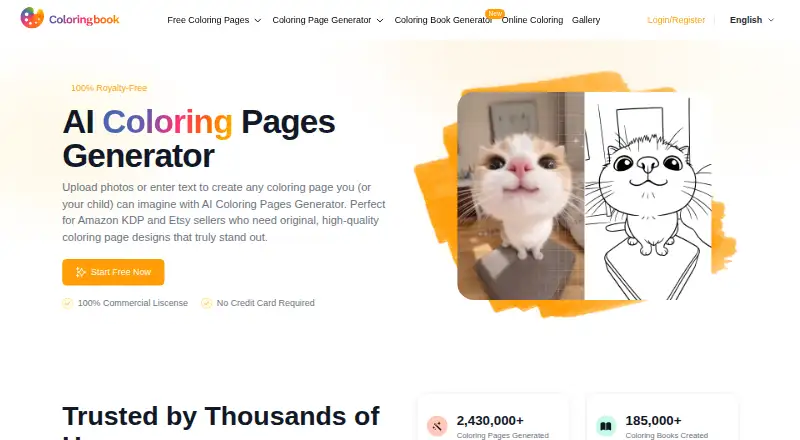
What ColoringBook.ai is
ColoringBook.ai turns written prompts and uploaded photos into coloring pages, and also offers workflows for creating AI coloring books. Its browser-based generator is described for modern desktop, laptop, tablet, and smartphone devices without requiring an app download. A book can contain up to 200 pages while keeping its plot and main character consistent. Pages can be downloaded as PNG images or multi-page PDF exports; book generation also supports PDF or ZIP downloads. Standard output measures 687 × 1024 px, while Upscale for Print produces 2748 × 4096 px. Online Coloring can be started without a login and includes brush, paint-bucket, and eraser tools. The free plan includes four monthly credits. Paid plans start at $6.99 per month, and commercial-use rights are included on Professional and Business plans. The site links to an iOS app and labels Android as coming soon. Monthly plan credits expire when the billing cycle renews and do not roll over; add-on-pack credits are separate from that expiry.
Who it suits
It suits people who want to make printable coloring pages from prompts or photos, or assemble longer coloring books. Professional and Business plans are options for users who need commercial-use rights.
What it does well
- Creates pages from text prompts and uploaded photos.
- Books can reach 200 pages.
- Downloads include PNG, PDF, or ZIP options.
- Upscale for Print outputs 2748 × 4096 px.
- Online Coloring starts without a login.
What to know first
- Free plan includes four monthly credits.
- Monthly plan credits expire at renewal.
- Android app is listed as coming soon.
Limits
The free plan provides four monthly credits. Starter, the lowest-priced paid plan at $6.99 a month, allows 100 coloring pages per month, personal use, and books of up to 10 pages. Monthly plan credits expire at renewal.
Plans
| Plan | Billed and limits | Price |
|---|---|---|
| Free | 4 monthly credits | Free |
| Hobby | $13.99/ Month; $167.92/ Year · 300 coloring pages/month · personal use · up to 10-page coloring book · batch mode · KDP Builder | $13.99 a month |
| Professional | $27.99/ Month; $335.92/ Year · 1000 coloring pages/month · commercial use · up to 200-page coloring book · batch mode · KDP Builder | $27.99 a month |
| Starter | $6.99/ Month; $83.92/ Year · 100 coloring pages/month · personal use · up to 10-page coloring book · batch mode · KDP Builder | $6.99 a month |
| Business | $69.99/ Month; $839.92/ Year · 5000 coloring pages/month · commercial use · up to 200-page coloring book · batch mode · KDP Builder | $69.99 a month |
As coloringbook.ai lists them, read 30 Sept 2026. The maker's own page has the final word.
Getting started
- Open https://www.coloringbook.ai/ in a browser.
- Choose text-to-coloring-page, image-to-coloring-page, or book generation.
- Use Online Coloring without logging in to color in the browser.
- Choose the Free plan or a paid plan based on monthly page needs and usage rights.
- Download generated pages as PNG or PDF, or books as PDF or ZIP.
- Use the iOS app if preferred.
ColoringBook.ai combines coloring-page generation from prompts and photos with tools for making and coloring books. It is best suited to people who want printable pages or a longer book project, though commercial publishing and 200-page books require higher-tier plans.
Overview
The service covers three workflows: generating a page from text, converting an uploaded image, and creating an AI coloring book. That range is useful for moving from a single illustration to a larger project without switching tools. Story books can reach 200 pages while maintaining a consistent plot and main character, but that capacity is reserved for Professional and Business; Starter and Hobby stop at 10 pages.
Pages download as PNGs or multi-page PDFs, and coloring books can also be exported as PDF or ZIP files. Standard output is 687 × 1024 px; Upscale for Print raises it to 2748 × 4096 px. The higher resolution is the more suitable option when printed detail matters. Multiple paper sizes are supported.
Key features
- Prompt and photo generation: Text-to-coloring-page and image-to-coloring-page workflows cover both original ideas and photo-based pages.
- Book and story generation: Longer books can preserve a plot and main character, making the tool more useful for a coherent project than for assembling unrelated pages. The 10-page limit on the cheaper paid plans rules them out for longer books.
- Online coloring: Anyone can start without logging in, using brush, paint-bucket and eraser tools. This is a convenient way to color on the site, though the stated download options are PNG and PDF rather than a description of saved online-coloring projects.
- Privacy and integrations: The site says content is encrypted and subscribers can enable privacy mode to keep generated pages visible only to them. Its privacy policy identifies the service as data controller and says it may use vendors for storage, payments, security and analytics; Gmail and social-media integrations are used when authorized.
- Device access: The browser-based generator runs on modern desktop, laptop, tablet and smartphone devices. An iOS app is linked, while Android is marked as coming soon.
Pricing
ColoringBook.ai is freemium, with a free plan and a free trial. Free provides 4 monthly credits, a small allowance for trying the service rather than a dependable page-making quota. Monthly plan credits expire when the billing cycle renews and do not roll over; add-on-pack credits are separate from that expiry rule.
| Plan | Price | What it includes | Best fit |
|---|---|---|---|
| Free | free | 4 monthly credits | Occasional exploration. |
| Starter | $6.99 a month; billed $6.99/ Month; $83.92/ Year | 100 coloring pages/month, personal use, books up to 10 pages, batch mode and KDP Builder; email support. | Personal projects with modest monthly volume. |
| Hobby | $13.99 a month; billed $13.99/ Month; $167.92/ Year | 300 coloring pages/month, personal use, books up to 10 pages, batch mode and KDP Builder; 24/7 email support. | Personal users who need more page capacity than Starter. |
| Professional | $27.99 a month; billed $27.99/ Month; $335.92/ Year | 1,000 coloring pages/month, commercial use, books up to 200 pages, batch mode and KDP Builder; 24/7 email support. | Creators who need commercial rights or longer books. |
| Business | $69.99 a month; billed $69.99/ Month; $839.92/ Year | 5,000 coloring pages/month, commercial use, books up to 200 pages, batch mode and KDP Builder; 24/7 email support. | Commercial users with substantially higher page volume. |
Starter and Hobby include personal use only; paid-plan commercial rights apply to Professional and Business, including uses such as Amazon KDP, Etsy downloads and printed books. The cheaper plans also trade away long-book capacity and, on Starter, 24/7 email support. All paid plans include KDP Builder and batch mode. Support is email on every paid tier, with 24/7 email support beginning at Hobby.
Platforms
Use the browser-based generator on modern desktop, laptop, tablet or smartphone devices without installing an app. An iOS app is also linked; Android is coming soon.
Who it's for
ColoringBook.ai suits people who want to make printable pages from prompts or photos, and creators who need to package pages into a book. Professional and Business are the relevant choices for commercial publishing or a book longer than 10 pages. For personal use, Starter or Hobby keeps the monthly allowance lower, with Hobby tripling Starter's page quota. Readers who need only occasional use can begin with Free, but its 4 monthly credits are limited.
Pros and cons
Pros
- Three generation workflows cover single pages, photo conversions and coloring books.
- Professional and Business allow commercial use and books up to 200 pages.
- PNG, PDF and ZIP exports, plus an upscale option to 2748 × 4096 px, support print-oriented work.
- Online Coloring starts without login, and the generator works in a browser across device types.
Cons
- Free is capped at 4 monthly credits, and unused monthly paid credits expire at renewal.
- Starter and Hobby restrict users to personal use and books of at most 10 pages.
- Commercial use and longer books require paying at least $27.99 a month for Professional.
- Android app support is not yet available; the site says it is coming soon.
Alternatives
For a broader comparison, browse the AI Coloring Page Generators list.
- ColoringMe is worth considering if you want a free plan with unlimited AI coloring-page generation across Android, iOS, Linux, macOS, web and Windows; its free plan generates one image at a time.
- FlexClip is a freemium option for people looking for video and stock-media project tools rather than a coloring-page-focused workflow.
- CrayonCraft may suit users who prioritize unlimited free coloring pages, browser-based processing and no account requirement.
- Phot.AI is another freemium option with a free Starter plan offering 500 credits per month, one seat and 2 GB of cloud storage.
- AI Ease is a freemium alternative with several basic features available for free.
- AiColoring.Art is a web-based freemium alternative with a free plan.
- Coloring.app may fit users comfortable with weekly free credits or one-time credit purchases; its free allowance resets weekly, and its A La Carte Credits are valid for 30 days.
- ColoringFam is another web-based freemium option, with watermarked downloads and standard print quality on its free plan.
Verdict
ColoringBook.ai is a good fit for people who want a single browser-based service for prompt- or photo-based pages and book exports, especially creators who need commercial rights or coherent books up to 200 pages. Its strongest case is the combination of generation workflows, print-resolution upscaling and higher-tier publishing rights. Look elsewhere if your use is occasional and the 4-credit free cap is too tight, or if you need commercial use without stepping up to Professional.
Verdict
ColoringBook.ai offers several ways to make and download coloring pages, with book generation up to 200 pages. Check the plan limits and credit expiry rules, and note that commercial-use rights are listed for Professional and Business plans.
Questions
Is ColoringBook.ai free?
Yes. Its Free plan costs nothing and includes four monthly credits.
What does the Starter plan cost?
Starter costs $6.99 a month, or $83.92 per year. It includes 100 coloring pages per month for personal use and books of up to 10 pages.
Which platforms can I use?
The generator runs in a browser on modern desktop, laptop, tablet, and smartphone devices. The site links to an iOS app and labels Android as coming soon.
Can I use pages commercially?
Commercial usage rights are included with Professional and Business plans. Starter and Hobby are listed for personal use.
What formats can I download?
Individual pages can be downloaded as PNG images or multi-page PDFs. The coloring-book generator also supports PDF or ZIP downloads.
Do monthly credits roll over?
No. Monthly plan credits expire when the billing cycle renews. Add-on-pack credits are separate from monthly expiry.
Facts from ColoringBook.ai's own pages
- Browser support
- The generator is browser-based and runs on modern desktop, laptop, tablet, and smartphone devices without an app download. · coloringbook.ai, 30 Sept 2026
- Commercial use
- Paid-plan coloring pages include commercial usage rights for uses such as Amazon KDP, Etsy downloads, and printed books. · coloringbook.ai, 30 Sept 2026
- Credit limits
- Monthly plan credits expire when the billing cycle renews and do not roll over; add-on-pack credits are separate from monthly expiry. · coloringbook.ai, 30 Sept 2026
- Data practices
- The privacy policy identifies coloringbook.ai as the data controller and says it may use vendors for cloud storage, payments, security, analytics, and related services. · coloringbook.ai, 30 Sept 2026
- Downloads
- Generated pages can be downloaded as PNG images or PDF multi-page exports; the coloring-book generator also supports PDF or ZIP downloads. · coloringbook.ai, 30 Sept 2026
- Input modes
- The service offers text-to-coloring-page, image-to-coloring-page, and AI coloring-book generation workflows. · coloringbook.ai, 30 Sept 2026
- Login integrations
- The privacy policy says users may access services through Gmail and interact through social-media platforms, with login integrations and widgets used when authorized. · coloringbook.ai, 30 Sept 2026
- Mobile app
- The site links to an iOS app and labels Android as coming soon. · coloringbook.ai, 30 Sept 2026
- Online coloring
- Online Coloring requires no login to start and provides brush, paint-bucket, and eraser tools. · coloringbook.ai, 30 Sept 2026
- Print resolution
- Standard output is 687 × 1024 px, while Upscale for Print enhances pages to 2748 × 4096 px. · coloringbook.ai, 30 Sept 2026
- Privacy
- The site says content is stored with encryption and that subscribers can enable privacy mode so generated pages remain visible only to them. · coloringbook.ai, 30 Sept 2026
- Story books
- Its AI coloring-book generator can create up to 200 pages while keeping the plot and main character consistent. · coloringbook.ai, 30 Sept 2026
- Support
- Starter includes email support, while Hobby, Professional, and Business include 24/7 email support. · coloringbook.ai, 30 Sept 2026
- What it does
- Coloringbook.ai transforms text prompts and uploaded photos into high-quality, print-ready coloring pages. · coloringbook.ai, 30 Sept 2026
Where ColoringBook.ai stands on Freedom251
- AI Coloring Page Generators#8 of 37