
Collate
What Collate is
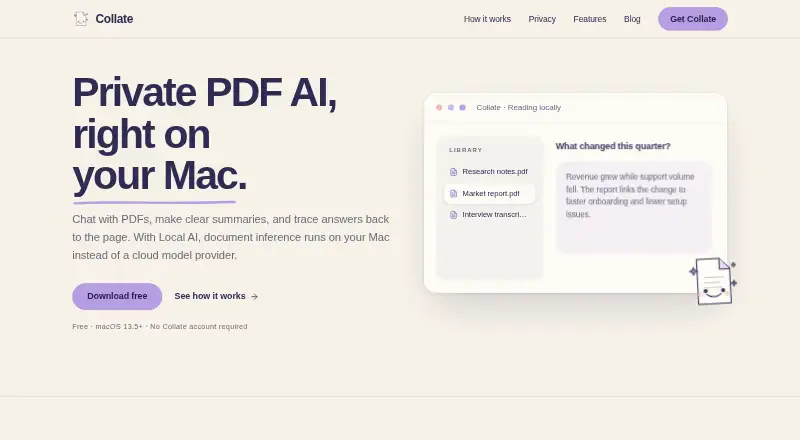
Collate is a native Mac workspace for reading, organizing, questioning, summarizing, and highlighting PDF files. It includes PDF chat, source citations, automatic highlights, summaries, folders, persistent conversations, and local model management. With Local AI, documents are processed on the Mac and can be worked with offline after the app and a supported model have been downloaded. Users may instead choose OpenAI or Anthropic models using their own API key; the content needed for a request is sent to the selected provider. Collate can compare findings across selected documents, keep conversations with folders, and export selected work as HTML, PDF, email drafts, or web links. Shared links to selected answers, summaries, or highlights are public, require no authentication, and expire after 90 days. The app is free to download for macOS 13.5 or later on Apple Silicon and Intel. It imposes no account-based document quota, though practical limits depend on storage, memory, PDF complexity, and the selected model. Windows is not yet ready, and the current reading and AI workflow focuses on PDFs.
Who it suits
Collate is intended for students, researchers, and anyone building understanding from documents. It suits Mac users working with PDFs who want local or optional cloud AI workflows.
What it does well
- Local AI can work offline after downloads
- PDF chat includes source citations
- Compare findings across selected documents
- Exports HTML, PDF, email drafts, and web links
- Free for macOS 13.5+ on Apple Silicon and Intel
What to know first
- Focused on PDF files
- Windows is not yet ready
- Public shared links expire after 90 days
Plans
| Plan | Billed and limits | Price |
|---|---|---|
| Collate for Mac | Free to download · macOS 13.5+ · Apple Silicon and Intel | Free |
As collate.one lists them, read 4 Oct 2026. The maker's own page has the final word.
Getting started
- Visit the Collate website and download the Mac app.
- Install it on a Mac running macOS 13.5 or later, with Apple Silicon or Intel.
- Download a supported model to use Local AI offline.
- Optionally select an OpenAI or Anthropic model and provide your own API key.
- Open PDFs to chat with them, organize them into folders, or compare selected documents.
- Export selected work or create a public web share link.
Verdict
Collate offers PDF research and organization tools in a free Mac app, with local AI and optional provider-based models. Users should note that its workflow focuses on PDFs and Windows is not yet available.
Questions
How much does Collate cost?
Collate for Mac is free to download at no cost. There is no free trial.
Which Macs can run Collate?
It is listed for macOS 13.5 or later on Apple Silicon and Intel Macs.
Does Collate work on Windows?
The download page says Collate is not yet ready for Windows and invites users to join a waitlist.
Does Collate have a document quota?
Collate says it has no account-based document quota. Practical limits depend on storage, memory, PDF complexity, and the selected model.
Does Local AI send documents to a cloud provider?
Collate says Local AI processes documents on the Mac and does not send document content to a cloud model provider. Offline use requires the app and a supported model to be downloaded.
Can I use OpenAI or Anthropic models?
Yes. Users can select those models with their own API key, and content required for a request is sent to the selected provider.
Facts from Collate's own pages
- Analytics
- Firebase app analytics is disabled by default and can be toggled in the Collate menu. · collate.one, 4 Oct 2026
- Audience
- Collate describes itself as made for students, researchers, and anyone building understanding from documents. · collate.one, 4 Oct 2026
- Cloud AI
- Users can optionally select OpenAI or Anthropic models with their own API key; Collate sends content required for the request to the selected provider. · collate.one, 4 Oct 2026
- Features
- The app includes PDF chat, source citations, summaries, automatic highlights, folders, persistent conversations, and local model management. · collate.one, 4 Oct 2026
- File support
- The current reading and AI workflow is focused on PDF files. · collate.one, 4 Oct 2026
- Local AI
- Local AI processes documents on the Mac and works offline after the app and a supported model have been downloaded. · collate.one, 4 Oct 2026
- Model requirements
- The recommended local model is about 5.9 GB, larger options can exceed 8 GB, and 16 GB or more of Mac memory provides more model choices. · collate.one, 4 Oct 2026
- Privacy
- Collate says Local AI does not send document content to a cloud model provider, and cloud API keys are stored in the macOS Keychain. · collate.one, 4 Oct 2026
- Product
- Collate is a native Mac workspace for reading, organizing, questioning, summarizing, and highlighting PDFs. · collate.one, 4 Oct 2026
- Research workflow
- Users can compare findings across selected documents, keep conversations with folders, and export selected work. · collate.one, 4 Oct 2026
- Sharing
- Collate can create web share links for selected answers, summaries, or highlights; links are public, unauthenticated, and expire after 90 days. · collate.one, 4 Oct 2026
- Support
- Collate provides email support at [email protected]. · collate.one, 4 Oct 2026
- Usage limits
- Collate says it imposes no account-based document quota; practical limits depend on storage, memory, PDF complexity, and the selected model. · collate.one, 4 Oct 2026
- Windows availability
- The download page says Collate is not yet ready for Windows and invites users to join a waitlist. · collate.one, 4 Oct 2026
Where Collate stands on Freedom251
- AI PDF Tools#12 of 30